WhatsApp Marketing for Fashion Shopify Brands
TL;DRWhatsApp marketing for fashion Shopify brands works best when the message matches the product moment. A shopper wants a sold-out size. A VIP customer wants first access to a drop. A first-time buyer needs delivery confidence. A hesitant shopper wants fit, fabric, styling, or return help before completing checkout.
That makes fashion different from a generic ecommerce campaign calendar. The strongest WhatsApp flows are built around variant demand, collection launches, back-in-stock intent, styling context, order confidence, reviews, and repeat purchase behavior.
This guide shows how fashion and apparel stores can use WhatsApp as a retention and conversion channel without turning it into a noisy promotional list.
Why Fashion Stores Need A Different WhatsApp Plan
Fashion buying decisions are visual and situational. Customers compare sizes, colors, fits, fabrics, delivery dates, return policies, styling options, and social proof. They may love a product but abandon the order because the right size is unavailable, the event date is close, or they are unsure whether the item will work for them.
That creates a few practical differences for WhatsApp:
| Fashion reality | What it means for WhatsApp |
|---|---|
| Variants matter | Size, color, length, fit, and stock status must drive the message |
| Drops move quickly | Launch and restock messages need precise segments and timing |
| Confidence affects conversion | Fit help, delivery promises, returns, and styling support can recover hesitant shoppers |
| Seasonality changes intent | Wedding, festive, vacation, winter, school, and gifting campaigns need different audiences |
| Fatigue builds fast | Too many sale broadcasts can train customers to ignore the channel |
For a fashion Shopify store, WhatsApp should feel like timely help around the product the customer cares about, not a generic discount notification.
The Fashion WhatsApp Campaign Map
Start by separating fashion WhatsApp marketing into three campaign types.
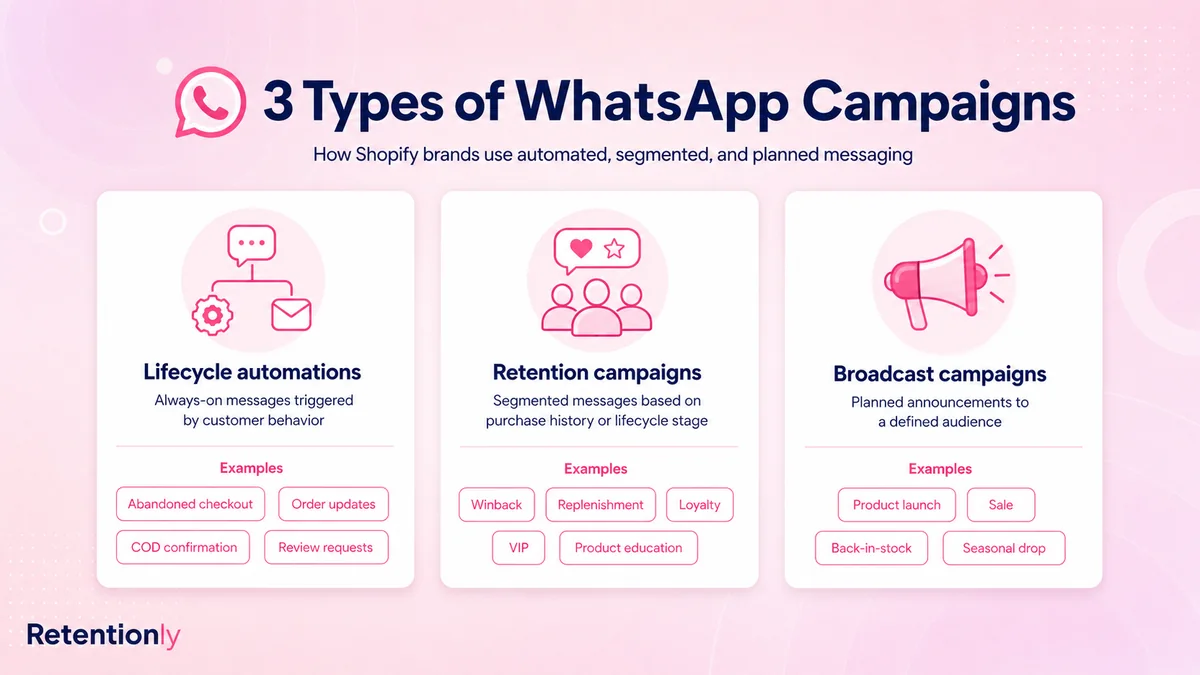
| Campaign type | Fashion use case | Best trigger | Main metric |
|---|---|---|---|
| Lifecycle automation | Abandoned checkout, COD confirmation, order updates, review request | Customer or order event in Shopify | Recovered revenue, confirmed orders, fewer support tickets |
| Retention campaign | Back-in-stock, winback, repeat buyer styling, loyalty reward | Product interest, past purchase, lifecycle stage | Repeat purchase revenue |
| Broadcast campaign | New drop, seasonal collection, VIP sale, limited inventory | Planned store event | Revenue per recipient and opt-outs |
Most fashion brands should not start with broad broadcasts. Start with the flows closest to customer intent: abandoned checkout, back-in-stock, order confidence, and post-purchase review or styling messages. Then add launches, VIP access, and seasonal campaigns once segmentation is clean.
Segment By Style, Variant, And Customer Moment
Fashion segmentation should go beyond total spend and last purchase date. Those signals help, but they rarely explain what the shopper wants.
Better WhatsApp segments include:
| Segment | Good WhatsApp angle |
|---|---|
| Size-specific waitlist | Exact-size back-in-stock alert |
| Color or variant interest | Variant restock, similar style, or alternative color |
| Category buyer | New collection in that category |
| First-time buyer | Delivery confidence, styling tip, review request |
| Repeat buyer | VIP access, loyalty reward, higher-fit recommendations |
| High-LTV customer | Early access to drops and private sale windows |
| COD customer | Confirmation, address check, prepaid conversion where relevant |
| Lapsed buyer | New arrivals based on prior category, not a generic "we miss you" |
| Return or exchange customer | Support-first follow-up, not a promotional push |
If a customer wanted a black size M dress, do not message them about every dress that returns to stock. If they bought kidswear, do not send a broad womenswear launch unless there is a clear reason. Fashion WhatsApp marketing gets stronger when the product context is specific.
Flow 1: Abandoned Checkout With Fit And Delivery Confidence
Fashion abandoned checkout messages should help the shopper finish the decision. The hesitation is often practical: size uncertainty, fabric questions, delivery timing, exchange policy, COD availability, or whether the item works for the occasion.
Use a first reminder that brings the customer back without sounding desperate.
| Component | Practical setup |
|---|---|
| Audience | Opted-in shoppers who started checkout but did not order |
| Timing | 30 to 60 minutes after checkout abandonment |
| Message job | Recover the saved checkout and invite fit or delivery questions |
| Suppression | Stop after purchase, opt-out, support issue, or final reminder |
| Metric | Recovered revenue, replies, conversion rate, opt-outs |
Example:
Hi [first_name], your [store_name] checkout is still saved. You can complete it here: [checkout_link]. Reply if you want help with size, fit, delivery, or returns before ordering.
Start with reassurance before discounts. For fashion, a clear return policy or fit answer may recover more high-quality orders than a coupon sent too early.
For the full checkout workflow, read the Shopify Abandoned Checkout WhatsApp Guide.
Flow 2: Size-Specific Back-In-Stock Alerts
Back-in-stock alerts are one of the strongest WhatsApp use cases for fashion because the customer already showed demand.
The alert must match the exact product or variant.
| Component | Practical setup |
|---|---|
| Audience | Customers who requested an alert for a sold-out item or variant |
| Trigger | Product or variant inventory becomes available in Shopify |
| Timing | Immediately, or in priority batches if stock is limited |
| Message job | Tell the customer the item is available and link directly to it |
| Suppression | Stop after purchase, opt-out, sellout, or alert expiry |
| Metric | Restock revenue, sell-through speed, waitlist conversion |
Example:
Good news, [first_name]. [product_name] in [size_or_variant] is back in stock at [store_name]. You can get it here before it sells out again: [product_link]
Precision matters. A size S restock should not go to customers waiting for size XL. If the restock quantity is small, message the highest-intent group first instead of frustrating the entire waitlist.
For a deeper flow, read the Shopify Back in Stock WhatsApp Alerts Guide.
Flow 3: New Drops And Collection Launches
Fashion launches work well on WhatsApp when the audience has a reason to care. They work poorly when every launch goes to the full list.
Better launch segments:
| Launch type | Best audience |
|---|---|
| New linen collection | Buyers or browsers of summer, resort, or casualwear |
| Festive collection | Past festive buyers, occasionwear buyers, VIPs |
| Limited sneaker drop | Waitlist, repeat buyers, high-intent browsers |
| Kidswear collection | Parents or prior kidswear buyers |
| Capsule collaboration | VIPs, category buyers, customers who joined early access |
Example:
[first_name], our new [collection_name] drop is live. Since you shopped [category_name] before, you get first access here: [collection_link]
The message should explain why the customer received it. "Because you bought from this category" or "because you joined early access" feels more useful than a blast that simply says the sale is live.
Flow 4: Styling Guidance And Product Education
Not every WhatsApp message needs to sell immediately. Fashion brands can use post-purchase guidance to improve product experience and prepare the next order.
Useful education messages include:
| Product type | Good follow-up |
|---|---|
| Occasionwear | Care instructions, storage, and styling ideas |
| Denim | Fit guidance, wash care, and alteration notes |
| Footwear | Break-in tips, care instructions, and sizing support |
| Accessories | Pairing suggestions and gift-use ideas |
| Kidswear | Care, size-up reminders, and seasonal outfit ideas |
Example:
Your [product_name] should be with you now. Here are three ways to style it for [occasion_or_season]: [guide_link]
Keep the first education message useful. A later cross-sell can work when the recommendation is obvious, but hiding a hard sell inside product care can weaken trust.
Flow 5: COD Confirmation And Prepaid Nudges
For fashion stores that accept cash on delivery, WhatsApp can reduce fulfillment waste by confirming intent before dispatch.
COD confirmation is especially useful when sizes, addresses, and delivery availability affect returns or failed delivery.
| Component | Practical setup |
|---|---|
| Audience | COD orders that need confirmation before fulfillment |
| Trigger | New COD order placed in Shopify |
| Timing | Soon after order placement |
| Message job | Confirm the order, address, and delivery intent |
| Suppression | Stop after confirmation, cancellation, opt-out, or support issue |
| Metric | Confirmed orders, cancellations caught early, RTO reduction |
Example:
Hi [first_name], please confirm your [store_name] COD order for [product_name]. Reply 1 to confirm or 2 if you need help changing size, address, or payment.
If your store offers prepaid incentives, keep them clear and optional:
Want to switch this order to prepaid and avoid cash handling on delivery? Use this secure link: [payment_link]
Do not mix COD confirmation with unrelated promotions. The job is to confirm the order and prevent fulfillment waste.
For the full workflow, read the Shopify COD Confirmation WhatsApp Guide.
Flow 6: Reviews After The Customer Has Used The Product
Fashion review requests need timing. Asking before delivery is useless. Asking too soon after delivery may miss fit, comfort, fabric, and styling feedback.
Use timing by product type:
| Product type | Better review timing |
|---|---|
| Accessories | 3 to 5 days after delivery |
| Everyday apparel | 5 to 10 days after delivery |
| Footwear | 7 to 14 days after delivery |
| Occasionwear | After the likely event window |
| Gift orders | Ask about shopping experience, not personal fit |
Example:
Hi [first_name], hope [product_name] worked well for you. Could you leave a quick review for [store_name]? It helps other shoppers understand fit, fabric, and style: [review_link]
Suppress refunds, exchanges, delivery failures, open complaints, and customers who already reviewed. If the buyer replies with a size or quality issue, route the conversation to support before sending another review reminder.
For Shopify-specific setup, read the Shopify Review Request WhatsApp Flow Guide.
Flow 7: Cross-Sells That Match The Outfit
Fashion cross-sells should feel like styling help. Random product recommendations are easy to ignore.
Better recommendation logic:
| Purchase | Better recommendation |
|---|---|
| Dress | Earrings, heels, belt, jacket, or care accessory |
| Shirt | Matching trouser, denim, blazer, or undershirt |
| Kidswear | Size-up bundle, seasonal layer, or matching set |
| Footwear | Socks, cleaning kit, replacement laces, or matching bag |
| Ethnic wear | Dupatta, jewelry, festive footwear, or matching bottom |
Example:
Many customers pair [product_name] with [recommended_product] for [occasion_or_style]. You can see the look here: [product_link]
Wait until the recommendation makes sense. A styling cross-sell may work after delivery. A matching bundle can work before checkout. A care accessory may work immediately after purchase.
For broader structure, read the Shopify Post Purchase Upsell WhatsApp Flow Guide.
Flow 8: VIP, Loyalty, And Early Access
Fashion customers often respond to access better than discounts. WhatsApp is useful for limited drops, early sale windows, loyalty rewards, referral prompts, and private shopping links.
Use VIP messages for customers who earned the attention.
| VIP moment | Good WhatsApp angle |
|---|---|
| Early drop | First access before public launch |
| Private sale | Limited window for high-value customers |
| Loyalty reward | Reward unlocked or points expiring soon |
| Referral | Invite friends before a collection release |
| Personal shopping | Help choosing size, style, or occasion outfit |
Example:
[first_name], you get early access to [collection_name] before it opens publicly. Your private link is here: [link]
Do not call every subscriber a VIP. If the message claims exclusivity, the audience should reflect it.
Flow 9: Fashion Winback
Winback should depend on the buying cycle. A customer who bought a festive outfit may not need another message after 30 days. A basics buyer may be ready sooner. A kidswear customer may respond when the next size or season arrives.
Useful winback segments:
| Segment | Better winback angle |
|---|---|
| Basics buyer inactive | New colors, bundle, refill-like replacement |
| Occasionwear buyer inactive | New festive, wedding, or event collection |
| Footwear buyer inactive | New styles, comfort variants, accessory care |
| Kidswear buyer inactive | Size-up reminder or seasonal collection |
| VIP inactive | Early access or personal shopping help |
Example:
Hi [first_name], we added new [category_name] styles since your last [store_name] order. You can see the edit here: [collection_link]
Avoid monthly "we miss you" messages to the same inactive list. If the first sequence gets no engagement, change the angle, widen the window, or suppress the customer from future promotional WhatsApp sends.
For more structure, read the WhatsApp Winback Campaigns for Shopify Guide.
Consent, Templates, And Returns
Fashion WhatsApp marketing needs clear consent and clean reply handling.
A checkout phone number is not automatically permission for promotional WhatsApp campaigns. Tell customers what they are opting into: order updates, size restocks, early access, style tips, offers, or launches.
Business-initiated messages outside the customer service window may need approved templates. Build templates around real jobs:
| Template job | Example use |
|---|---|
| Cart recovery | Saved checkout reminder |
| Back-in-stock | Exact-size or variant restock |
| Launch | Category-specific new drop |
| COD confirmation | Confirm intent before fulfillment |
| Review request | Ask after delivery and use |
| Winback | New arrival based on prior category |
Also define escalation rules. If someone mentions wrong size, exchange, return, damaged product, delayed delivery, address change, refund, or payment issue, pause promotional flows and move the conversation to support.
WhatsApp is personal. If a customer replies with a problem, the automation should stop selling.
Frequency And Suppression Rules
Fashion stores often have many possible messages: launch, sale, restock, cart recovery, COD, review, loyalty, winback, order updates, and support replies. The customer experiences all of them as one brand relationship.
Use global suppression rules:
Stop abandoned checkout messages after purchase.
Stop restock alerts after the customer buys or the product sells out again.
Pause promotional campaigns during open support, return, or exchange issues.
Exclude recent purchasers from broad discount broadcasts.
Avoid sending launch, winback, and review messages in the same short window.
Respect product and variant context before every send.
Limit promotional sends over a defined period.
Honor opt-outs before the next campaign.
The goal is not maximum send volume. The goal is maximum relevance.
What Fashion Brands Should Measure
Measure WhatsApp by flow, not only by opens or clicks.
| Flow | Primary metric | Guardrail |
|---|---|---|
| Abandoned checkout | Recovered revenue | Opt-outs and discount dependency |
| Back-in-stock | Restock revenue | Wrong-variant complaints |
| Launch | Revenue per recipient | Segment fatigue |
| Styling education | Repeat purchase readiness or fewer questions | Confused replies |
| COD confirmation | Confirmed orders and lower RTO | Cancellations and non-response |
| Review request | Reviews collected | Negative replies and return issues |
| Cross-sell | Second-order revenue | Irrelevant recommendations |
| VIP campaign | VIP revenue | Over-discounting best customers |
| Winback | Repeat purchase revenue | Offer cost and opt-outs |
Clicks alone are not enough. A good fashion WhatsApp program should improve conversion, order confidence, repeat purchase behavior, review quality, and customer experience without increasing complaints.
Where Retentionly Fits
Retentionly is built for Shopify teams that want WhatsApp marketing tied to store events and retention revenue.
For fashion brands, that means planning flows around abandoned checkout, inventory, variants, delivery, COD confirmation, reviews, VIP segments, winback, and customer replies. The point is not to send more campaigns. The point is to make every message match a real customer moment.
Use Retentionly when you want:
Shopify-triggered WhatsApp automations.
Segments based on purchase history, product interest, variant demand, and lifecycle stage.
Abandoned checkout, back-in-stock, COD, review, winback, upsell, and VIP flows.
Suppression rules for purchases, opt-outs, returns, exchanges, support issues, and completed flows.
Revenue tracking around recovered and repeat purchases.
For broader strategy, read the WhatsApp Marketing for Ecommerce Guide and the WhatsApp Campaign Ideas for Shopify Stores.
Final Recommendation
Build fashion WhatsApp marketing around product intent first.
Start with one high-intent flow: abandoned checkout, exact-size back-in-stock, COD confirmation, or VIP launch access. Add styling education and reviews after delivery. Add cross-sells only when the outfit or product relationship is obvious. Use winback when the category timing makes sense.
Before every send, answer six questions: who should receive this, why now, what product or variant context matters, what should the message do, when should it stop, and what proves it worked?
That is how fashion Shopify brands turn WhatsApp into a retention channel instead of another promotional blast.
Install Free on Shopify to launch WhatsApp marketing flows for fashion back-in-stock alerts, abandoned checkout recovery, COD confirmation, reviews, VIP campaigns, winback, and repeat purchases.