WhatsApp Campaign Ideas for Shopify Stores
TL;DRWhatsApp campaign ideas for Shopify stores should start with customer context, not a blank promotional calendar. The best campaigns are tied to what the shopper just did, what they bought before, what they are likely to need next, or what they explicitly asked to hear about.
That is the difference between a useful WhatsApp campaign and a noisy broadcast. A product launch can work when it goes to category buyers or VIP customers. A price-drop alert can work when it goes to people who showed interest in that product. A reorder reminder can work when the purchase cycle is real. The same message sent to every phone number can damage the channel.
This guide gives Shopify teams practical WhatsApp campaign ideas, plus the audience, trigger, message angle, stop rule, and metric for each one.
Start With Three Campaign Types
For Shopify stores, most WhatsApp campaigns fit into three groups.
| Campaign type | What starts it | Examples | Risk if misused |
|---|---|---|---|
| Lifecycle automation | A customer or order event | Abandoned checkout, COD confirmation, order updates, review requests | Poor timing or missing stop rules |
| Retention campaign | A known customer segment or lifecycle stage | Winback, reorder, VIP, loyalty, post-purchase education | Shallow segmentation |
| Broadcast campaign | A planned store event | Launch, seasonal sale, back-in-stock, flash sale, campaign announcement | Sending too broadly |
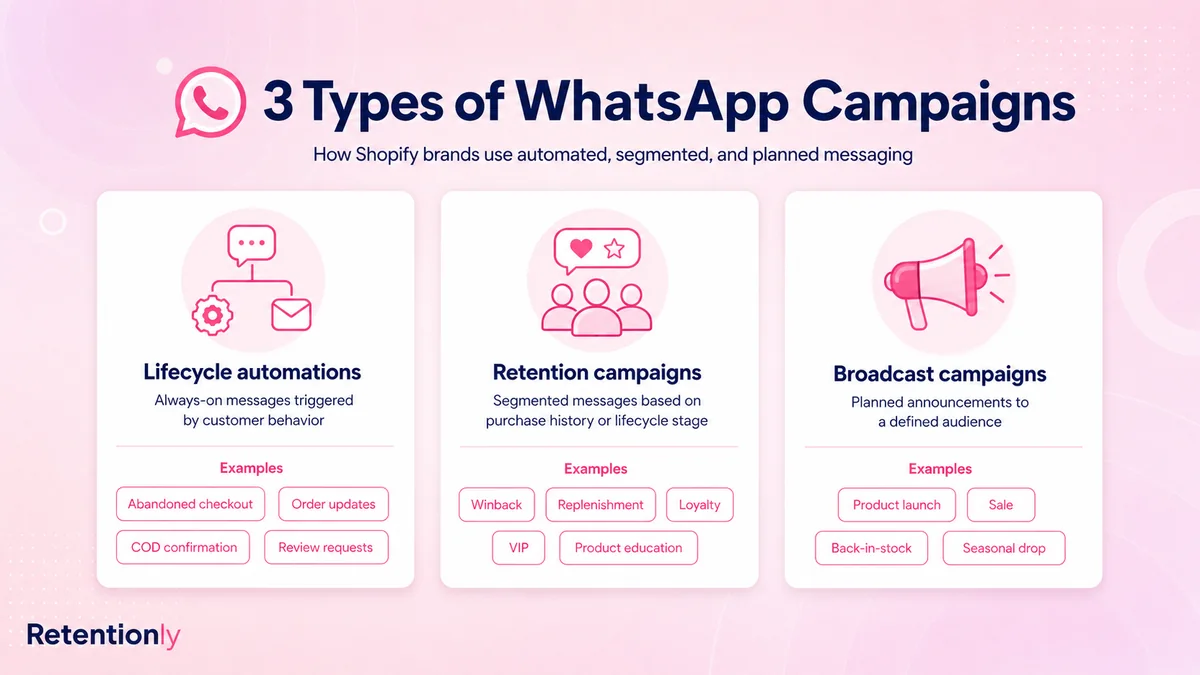
Build in that order. Lifecycle automations are closest to customer intent. Retention campaigns need clean segments. Broadcast campaigns can drive revenue, but they also create the highest fatigue risk.
For the broader strategy, read the WhatsApp Marketing Shopify Guide. This post focuses on campaign ideas you can turn into actual flows.
A Good Shopify WhatsApp Campaign Has Five Parts
Before choosing ideas, define the campaign mechanics.
| Part | Question to answer | Example |
|---|---|---|
| Audience | Who should receive this? | Repeat buyers in the skincare category |
| Trigger | Why now? | Customer is near a likely reorder window |
| Message promise | What useful thing is being offered? | Reorder the same product before running out |
| Stop rule | When should the campaign stop? | Stop after purchase, opt-out, or support issue |
| Metric | What proves it worked? | Repeat purchase revenue and opt-out rate |
If a campaign only answers "we want sales," it is not ready for WhatsApp. The customer should be able to understand why the message arrived.
1. Abandoned Checkout Recovery
This is usually the first WhatsApp campaign Shopify stores should launch because the shopper already showed buying intent.
| Campaign detail | Practical setup |
|---|---|
| Audience | Opted-in shoppers who started checkout but did not place an order |
| Trigger | Checkout started, no order after 30 to 60 minutes |
| Message angle | Help them return to the saved checkout |
| Stop rule | Stop after purchase, opt-out, final reminder, or support escalation |
| Metric | Recovered revenue, conversion rate, replies, opt-outs |
Example message:
Hi [first_name], your [store_name] checkout is still saved. You can complete it here: [checkout_link]. Reply if you have a question before ordering.
Start without a discount. If the campaign needs improvement, test timing, product context, reassurance, and then selective offers. For the full workflow, read the Shopify Abandoned Cart WhatsApp Recovery Guide.
2. Abandoned Browse Or Product Interest Campaign
Not every interested shopper reaches checkout. A browse campaign can work when a visitor looked at a product, joined a waitlist, clicked a WhatsApp ad, or asked a question about an item.
| Campaign detail | Practical setup |
|---|---|
| Audience | Known contacts with recent product or category interest |
| Trigger | Product view, WhatsApp chat, quiz result, or campaign click |
| Message angle | Give the next useful product action |
| Stop rule | Stop after purchase, low intent, opt-out, or no engagement |
| Metric | Product clicks, assisted revenue, replies, opt-outs |
Example message:
Still comparing [product_name]? Here are the details most shoppers ask about: [product_link]. Reply if you want help choosing the right option.
Use this carefully. Product interest is weaker than checkout intent, so the message should be helpful rather than aggressive.
3. Back-In-Stock Alert
Back-in-stock campaigns are strong because the customer already expressed demand. The message should be direct and fast.
| Campaign detail | Practical setup |
|---|---|
| Audience | Customers who requested a restock alert or viewed an unavailable product |
| Trigger | Product or variant returns to stock |
| Message angle | The item is available again |
| Stop rule | Stop after purchase, stockout, alert expiry, or opt-out |
| Metric | Restock conversion, sell-through, revenue per recipient |
Example message:
[product_name] is back in stock at [store_name]. You can get it here before it sells out again: [product_link]
For variants, be specific. A size-8 restock should not message every shopper who wanted a different size.
4. Price-Drop Alert
A price-drop campaign can recover price-sensitive demand, but it needs margin discipline.
| Campaign detail | Practical setup |
|---|---|
| Audience | Customers who viewed, wishlisted, or requested updates for the product |
| Trigger | Product crosses a meaningful price threshold |
| Message angle | The product they cared about is now cheaper |
| Stop rule | Stop after purchase, price returns, stockout, or opt-out |
| Metric | Revenue, margin, conversion rate, discount dependency |
Example message:
Good news, [first_name]. [product_name] just dropped to [price]. You can check it here: [product_link]
Do not send every small markdown. If the price change is not meaningful, the campaign teaches customers to wait for discounts. For the deeper workflow, read the WhatsApp Price Drop Alerts Shopify Guide.
5. Product Launch For Known Category Buyers
Launch campaigns work best when the audience has a reason to care.
| Campaign detail | Practical setup |
|---|---|
| Audience | Buyers, browsers, or VIPs tied to the launch category |
| Trigger | New product, collection, drop, or preorder opens |
| Message angle | Early access or relevant new arrival |
| Stop rule | Stop after purchase, launch window ends, or opt-out |
| Metric | Launch revenue, click rate, repeat purchase rate |
Example message:
[first_name], our new [category_name] drop is live. Since you bought from this category before, you get first access here: [collection_link]
Avoid sending launch campaigns to the full list unless the product is genuinely broad. A better campaign feels like access, not interruption.
6. VIP Early Access Campaign
VIP campaigns should recognize customer value. They should not be normal sale messages with the word VIP added.
| Campaign detail | Practical setup |
|---|---|
| Audience | High-LTV customers, repeat buyers, loyalty members, or top category buyers |
| Trigger | Early access window, private sale, limited inventory, or premium drop |
| Message angle | Recognition and first access |
| Stop rule | Stop after purchase, access window ends, or inventory runs out |
| Metric | VIP revenue, revenue per recipient, opt-outs |
Example message:
[first_name], you get early access to [collection_name] before it opens publicly. Your private link: [link]
VIP campaigns do not always need discounts. Access, priority, exclusive bundles, and concierge help can protect margin better than another coupon.
7. Winback Campaign For Inactive Customers
Winback campaigns are useful when the message reflects the customer's history. A generic "we miss you" message is easy to ignore.
| Campaign detail | Practical setup |
|---|---|
| Audience | Customers with no purchase after a defined window |
| Trigger | 45, 60, 90, or 120 days since last order, depending on product cycle |
| Message angle | Relevant reason to return |
| Stop rule | Stop after purchase, opt-out, recent support issue, or final reminder |
| Metric | Repeat purchase revenue, revenue per recipient, offer cost |
Example message:
Hi [first_name], we picked a few new arrivals from [category_name] based on your last order. You can see them here: [collection_link]
Segment winback by product category, purchase count, and customer value. A first-time buyer and a five-order customer should not get the same return message. For more examples, read the WhatsApp Winback Campaigns for Shopify Guide.
8. Reorder Reminder
Reorder reminders are strong for consumable products because the campaign matches a practical need.
| Campaign detail | Practical setup |
|---|---|
| Audience | Customers who bought repeatable products |
| Trigger | Expected replenishment window |
| Message angle | Reorder before running out |
| Stop rule | Stop after purchase, skipped product cycle, opt-out, or support issue |
| Metric | Reorder revenue, repeat purchase rate, time between purchases |
Example message:
Running low on [product_name]? You can reorder from [store_name] in one tap here: [reorder_link]
Use product-specific timing. A 30-day supply, 60-day supply, and irregular fashion purchase should not use the same schedule. For the full flow, read the Shopify Reorder Reminders WhatsApp Guide.
9. Post-Purchase Education Campaign
Some products need usage guidance before the next sale makes sense. Education campaigns reduce buyer confusion and improve repeat purchase readiness.
| Campaign detail | Practical setup |
|---|---|
| Audience | Recent buyers of products that need onboarding, care, or usage tips |
| Trigger | Order delivered or product usage window starts |
| Message angle | Help the customer get more value from the product |
| Stop rule | Stop after negative reply, refund, support issue, or completed sequence |
| Metric | Support reduction, repeat purchase, review rate, replies |
Example message:
Your [product_name] should be with you now. Here is the quick setup guide customers find most useful: [guide_link]
This is not a disguised promotion. Make the first message genuinely helpful. A later cross-sell can work only after the customer has enough product context.
10. Review Request Campaign
Review requests work when timing and customer state are right.
| Campaign detail | Practical setup |
|---|---|
| Audience | Delivered orders, excluding refunds, cancellations, and support-risk customers |
| Trigger | Delivery plus an appropriate usage window |
| Message angle | Ask for a quick review after product experience |
| Stop rule | Stop after review, opt-out, negative reply, or one reminder |
| Metric | Reviews collected, review rate, rating quality |
Example message:
Hi [first_name], hope you are enjoying [product_name]. Could you leave a quick review for [store_name]? It helps other shoppers choose with confidence: [review_link]
The timing should fit the product. Ask quickly for simple products. Wait longer for skincare, supplements, electronics, or items that need use before judgment. For Shopify-specific setup, read the Shopify Review Request WhatsApp Flow Guide.
11. Post-Purchase Upsell Or Cross-Sell
Upsell campaigns should be based on the order, not the store's need to sell extra inventory.
| Campaign detail | Practical setup |
|---|---|
| Audience | Recent buyers with a clear complementary product match |
| Trigger | Order placed, shipped, delivered, or product usage milestone |
| Message angle | Recommend the next useful product |
| Stop rule | Stop after purchase, refund, support issue, or campaign window |
| Metric | Attach rate, second-order revenue, AOV lift |
Example message:
Many customers pair [product_name] with [recommended_product] for [specific_benefit]. You can see it here: [product_link]
This campaign works when the recommendation is obvious. If the connection is weak, wait for a better customer signal. For more structure, read the Shopify Post Purchase Upsell WhatsApp Flow Guide.
12. Loyalty Reward Campaign
Loyalty campaigns should activate real member value: points earned, rewards unlocked, VIP tiers, birthday perks, referrals, and expiry windows.
| Campaign detail | Practical setup |
|---|---|
| Audience | Loyalty members with a meaningful loyalty event |
| Trigger | Reward unlocked, tier change, points expiry, referral eligibility |
| Message angle | Make the loyalty benefit easy to use |
| Stop rule | Stop after redemption, expiry, opt-out, or support issue |
| Metric | Redemption rate, repeat purchase revenue, referral revenue |
Example message:
Good news, [first_name]. You unlocked [reward_name] at [store_name]. Use it on your next order here: [reward_link]
Do not send tiny points balances that cannot be redeemed. The campaign should make a real benefit visible. For more ideas, read the WhatsApp Loyalty Program Shopify Campaign Ideas.
13. Seasonal Campaign With Purchase History
Seasonal campaigns are common, but they work better when they are tied to what the customer bought or browsed before.
| Campaign detail | Practical setup |
|---|---|
| Audience | Customers whose past category, size, location, or purchase timing matches the season |
| Trigger | Holiday, sale period, weather shift, festival, school season, or gifting window |
| Message angle | Timely product relevance |
| Stop rule | Stop after purchase, campaign end, opt-out, or frequency cap |
| Metric | Campaign revenue, revenue per recipient, opt-outs, margin |
Example message:
[first_name], our [season_name] picks for [category_name] are live. Since you shopped this category before, start here: [collection_link]
The best seasonal campaigns do not send the same sale to everyone. They match the moment to the customer's likely interest.
14. Click-To-WhatsApp Ad Follow-Up
If a customer starts a WhatsApp chat from an ad, the campaign should preserve the ad context.
| Campaign detail | Practical setup |
|---|---|
| Audience | Customers who clicked a WhatsApp ad or started a campaign chat |
| Trigger | Incoming ad-sourced WhatsApp conversation |
| Message angle | Continue the offer, product quiz, or question from the ad |
| Stop rule | Stop after purchase, no response, opt-out, or support handoff |
| Metric | Cost per conversation, conversion rate, assisted revenue |
Example message:
Thanks for checking out [offer_name]. Want help choosing the right option? Reply with 1 for [option_a] or 2 for [option_b].
Do not drop ad-sourced contacts into a generic broadcast list. The first follow-up should match what they clicked.
15. WhatsApp-Only Feedback Campaign
Feedback campaigns can help Shopify teams learn why customers did or did not buy. Keep them short.
| Campaign detail | Practical setup |
|---|---|
| Audience | Delivered customers, canceled orders, or customers who replied during a flow |
| Trigger | Delivery, cancellation, refund, or campaign reply |
| Message angle | Ask one clear question |
| Stop rule | Stop after response, no response, or support escalation |
| Metric | Response rate, issue themes, product or support improvements |
Example message:
Quick question, [first_name]: was your [store_name] order experience smooth? Reply 1 for yes or 2 if we should improve something.
Use feedback responsibly. If the customer reports a problem, route it to support before sending another promotional campaign.
Which Campaign Should You Launch First?
The best first campaign depends on the store's biggest revenue or experience leak.
| Store situation | Start with |
|---|---|
| High checkout abandonment | Abandoned checkout recovery |
| Frequent out-of-stock products | Back-in-stock alerts |
| Consumable products | Reorder reminders |
| High repeat purchase potential | Winback or loyalty campaigns |
| New product drops | Category buyer launch campaign |
| Large VIP segment | VIP early access |
| Low review volume | Review request campaign |
| High support questions after delivery | Post-purchase education and order updates |
| Paid traffic to WhatsApp | Click-to-WhatsApp ad follow-up |
Do not launch all ideas at once. Start with one campaign where the audience and stop rule are obvious. Then add the next campaign only after the first one is measured.
Frequency And Suppression Rules
WhatsApp campaigns need a global frequency view. A customer should not receive an abandoned checkout reminder, a launch broadcast, a review request, and a winback campaign in the same short window just because each flow was built separately.
Use these rules as a starting point:
Stop abandoned checkout messages after purchase.
Pause promotional campaigns after a support complaint.
Exclude recent purchasers from aggressive discounts.
Exclude refunded or canceled orders from review requests.
Suppress winback after any recent order.
Limit broad promotional messages within a defined period.
Give support, delivery, refund, and active-cart messages priority over planned broadcasts.
Honor opt-outs before the next campaign sends.
Meta's WhatsApp Business Messaging Policy says businesses should only contact people on WhatsApp after receiving the phone number and opt-in permission, and businesses must respect opt-out requests. That means list quality, consent source, and message expectation are not optional campaign details.
What To Measure
Do not measure every campaign with the same scorecard.
| Campaign | Primary metric | Guardrail |
|---|---|---|
| Abandoned checkout | Recovered revenue | Opt-outs and discount dependency |
| Back-in-stock | Restock revenue | Stockout and customer complaints |
| Price drop | Revenue and margin | Training customers to wait |
| Product launch | Launch revenue | Segment fatigue |
| VIP early access | VIP revenue | Over-discounting top customers |
| Winback | Repeat purchase revenue | Offer cost and opt-outs |
| Reorder | Repeat purchase rate | Wrong timing |
| Review request | Reviews collected | Negative replies |
| Upsell | Attach rate or second-order revenue | Irrelevant recommendations |
| Seasonal broadcast | Revenue per recipient | Blocks and opt-outs |
The campaign is not successful just because it got clicks. A good WhatsApp campaign should improve revenue, retention, support experience, or customer insight without damaging trust.
Common Mistakes To Avoid
Avoid these mistakes when planning Shopify WhatsApp campaigns:
Sending every campaign to every phone number.
Treating delivery phone numbers as promotional opt-ins.
Running broadcasts before lifecycle automations are working.
Ignoring customer replies after a campaign launches.
Sending discounts when the better message is availability, access, education, or reassurance.
Reusing the same copy for first-time buyers, repeat buyers, VIPs, and inactive customers.
Forgetting stop rules after purchase, opt-out, refund, or support issue.
Measuring opens instead of revenue, repeat purchase, margin, reviews, and opt-outs.
Adding more campaigns when the real problem is weak segmentation.
WhatsApp is a high-attention channel. That makes restraint part of the strategy.
Where Retentionly Fits
Retentionly is built for Shopify stores that want WhatsApp campaigns tied to customer events and retention revenue.
Use Retentionly when you want to:
Trigger campaigns from Shopify checkout, order, customer, and product signals.
Launch abandoned checkout, COD confirmation, order update, review, winback, reorder, upsell, welcome, and campaign flows.
Segment customers by purchase count, last order, lifetime value, product interest, and lifecycle stage.
Suppress customers who purchased, opted out, replied with an issue, or entered a higher-priority flow.
Measure campaigns by recovered revenue, repeat purchases, reviews, and customer outcomes.
Retentionly is not only a broadcast tool. It is the WhatsApp automation layer for Shopify teams that want campaigns to fit real customer moments.
Final Recommendation
Pick three WhatsApp campaign ideas to build first:
One revenue recovery campaign, such as abandoned checkout or back-in-stock.
One retention campaign, such as reorder, winback, loyalty, or VIP access.
One customer experience campaign, such as review requests, post-purchase education, or feedback.
For each campaign, define the audience, trigger, message promise, stop rule, and metric before writing copy. Keep broadcasts segmented. Give lifecycle messages priority. Stop sending when the customer's state changes.
That is how Shopify stores turn WhatsApp campaigns into a retention system instead of another promotional list.
Install Retentionly free on Shopify to launch WhatsApp campaigns for abandoned checkout recovery, back-in-stock alerts, price drops, winback, reviews, reorders, loyalty, VIP access, and repeat purchases.