Shopify COD Confirmation WhatsApp Guide to Reduce RTO
TL;DRShopify COD confirmation on WhatsApp helps stores verify buyer intent before they spend money packing and shipping a cash-on-delivery order. The goal is simple: confirm genuine orders quickly, catch accidental or fake orders early, and hold uncertain orders before they create fulfillment waste.
Cash on delivery can increase conversion in markets where customers prefer paying at the door. It also creates risk. A low-intent buyer, wrong phone number, fake address, or accidental order can turn into return-to-origin cost, blocked inventory, and extra support work.
This guide shows how to build a practical WhatsApp COD confirmation flow for Shopify stores that want to reduce RTO risk without annoying genuine customers.
What COD Confirmation Means For Shopify
COD confirmation is a WhatsApp workflow that starts when a customer places a cash-on-delivery order in Shopify. The customer receives a short message asking them to confirm or cancel the order before fulfillment.
A useful COD confirmation flow has six pieces.
| Flow component | Starting point |
|---|---|
| Trigger | New Shopify order with cash-on-delivery payment method |
| Audience | COD orders with valid phone numbers and WhatsApp consent |
| Timing | Immediately after order placement, before packing |
| Message | Ask the customer to confirm or cancel |
| Shopify action | Tag, hold, release, cancel, or route the order for review |
| Metric | Confirmation rate, cancellation rate, non-response rate, RTO reduction |
This is different from a normal order confirmation message. A normal order confirmation reassures the customer that the order was received. A COD confirmation asks the customer to take an action before the store commits fulfillment cost.
If you need the broader launch sequence first, read the WhatsApp Automation for Shopify Guide.
When A Store Needs COD Confirmation
Not every Shopify store needs this flow. It is most useful when COD is meaningful enough that bad orders affect margin or operations.
COD confirmation should move up your priority list if:
COD orders are a large share of total orders.
Your team sees fake orders, wrong phone numbers, or unreachable customers.
Return-to-origin cost is hurting margin.
Warehouse teams pack orders before checking buyer intent.
Some customers place COD orders accidentally or change their mind quickly.
Support spends time calling customers manually before fulfillment.
High-value COD orders feel risky without an extra confirmation step.
For prepaid-only stores, this is not the first workflow to build. Start with abandoned checkout recovery, order updates, reviews, winback, or reorder reminders instead.
For COD-heavy stores, this can be one of the first WhatsApp automations to launch because the business case is clear: every weak order caught before shipping can protect fulfillment cost.
The Basic COD Confirmation Flow
Start with a simple version before adding branches.
| Step | What happens | Why it matters |
|---|---|---|
| 1 | Shopify order is created with COD payment method | Keeps the flow tied to the right orders |
| 2 | WhatsApp confirmation message sends immediately | Reaches the buyer before fulfillment starts |
| 3 | Customer confirms, cancels, or does not respond | Creates a clear next action |
| 4 | Confirmed orders are released for fulfillment | Genuine orders keep moving |
| 5 | Canceled orders are reviewed or canceled | Saves avoidable packing and shipping |
| 6 | Non-responses are held or routed for review | Prevents risky orders from shipping blindly |
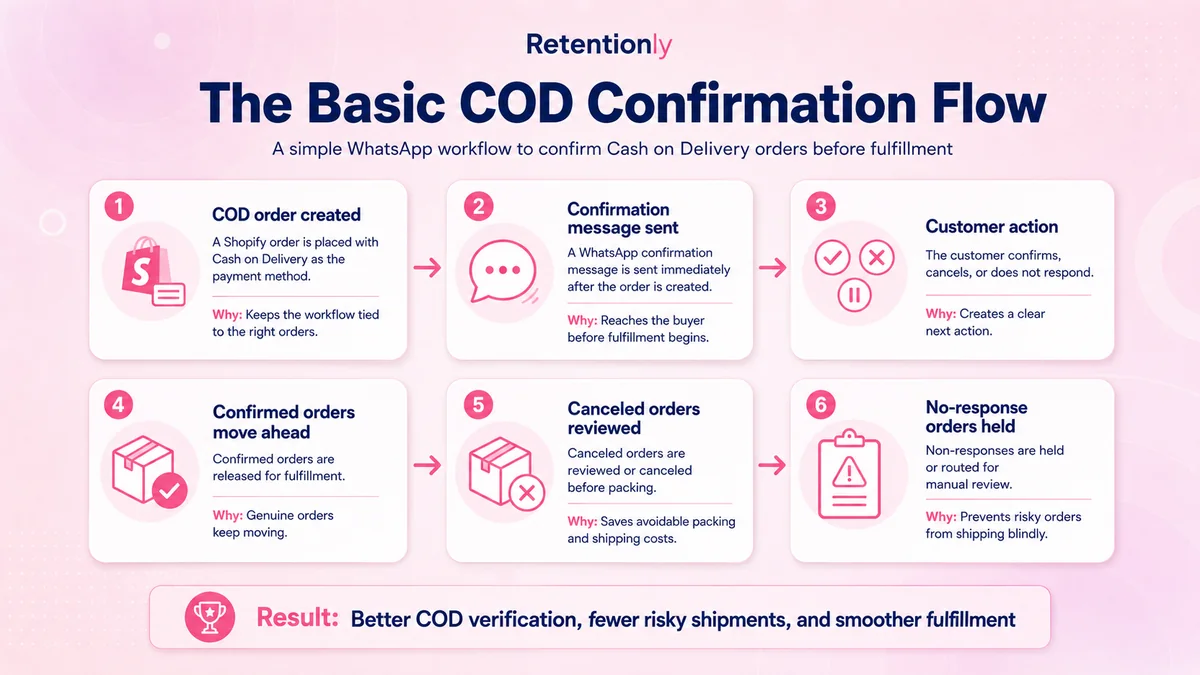
The first version should not be clever. Do not ask the customer to read a long policy, choose from five options, or explain why they ordered. Ask for one decision: confirm or cancel.
Step 1: Trigger Only On COD Orders
The trigger should be narrow. Send this flow only when the Shopify order uses a cash-on-delivery payment method.
Useful trigger checks:
Order was created.
Payment method is COD or pay on delivery.
Order is not already canceled or fulfilled.
Customer phone number is present and valid.
Customer can receive WhatsApp messages.
The order has not already been confirmed through another process.
Avoid sending COD confirmation to prepaid orders. A prepaid customer does not need to confirm payment intent again. They may still need order updates, but that is a different flow.
Also avoid using product views, cart activity, or checkout abandonment as the trigger. COD confirmation belongs after order creation. Before that, the shopper has not placed a COD order yet.
Step 2: Decide Which COD Orders Need Confirmation
Many stores can start by confirming every COD order. As order volume grows, segmentation becomes useful.
| Segment | Recommended handling |
|---|---|
| First-time COD customer | Send confirmation before fulfillment |
| Repeat customer with good delivery history | Confirm normally or use a lighter message |
| High-value COD order | Confirm and route non-response to manual review |
| Risky region or high-RTO area | Confirm before packing and consider one reminder |
| Low-value order | Confirm if shipping cost still matters |
| Recently canceled customer | Confirm and review before fulfillment |
| Prepaid order | Exclude from this flow |
Segmentation should help your team make better fulfillment decisions. If it makes the flow hard to operate, launch the simple version first and add segments after you see confirmation data.
Step 3: Send The First Message Immediately
Timing matters because the message should arrive before warehouse work starts. The best starting point is immediately after the COD order is placed, or within a few minutes.
The first message should include:
Customer name if available.
Store name.
Order number.
Total amount if useful.
Clear confirm and cancel options.
Short support path if the customer has a question.
Example confirm/cancel message:
Hi [first_name], please confirm your COD order [order_number] from [store_name] for [order_total]. Reply 1 to confirm or 2 to cancel.
Example button-style message:
Please confirm your cash-on-delivery order [order_number] from [store_name]. Tap Confirm Order if you want us to ship it, or Cancel Order if this was a mistake.
Example message with support option:
Hi [first_name], your COD order [order_number] from [store_name] is waiting for confirmation. Reply 1 to confirm, 2 to cancel, or ask us here if you need help.
Keep it short. The customer should understand the message in a few seconds.
Step 4: Map Replies To Shopify Actions
The WhatsApp reply is only useful if it changes what the store does next.
| Customer response | Shopify action | Team action |
|---|---|---|
| Confirms order | Tag as COD confirmed and release for fulfillment | Pack and ship normally |
| Cancels order | Tag as COD canceled or cancel after review | Stop fulfillment and optionally ask why |
| Asks a question | Tag for support and pause fulfillment if needed | Reply before shipping |
| Does not respond | Tag as COD unconfirmed | Hold, remind, or manually review |
| Invalid number or failed message | Tag as delivery failed | Verify phone before shipping |
Do not let confirmed, canceled, and unconfirmed orders look the same in Shopify. The value of the flow comes from giving fulfillment and support teams a clear state.
At minimum, use tags or notes such as:
cod-confirmedcod-canceledcod-unconfirmedcod-support-neededcod-message-failed
Use whatever tag format matches your operations, but keep the states easy to scan.
Step 5: Use One Reminder Carefully
Some customers will miss the first message. A reminder can help, but too many reminders can make the store feel pushy.
A practical starting rule:
| Reminder | Timing | Use when |
|---|---|---|
| First confirmation | Immediately after COD order | Every eligible COD order |
| Reminder | 1 to 3 hours later | No response and fulfillment has not started |
| Manual review | After reminder or before shipping cutoff | High-value, risky, or still-unconfirmed orders |
Example reminder:
Quick reminder: please confirm your COD order [order_number] from [store_name]. Reply 1 to confirm or 2 to cancel so we know whether to ship it.
Do not automatically cancel every order that misses one message. Some genuine customers are busy, offline, or unfamiliar with the process. A better first policy is to tag non-responses and decide based on order value, customer history, region, and fulfillment cutoff.
Step 6: Decide What Happens To Non-Responders
Non-response is the hardest part of COD confirmation. It is not the same as cancellation. It means the store does not yet know whether the order is genuine.
Use a decision framework instead of one blanket rule.
| Non-response situation | Better action |
|---|---|
| Low-value repeat customer with good history | Fulfill if normal operations allow it |
| First-time customer in high-RTO region | Hold and review before shipping |
| High-value COD order | Call, message again, or require manual confirmation |
| Invalid phone number | Do not ship until contact details are verified |
| Customer asked a question | Pause fulfillment until support replies |
| Order close to shipping cutoff | Route to manual review quickly |
The workflow should protect margin without blocking genuine demand. If the flow cancels too aggressively, it may save shipping cost while losing real orders.
Step 7: Track The Right Metrics
COD confirmation should be measured by operational outcomes, not only message delivery.
Track these metrics:
| Metric | Why it matters |
|---|---|
| Confirmation rate | Shows how many COD buyers confirm intent |
| Cancellation rate | Shows how many weak or accidental orders are caught early |
| Non-response rate | Shows where manual review or better timing may be needed |
| Fulfillment hold count | Shows how many orders the flow pauses |
| RTO rate for COD orders | Shows whether the flow reduces delivery failures |
| Shipping cost saved | Estimates avoided fulfillment waste |
| Support replies | Shows how many customers need help before shipping |
| Message failures | Reveals phone number quality issues |
Review results by segment. A first-time COD customer, repeat customer, high-value order, and risky region may behave differently. That is where the flow improves over time.
COD Confirmation Message Templates
Use these as starting points and adapt them to your brand voice.
| Use case | Template |
|---|---|
| Basic confirmation | Hi [first_name], please confirm your COD order [order_number] from [store_name]. Reply 1 to confirm or 2 to cancel. |
| Total amount included | Hi [first_name], your COD order [order_number] for [order_total] is waiting for confirmation. Reply 1 to confirm or 2 to cancel. |
| Address check | Please confirm your COD order [order_number] from [store_name]. If your delivery address is correct, reply 1. If you need changes, reply HELP. |
| Reminder | Quick reminder: should we ship your COD order [order_number]? Reply 1 to confirm or 2 to cancel. |
| High-value order | Hi [first_name], we need confirmation before shipping your COD order [order_number]. Reply 1 to confirm or ask us here if you need help. |
| Support handoff | Thanks for your message. We have paused order [order_number] and our team will help before shipping. |
Keep templates short enough for a customer to answer quickly. If the customer needs product education, that belongs in a support reply, not the first confirmation message.
Common Mistakes To Avoid
The biggest mistake is treating COD confirmation like a generic broadcast. It is not a promotion. It is an operational decision point before fulfillment.
Avoid these mistakes:
Sending COD confirmation to prepaid orders.
Asking customers to reply with long phrases.
Shipping unconfirmed high-risk orders without review.
Automatically canceling every non-response too quickly.
Forgetting to tag confirmed, canceled, and unconfirmed states in Shopify.
Sending multiple reminders after the order has already shipped.
Ignoring customer replies that ask for help.
Measuring delivery rate but not RTO, cancellation, and confirmation outcomes.
Using COD confirmation as a place to upsell unrelated products.
The message should reduce uncertainty, not create a new support mess.
Where COD Confirmation Fits In The WhatsApp Lifecycle
COD confirmation is one part of a broader Shopify WhatsApp system.
| Customer moment | WhatsApp flow |
|---|---|
| Shopper leaves checkout | Abandoned checkout recovery |
| Customer places COD order | COD confirmation |
| Order ships | Shipping update |
| Order is delivered | Delivery confirmation or review request |
| Customer goes inactive | Winback campaign |
| Product may run low | Reorder reminder |
| Customer may need a related item | Post-purchase upsell |
Start with COD confirmation if COD risk is costing money. Otherwise, start with the flow closest to your current bottleneck.
For many Shopify stores, the first three WhatsApp flows are abandoned checkout recovery, COD confirmation, and order updates. Together, they recover revenue, protect margin, and reduce avoidable support questions.
Where Retentionly Fits
Retentionly is built for Shopify stores that want WhatsApp automation tied to real store events and revenue workflows.
Use Retentionly for COD confirmation when you want to:
Trigger messages from Shopify order events.
Separate COD orders from prepaid orders.
Confirm, cancel, tag, and review orders before fulfillment.
Launch WhatsApp flows without building custom API logic.
Track performance by confirmation, cancellation, and revenue workflows.
Connect COD confirmation with abandoned checkout, order updates, reviews, winback, and repeat purchase automations.
Install Retentionly free on Shopify to launch COD confirmation on WhatsApp and build the rest of your retention automation stack from the same Shopify-first workflow system.