Yotpo WhatsApp Review Request Guide
TL;DRA Yotpo WhatsApp review request should help a happy customer leave a review after the order has actually been delivered and used. It should not become a second noisy review campaign that collides with Yotpo email requests, asks too early, or sends customers to the wrong review destination.
For Shopify stores, the useful question is not simply "Can we ask for Yotpo reviews on WhatsApp?" The better question is: which post-purchase customers should receive a WhatsApp review follow-up, when should it go out, what link should it use, and what happens if the customer replies with a problem instead of leaving a review?
This guide shows how to plan a Yotpo review request workflow around WhatsApp without turning it into a generic blast.
Where Yotpo Ends And WhatsApp Starts
Yotpo is the review system. It owns the review collection experience, review forms, review display, moderation, and the email review request workflow your store has configured.
WhatsApp should not replace that foundation unless your review stack is intentionally designed that way. For most Shopify stores, WhatsApp is better used as a high-attention follow-up layer around a specific review destination.
That means the WhatsApp workflow should answer five operational questions:
| Question | Practical decision |
|---|---|
| Who should receive it? | Delivered customers with WhatsApp consent and no unresolved issue |
| When should it send? | After delivery or after a conservative product-use window |
| Where should the button go? | The exact Yotpo product, site, or review request destination your store uses |
| What if the customer is unhappy? | Route the reply to support and suppress further review asks |
| What should be measured? | Clicks, reviews completed, negative replies, opt-outs, and repeat purchase impact |
If those decisions are unclear, the problem is not the message copy. The workflow is not ready yet.
Use Delivery Timing Instead Of Purchase Timing
Review requests fail when they arrive before the customer can judge the product. A customer cannot honestly review a skincare product they have not tried, a fashion item they have not worn, or a home product they have not installed.
Yotpo's review request settings already recognize this timing problem. Stores can schedule review requests after purchase, adjust timing for shipping time, and for supported Shopify setups use delivery-based timing with a fallback window when delivery confirmation is unavailable.
WhatsApp should follow the same principle.
| Product type | Safer WhatsApp timing |
|---|---|
| Digital product or instant access | 1-2 days after access |
| Local delivery | 1-3 days after delivery |
| Fashion and accessories | 3-7 days after delivery |
| Beauty, wellness, or consumables | 7-14 days after delivery |
| Home goods | After unboxing, setup, or placement |
| Subscription products | After the first useful cycle, not every shipment |
If delivery data is reliable, trigger the WhatsApp review request after delivery. If delivery data is patchy, use fulfillment date plus the store's normal delivery window plus a buffer.
Asking later is usually better than asking before the package arrives.
Coordinate With Yotpo Email Requests
Many stores already use Yotpo email review requests. Adding WhatsApp without coordination can create pressure:
Yotpo email asks for a review.
SMS asks for a review.
WhatsApp asks for a review.
A reminder asks again.
That is too much for most customers.
Decide whether WhatsApp is the primary review request channel for a segment or a backup channel after email non-engagement.
| Role for WhatsApp | When it fits | How to use it |
|---|---|---|
| Primary channel | Customers who engage more reliably on WhatsApp than email | Send one WhatsApp review request after delivery and suppress duplicate email pressure where possible |
| Backup channel | Email was sent but not opened, clicked, or converted | Wait several days, then send one short WhatsApp follow-up |
| High-value segment | Review volume matters for a new product, VIP segment, or repeat buyer group | Use tighter eligibility and a more specific product ask |
| Support-first channel | Product fit, delivery, or setup questions are common | Ask for a review only while giving customers a clear reply path for help |
The goal is not to maximize the number of review requests sent. The goal is to improve the number and quality of reviews without damaging the customer relationship.
Define The Review Destination Before Writing The Message
The button or link is the most important part of the WhatsApp message.
For a Yotpo workflow, do not send customers to a generic homepage, product page, or "please search for the review section" path. Use the actual review destination your Yotpo setup supports.
| Destination | Use when | Message angle |
|---|---|---|
| Product review request | You want product-page social proof | Ask about the specific product purchased |
| Site review request | You want store-level trust | Ask about shopping, delivery, and service experience |
| Product plus site review | Yotpo setup asks for both | Keep the WhatsApp copy short so the form does the extra work |
| Review reminder path | Customer ignored the first Yotpo email | Make WhatsApp a light nudge, not a fresh long pitch |
| Support path first | Customer may have an issue | Invite a reply before asking again |
If you cannot generate or identify the right Yotpo review link, fix that first. A better WhatsApp message will not save a broken review path.
Build A Yotpo WhatsApp Review Flow
A good review request flow is simple, but every step matters.
| Step | Rule |
|---|---|
| Trigger | Delivered order, or fulfillment plus delivery buffer |
| Audience | WhatsApp opted-in customers only |
| Suppression | Exclude refunds, returns, cancellations, failed deliveries, open support issues, existing reviewers, and recent review-request recipients |
| Message | One clear honest review ask with product or store context |
| Button | Direct Yotpo review destination |
| Reply handling | Route unhappy replies to support |
| Reminder | At most one polite reminder |
| Stop rule | Stop after review, click if appropriate, reply, opt-out, return, refund, or support escalation |
That structure keeps the workflow tied to the customer journey instead of turning it into a broadcast.
Message Examples For Yotpo Review Requests
Keep the copy short. The customer should understand why the message arrived and what to do next.
Product Review Request
Hi [first_name], hope you are enjoying [product_name] from [store_name].
Could you share an honest review? It helps other shoppers choose with confidence.
[yotpo_review_link]
Site Review Request
Hi [first_name], thanks again for ordering from [store_name].
If your experience was smooth, could you leave a quick store review here?
[yotpo_review_link]
Photo Review Request
Hi [first_name], we hope [product_name] worked well for you.
If you can, please add a photo with your review. It helps other shoppers see the product in real use.
[yotpo_review_link]
Email Non-Responder Follow-Up
Hi [first_name], quick follow-up on your recent [store_name] order.
If you have tried [product_name], your honest review would really help:
[yotpo_review_link]
Support-First Review Request
Hi [first_name], checking in on your recent order from [store_name].
If everything looks good, we would appreciate a quick review:
[yotpo_review_link]
If something is not right, reply here and our team will help.
The support-first version is often the safest default because it gives unhappy customers a private path before they leave public feedback.
Suppress The Wrong Customers
The biggest operational mistake is treating every delivered order as review-ready.
Suppress customers when:
The order was canceled, refunded, returned, or marked failed delivery.
The customer has an open support issue.
The product has not had enough time to be used.
The customer already left a review for the product or order.
The customer received a Yotpo email review request very recently.
The customer opted out of WhatsApp messages.
The customer has already received enough post-purchase messages this week.
This is especially important when Yotpo email requests, WhatsApp order updates, loyalty messages, and promotional campaigns all operate in the same post-purchase window.
One useful review request can help. Four disconnected post-purchase messages can feel careless.
Handle Negative Replies Before Asking Again
WhatsApp creates conversations. That is an advantage only if the replies change the workflow.
| Customer reply | What the workflow should do |
|---|---|
| "Loved it" | Send or repeat the review link once if they have not reviewed |
| "It arrived damaged" | Pause review asks and route to support |
| "Wrong size" | Route to exchange or return support |
| "I did not receive it" | Check delivery status before any review follow-up |
| "Stop" or opt-out language | Stop eligible WhatsApp marketing messages |
| No response | Wait, send at most one reminder, then stop |
Do not treat negative replies as failed review collection. They are product, fulfillment, or support signals. Fix the customer experience before asking for public proof.
What To Measure
A Yotpo WhatsApp review workflow should be judged by outcomes, not sends.
| Metric | Why it matters |
|---|---|
| WhatsApp delivery rate | Confirms the message reached customers |
| Click rate | Shows whether the review ask and button are clear |
| Review completion rate | Measures the real review outcome |
| Product review mix | Shows which products are gaining social proof |
| Negative reply rate | Reveals product, delivery, or support friction |
| Support recovery rate | Tracks whether unhappy replies were handled |
| Opt-out rate | Warns when the request feels too aggressive |
| Repeat purchase after review | Connects review engagement to retention |
If click rate is strong but review completion is weak, inspect the Yotpo destination. If opt-outs rise, inspect timing, frequency, and whether WhatsApp is duplicating email too closely.
Where Retentionly Fits
Retentionly is useful when the review request is part of a broader Shopify WhatsApp retention system.
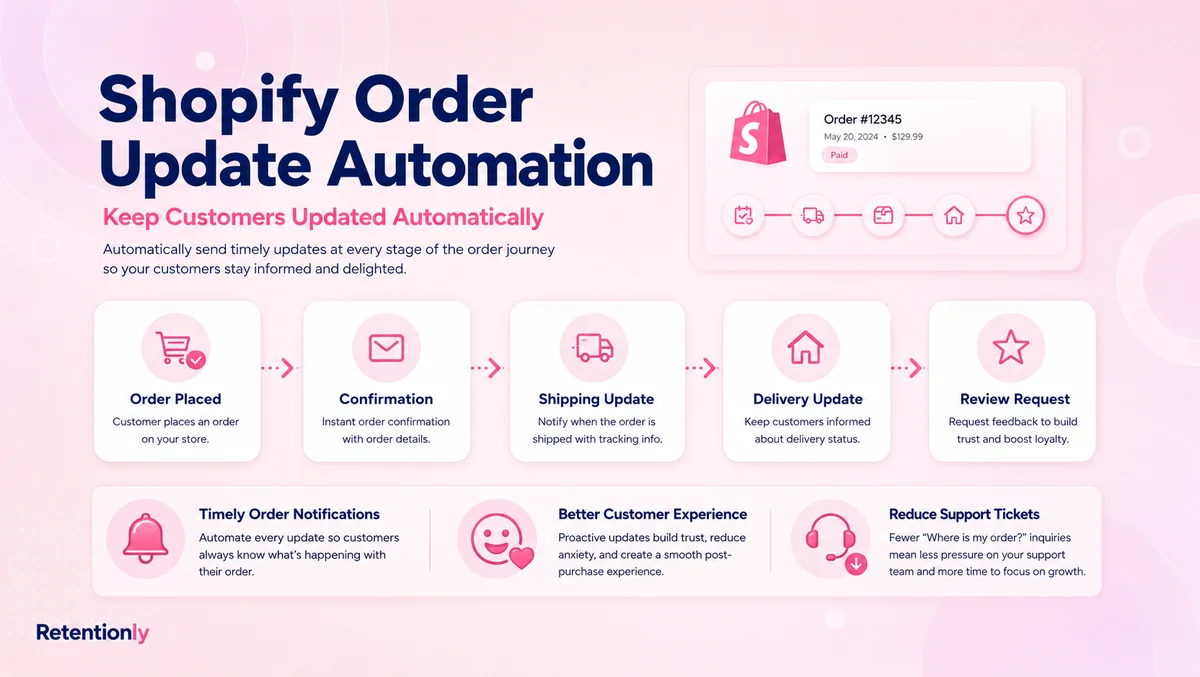
The workflow can sit after Shopify order updates on WhatsApp, alongside WhatsApp review request message examples, and before later lifecycle flows such as reorder reminders, winback campaigns, and post-purchase upsells.
Retentionly should not be positioned as the tool that manages Yotpo's review database. Yotpo remains the review destination. Retentionly is the WhatsApp automation layer for Shopify teams that want to control timing, eligibility, message copy, support handoff, and lifecycle follow-up around that destination.
That distinction keeps the workflow practical.
Use Yotpo for reviews. Use WhatsApp carefully for the moments where a timely, consent-based message can help a satisfied customer take action.
Install Free on Shopify and build Yotpo review request follow-ups that fit your real post-purchase journey.
Quick FAQs
Can I send Yotpo review requests on WhatsApp?
Yes, if your setup has a valid Yotpo review destination and the customer has given WhatsApp consent. The important part is not only sending the link. You also need delivery timing, suppression rules, reply handling, and a stop rule.
Should WhatsApp replace Yotpo email review requests?
Usually no. Many stores should keep Yotpo email requests and use WhatsApp for high-fit segments or non-responders. If both channels ask at the same time, the experience can feel heavy.
When should a Yotpo WhatsApp review request be sent?
Send it after delivery or after a conservative product-use window. The timing should vary by product category. Beauty, wellness, food, and subscription products often need more time than simple accessories or instant-access products.
What should the WhatsApp button link to?
Use the exact review destination your Yotpo setup supports, such as a product review, site review, or review request path. Avoid generic product or homepage links when the customer is expected to leave a review.
What if the customer replies with a complaint?
Pause the review request path and route the reply to support. Do not send reminders while the customer has a damaged item, delivery issue, refund request, return, or unresolved question.