Shopify Order Updates WhatsApp Automation Guide
TL;DRShopify order updates on WhatsApp are not just another notification channel. Used well, they reduce "where is my order" support tickets, reassure customers after checkout, and create a better post-purchase experience without asking your team to answer the same questions all day.
The mistake is treating every order update as a campaign. Order confirmation, fulfillment, shipping, out-for-delivery, delivered, delay, and failed-delivery messages all have different jobs. A useful WhatsApp flow sends the right update at the right operational moment, with enough context for the customer to act.
Why Order Updates Belong On WhatsApp
Customers usually do not want to search their inbox after placing an order. They want to know three things quickly:
Did the store receive the order?
Has it shipped?
What should I do if there is a delivery issue?
Shopify already supports order and shipping emails, and those emails should still exist. WhatsApp adds a more immediate channel for high-attention moments, especially in markets where customers expect post-purchase communication on chat.
That does not mean every status change deserves a message. The goal is not to create more noise. The goal is to remove uncertainty from the customer journey.
For most Shopify stores, WhatsApp order updates are useful when:
Customers often ask for order status manually.
Delivery questions take up support time.
COD, prepaid, or high-value orders need extra reassurance.
Customers frequently miss email notifications.
Delivery exceptions lead to returns, cancellations, or failed attempts.
The Order Update Flow At A Glance
A strong Shopify WhatsApp order update flow has six parts:
| Flow part | Decision to make | Good default |
|---|---|---|
| Trigger | Which Shopify event starts the message? | Order created, fulfilled, shipped, out for delivery, delivered, exception |
| Audience | Who should receive it? | Customers with WhatsApp consent and a valid phone number |
| Timing | When should it send? | Immediately after the event, except reminders and exceptions |
| Message | What should the customer know? | Status, order reference, next step, tracking link if available |
| Fallback | What happens if the message fails or the customer replies? | Email/SMS backup or support handoff |
| Goal | What should improve? | Fewer WISMO tickets, fewer failed deliveries, better post-purchase trust |
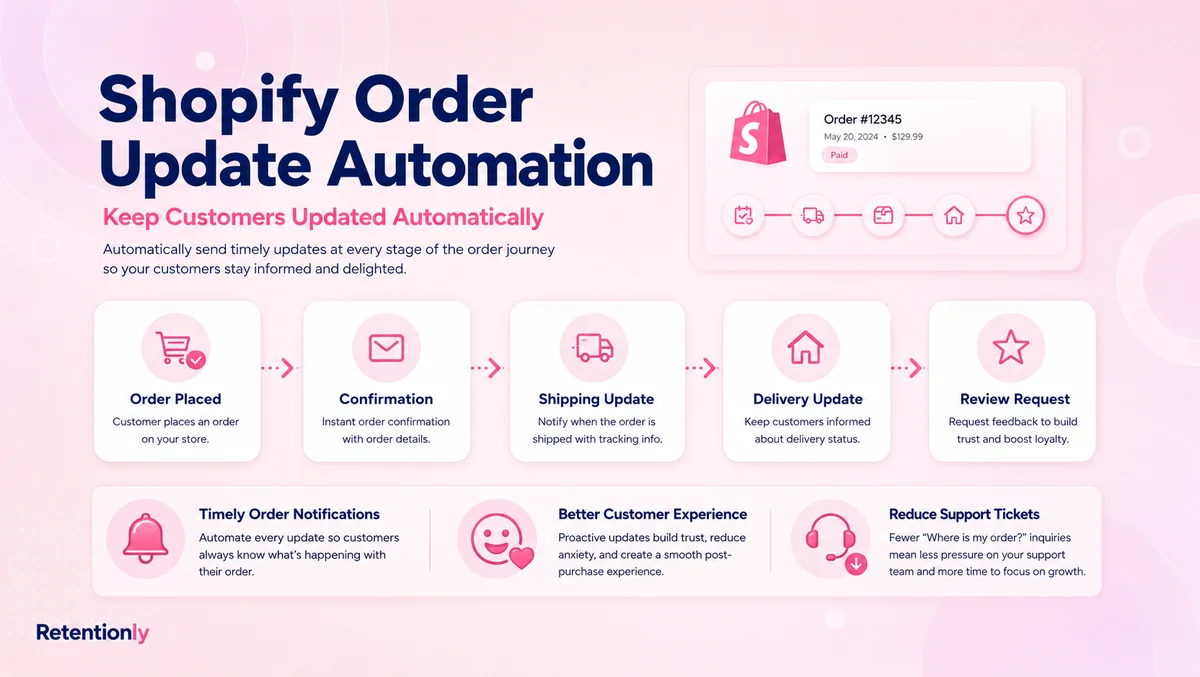
The simplest version starts with order confirmation and shipping updates. More advanced stores add delivery nudges, delay alerts, failed-delivery recovery, and review or reorder paths after delivery.
Step 1: Start With The Right Shopify Events
The workflow should follow real store events, not a fixed drip sequence.
Start with these triggers:
| Shopify moment | WhatsApp message job | Send when |
|---|---|---|
| Order placed | Reassure the customer that the order was received | Immediately after order creation |
| Order fulfilled | Tell the customer the order is being packed or has moved to fulfillment | When fulfillment is created or updated |
| Tracking available | Give the customer a trackable link | When tracking number or tracking URL is present |
| Out for delivery | Prepare the customer to receive the package | When carrier or fulfillment status supports it |
| Delivered | Confirm completion and set up the next lifecycle step | After delivery confirmation |
| Delivery exception | Prevent failed delivery or confusion | When a carrier event flags delay, failed attempt, address issue, or return risk |
Do not send a message for every internal status change. If the status is only useful to your operations team, keep it internal.
Step 2: Segment Which Orders Need WhatsApp
Not every order needs the same level of communication.
A low-risk prepaid order with a reliable carrier may only need order confirmation and shipping confirmation. A high-value COD order in a pin code with high failed-delivery risk may need COD confirmation, shipping update, out-for-delivery reminder, and failed-attempt recovery.
Useful segments include:
First-time customers who need reassurance.
COD orders where delivery success affects margin.
High-value prepaid orders where anxiety is higher.
Orders with delayed fulfillment.
Orders shipped by carriers with frequent status questions.
Customers who previously contacted support about delivery.
Local delivery orders where the customer must be available.
The point is to spend WhatsApp attention where it improves the customer experience or protects revenue.
Step 3: Keep Each Message Transactional
Order updates should be clear, short, and tied to the customer's existing purchase.
That means the message should include:
Customer name when available.
Order number or short reference.
Current status.
Tracking link or order status link when available.
One next action if needed.
A simple reply path for questions.
Avoid adding unrelated discounts, product pushes, or broad campaign copy inside operational updates. If the customer expects a shipping update and receives a promotion, trust drops quickly. Keep the order update focused, then use separate lifecycle flows for review requests, reorders, winback, and upsells.
Step 4: Use The Right Message For Each Status
Here are practical message examples a Shopify store can adapt.
| Situation | Example WhatsApp message |
|---|---|
| Order confirmation | Hi [first name], we received your order [order number]. We will update you here when it ships. You can view your order here: [order status link] |
| Fulfillment started | Hi [first name], your order [order number] is being prepared. We will send tracking details as soon as they are available. |
| Shipping update | Good news, [first name]. Your order [order number] has shipped. Track it here: [tracking link] |
| Out for delivery | Your order [order number] is out for delivery today. Please keep your phone available in case the courier needs to reach you. |
| Delivered | Your order [order number] has been marked delivered. Reply here if anything looks wrong and our team will help. |
| Delay alert | Quick update on order [order number]: delivery is taking longer than expected. We are watching the shipment and will update you when the next carrier scan appears. |
| Failed delivery attempt | The courier could not complete delivery for order [order number]. Reply 1 if the address is correct, or reply 2 if you need help updating delivery details. |
For utility-style order updates, keep the copy factual. If you add an offer or unrelated product recommendation, the message starts behaving like marketing.
Step 5: Decide How Replies Should Work
Order update flows become much more useful when the customer can reply.
Common reply paths:
| Customer reply | What the automation should do |
|---|---|
| "Where is my order?" | Send tracking link or latest status if available |
| "Change address" | Check fulfillment status, collect new address, route to support if still editable |
| "Cancel" | Check cancellation eligibility and route based on payment/fulfillment status |
| "Not received" | Open a delivery issue path and route to support |
| "Wrong item" | Open a post-delivery support handoff |
| "Thanks" or no action needed | No ticket creation needed |
This is where WhatsApp becomes more than a one-way notification system. The store can answer common questions automatically and route only the exceptions to a person.
Step 6: Add Stop Rules And Suppression Logic
Order updates can backfire if they keep sending after the context has changed.
Use stop rules such as:
Stop shipping reminders after delivery.
Stop out-for-delivery nudges if the order is cancelled.
Stop delay alerts once a fresh tracking scan appears.
Stop operational messages if the customer opts out.
Do not send duplicate tracking updates when the tracking URL has not changed.
Do not send WhatsApp updates for orders without proper consent.
Do not send a review request until the delivered status is confirmed and enough usage time has passed.
Suppression logic matters because post-purchase messages are trust-building messages. A duplicate or wrong-status message creates support work instead of reducing it.
Step 7: Measure Support Load, Not Only Clicks
Order update automation should be judged by operational outcomes.
Track:
| Metric | Why it matters |
|---|---|
| WISMO ticket volume | Shows whether customers still need to ask "where is my order" |
| Tracking link click rate | Shows whether customers are using the status link |
| Reply rate by message type | Helps identify unclear or anxiety-producing statuses |
| Failed delivery recovery rate | Shows whether exception messages save deliveries |
| Delivery-related cancellation rate | Shows whether better communication protects revenue |
| Support handoff rate | Shows which statuses still need human help |
| Opt-out rate | Shows whether the flow is becoming too noisy |
Revenue attribution can matter too, especially when delivery updates lead into review requests, reorder reminders, or winback flows. But for the order update flow itself, the first job is to reduce uncertainty and support load.
Common Mistakes To Avoid
The most common mistake is sending too many messages. A customer does not need a WhatsApp ping for every tiny operational update. They need the statuses that change what they know or what they should do.
Another mistake is mixing operational updates with promotional copy. A shipping update is not the place to push a flash sale. If the customer gave attention because they expected order information, respect that context.
Stores also forget to handle replies. If a customer replies to a WhatsApp delivery update and nobody owns the response, the message creates frustration. Every automated update should have a clear reply owner: automation, support, fulfillment, or no action.
Finally, many teams do not test edge cases. Test cancelled orders, partial fulfillments, split shipments, missing tracking links, failed deliveries, prepaid orders, COD orders, and customers with no WhatsApp consent before turning on the flow broadly.
How Order Updates Connect To Retention
Order updates do not directly create repeat purchases the way winback, reorder, and upsell flows can. But they create the conditions for retention.
A customer who feels informed is less likely to panic, cancel, or flood support. A customer who receives a clean delivery update is easier to ask for a review later. A customer who gets help during a failed delivery is more likely to trust the brand again.
The order update flow should connect to the rest of the lifecycle like this:
| Stage | WhatsApp workflow |
|---|---|
| Before purchase | Welcome flow, product questions, campaign replies |
| Checkout | Abandoned cart recovery |
| New order | Order confirmation, COD confirmation if relevant |
| Fulfillment | Shipping update, delay alert, delivery nudge |
| After delivery | Review request, product care tips, support handoff |
| Later lifecycle | Reorder reminder, winback, post-purchase upsell |
That is why order updates deserve their own workflow. They sit between conversion and retention, and they influence how confident the customer feels about buying again.
Where Retentionly Fits
Retentionly is built for Shopify stores that want WhatsApp automation tied to real lifecycle moments.
For order updates, that means the flow should start from Shopify order and fulfillment events, respect customer consent, send clean transactional messages, and create a support handoff when the customer needs help. It should not feel like a generic campaign scheduler pretending to be an operations tool.
Once order updates are working, the same WhatsApp lifecycle can extend into abandoned checkout recovery, COD confirmation, review requests, winback campaigns, reorder reminders, and post-purchase upsells. The important part is that each flow has a job.
Install Retentionly free on Shopify if you want WhatsApp automations built around Shopify retention, repeat purchases, and post-purchase customer experience without unnecessary platform complexity.
Final Recommendation
Start with two messages: order confirmation and shipping update. Add out-for-delivery and failed-delivery messages only when they reduce support or improve delivery success. Then connect the delivered event to the next retention action, such as a review request or reorder reminder.
WhatsApp order updates work best when they are calm, specific, and useful. If the message answers a real customer question before they ask it, it belongs in the flow. If it only adds noise, leave it out.