WhatsApp Promotional Messages Shopify Stores Can Send Without Spamming
TL;DRWhatsApp promotional messages for Shopify work when they feel connected to something the customer already did or asked for. A shopper viewed a product. A repeat buyer is eligible for early access. A customer is near a reorder window. A VIP segment gets first access to a drop.
The same offer sent to every phone number feels like spam. The better version uses Shopify context to decide who should receive the message, why now, what the customer should do next, and when the message should stop.
This guide gives Shopify stores practical WhatsApp promotional message examples, plus the audience, timing, suppression rule, and metric behind each one.
What Counts As A WhatsApp Promotional Message?
A promotional WhatsApp message is any outbound message that tries to drive demand, re-engagement, a sale, or a repeat purchase. It can be a discount, launch, product recommendation, bundle, back-in-stock alert, price drop, VIP offer, winback message, or post-purchase cross-sell.
For Shopify teams, the important distinction is not whether the copy sounds friendly. The important distinction is the customer's expectation.
| Message type | Customer expectation | Example |
|---|---|---|
| Utility or order update | The customer expects information about an order, payment, delivery, or account action | Your order has shipped |
| Service reply | The customer messaged you and expects help inside the support window | Here is your tracking link |
| Promotional message | The store is trying to drive interest, purchase, reactivation, or loyalty | Your saved item is now 15% off |
Treat promotional messages as marketing. That means clear opt-in, approved templates when required, a useful reason to send, and an easy way to stop.
Start With Campaign Type Before Writing Copy
Most Shopify promotional messages fit into three campaign types.
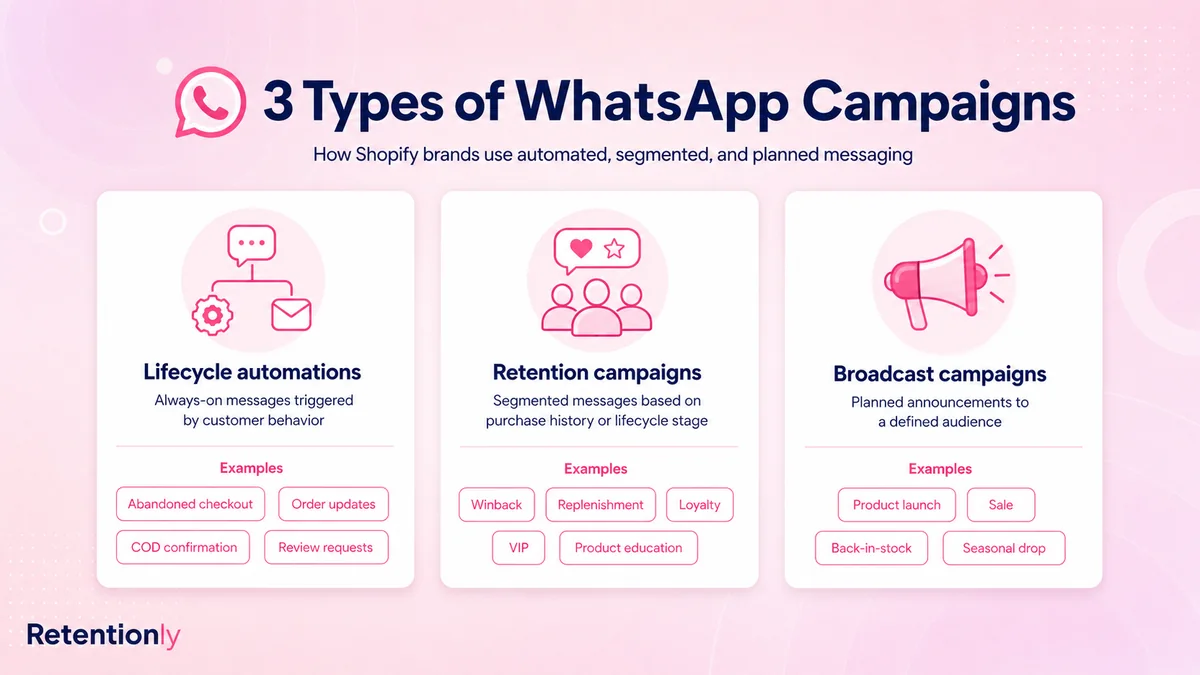
| Campaign type | Best promotional use | Spam risk |
|---|---|---|
| Lifecycle automation | Cart recovery offer, post-purchase upsell, reorder reminder, price drop alert | Sending after the customer already bought or opted out |
| Retention campaign | Winback, VIP access, loyalty reward, product education followed by offer | Weak segmentation or irrelevant offers |
| Broadcast campaign | Store-wide sale, launch, seasonal offer, event announcement | Sending too often or to the full list by default |
Build promotional WhatsApp messages in that order. Lifecycle messages are usually closest to customer intent. Retention campaigns need clean customer segments. Broadcasts should be used carefully because they have the highest fatigue risk.
For broader campaign planning, read the WhatsApp Campaign Ideas for Shopify Stores. This post focuses on the message examples and send rules.
The Five-Part Promotional Message Checklist
Before sending a promotion on WhatsApp, answer these five questions.
| Part | Question | Bad answer | Better answer |
|---|---|---|---|
| Audience | Who should receive this? | Everyone with a phone number | Customers with WhatsApp marketing consent who match the offer |
| Trigger | Why now? | We need sales today | Product is back in stock, cart is still open, VIP sale opened, reorder window arrived |
| Promise | What useful thing is offered? | Big discount | Early access, relevant product, saved checkout, replenishment, limited bundle |
| Suppression | Who should not receive it? | No one | Recent purchasers, open support issues, opt-outs, wrong category buyers, recently messaged customers |
| Metric | What proves it worked? | Sends | Revenue, conversion, replies, opt-outs, margin, repeat purchase rate |
If the message cannot pass this checklist, it is not ready for WhatsApp. Use email, onsite banners, or paid retargeting until the audience and timing are clearer.
Product Launch Messages
Product launches work on WhatsApp when the audience has a reason to care. A launch message should usually go to category buyers, waitlist contacts, VIP customers, or people who clicked a launch teaser.
| Use case | Audience | Message |
|---|---|---|
| Category buyer launch | Customers who bought from the category before | Hi [first_name], our new [category_name] drop is live. Since you bought from this category before, you get first access here: [collection_link] |
| Waitlist launch | Customers who requested launch updates | [product_name] is now live at [store_name]. You asked for the update first, so here is your early link: [product_link] |
| Limited inventory launch | VIP or high-intent segment | [first_name], limited stock of [product_name] is available now. You can shop before the wider announcement here: [product_link] |
| Preorder launch | Customers interested in the collection | Preorders for [product_name] are open. Reserve yours here before [deadline]: [product_link] |
Suppress launch messages for recent purchasers of the same item, customers with open support issues, customers outside the relevant category, and anyone recently sent another promotional message.
Measure launch revenue, conversion rate, revenue per recipient, opt-out rate, and sell-through by segment.
Sale And Discount Messages
Discount messages need the most discipline because they can train customers to wait. Use them when the offer has a real reason: clearance, seasonal sale, abandoned checkout recovery, VIP event, inventory pressure, or price-sensitive segment.
| Use case | Audience | Message |
|---|---|---|
| Targeted sale | Customers interested in a specific category | Hi [first_name], selected [category_name] products are now up to [discount]% off. You can see the sale here: [collection_link] |
| Abandoned checkout offer | Shopper with saved checkout and no purchase | Your [store_name] checkout is still saved. Use [discount_code] before [deadline] if you want to complete it today: [checkout_link] |
| VIP discount | Repeat buyers or loyalty members | [first_name], your VIP offer is live: [offer_details]. Use it before [deadline] here: [link] |
| Clearance | Buyers or browsers of the marked-down category | Last sizes in [category_name] are now marked down. Check what is still available here: [collection_link] |
Avoid sending a discount to customers who just bought at full price unless the offer is for a different category or a loyalty benefit that makes sense. Also suppress customers who received a discount recently.
Measure revenue, margin, discount cost, repeat purchase rate, opt-outs, and whether full-price conversion drops after repeated sends.
Price Drop Messages
Price drop messages are strongest when they match a product the customer already showed interest in.
| Use case | Audience | Message |
|---|---|---|
| Product watcher | Wishlist, product alert, or high-intent product viewer | Good news, [first_name]. [product_name] just dropped to [price]. You can check it here: [product_link] |
| Saved checkout price drop | Abandoned checkout shopper | The item in your saved checkout is now [price]. Complete your order here before the offer ends: [checkout_link] |
| Category markdown | Category buyers or repeat browsers | Your saved [category_name] picks are now on sale. See the updated prices here: [collection_link] |
Suppress if the product is out of stock, the price returned to normal, the customer already purchased, the discount is too small to be meaningful, or the customer has opted out of promotional messages.
For the full workflow, read the WhatsApp Price Drop Alerts Shopify Guide.
Bundle And Cross-Sell Messages
Bundles and cross-sells work when they help the customer get more value from something they already bought. They fail when the recommendation is random.
| Use case | Audience | Message |
|---|---|---|
| Complementary product | Recent buyer after delivery window | Your [product_name] should be with you now. Customers often pair it with [related_product]. See the bundle here: [bundle_link] |
| Refill bundle | Buyer near replenishment window | Running low on [product_name]? You can reorder it with [bundle_item] and save [offer] here: [reorder_link] |
| Category upgrade | Repeat category buyer | Since you liked [category_name], you may want to see the new premium set here: [collection_link] |
| Gift bundle | Previous gift buyer or seasonal shopper | [first_name], our [occasion] gift bundle is ready. It includes [key_items] and ships by [shipping_deadline]: [bundle_link] |
Suppress bundle messages during active returns, complaints, delayed deliveries, or before the customer has had enough time to use the first product.
Measure second-order conversion, average order value, bundle attach rate, refund rate, and reply quality.
For upsell-specific copy, read WhatsApp Upsell Message Examples for Ecommerce.
Winback And Re-Engagement Messages
Winback messages should not sound desperate. They should give the customer a relevant reason to return based on what they bought or browsed before.
| Use case | Audience | Message |
|---|---|---|
| Category winback | Customer inactive after normal buying cycle | Hi [first_name], we added new [category_name] picks since your last order. You can see them here: [collection_link] |
| Offer-led winback | Lapsed customers who respond to offers | It has been a while, [first_name]. Here is [offer] if you want to order from [store_name] again before [deadline]: [link] |
| VIP return | High-value customer inactive recently | [first_name], your private return offer is ready. Use it on your next order here: [link] |
| Subscription or refill reactivation | Customer overdue for repeat purchase | Need [product_name] again? Reorder here in one tap: [reorder_link] |
Suppress customers who recently bought, opted out, had a poor support experience, or no longer match the category. Do not send the same winback offer every month to non-responders.
Measure repeat purchase revenue, conversion by inactivity window, revenue per recipient, opt-outs, and whether reactivated customers place a second order later.
For more copy variants, read WhatsApp Winback Message Examples for Ecommerce.
Back-In-Stock And Waitlist Messages
Back-in-stock messages are promotional, but they often feel expected because the customer asked for the update.
| Use case | Audience | Message |
|---|---|---|
| Product restock | Customers who joined a restock alert | [product_name] is back in stock at [store_name]. You can get it here before it sells out again: [product_link] |
| Variant restock | Customers waiting for a size, shade, or flavor | [variant_name] is available again. Here is the direct link: [product_link] |
| Waitlist early access | Waitlist members before public launch | You are getting early access to [product_name] before the public restock. Shop here: [product_link] |
Suppress customers waiting for a different variant, customers who already bought after joining the waitlist, or anyone who only consented to order updates and not marketing.
Measure restock conversion, sell-through, time to purchase, and opt-outs. For a deeper version, read the Shopify Back-In-Stock WhatsApp Guide.
Loyalty, Birthday, And VIP Messages
Relationship-based promotions can work well because they give the customer a clear reason for the message.
| Use case | Audience | Message |
|---|---|---|
| Loyalty reward | Loyalty members with available reward | [first_name], you have [points] points available at [store_name]. Use them on your next order here: [link] |
| Birthday offer | Customers who opted into birthday messages | Happy birthday, [first_name]. Your birthday offer is ready: [offer_details]. Use it before [deadline]: [link] |
| VIP early access | Top customers or repeat buyers | VIP access is open, [first_name]. Shop [collection_name] before the public sale here: [link] |
| Anniversary | Customer with first-order anniversary | It has been a year since your first [store_name] order. Here is a thank-you offer for your next one: [link] |
Suppress customers who opted out of marketing, have an open complaint, recently used a similar offer, or fall outside eligibility rules.
Measure redemption rate, revenue per recipient, repeat purchase rate, and opt-outs by segment.
What Not To Send On WhatsApp
Some promotions are better kept out of WhatsApp.
| Avoid this | Why it creates risk | Better option |
|---|---|---|
| Daily sale blasts | Trains customers to ignore or block messages | Weekly or campaign-based frequency caps |
| Same offer to the full list | Feels irrelevant to most recipients | Segment by product interest, purchase history, or lifecycle stage |
| Promotion during a support issue | Looks tone-deaf and can increase complaints | Pause promotions until the issue is resolved |
| Order update with hidden discount | Confuses utility and marketing expectations | Keep order updates factual; send offers separately with consent |
| Vague opt-in | Customers may not expect marketing | Use clear WhatsApp marketing consent |
| No stop rule | Sends stale messages after purchase or opt-out | Stop after purchase, opt-out, support handoff, expiry, or frequency cap |
WhatsApp is a high-trust channel. The best long-term strategy is to send fewer, better promotional messages and protect reply quality.
Promotional Message Rules For Shopify Stores
Use these rules before launching any promotional flow.
| Rule | Practical meaning |
|---|---|
| Keep marketing consent separate | A delivery phone number is not automatically promotional WhatsApp consent |
| Use approved templates when required | Business-initiated messages outside the customer service window need approved templates |
| Match the offer to Shopify data | Use product, order, category, purchase count, and customer state |
| Frequency-cap promotional sends | Avoid multiple offers in a short period unless the customer is actively engaging |
| Suppress support-risk customers | Pause promotions during complaints, returns, delayed delivery, or refund issues |
| Stop after conversion | Do not keep sending an offer after the customer bought |
| Track opt-outs next to revenue | A campaign that drives sales but damages the list may not be healthy |
For opt-in strategy, read How to Collect Phone Numbers for WhatsApp on Shopify.
Metrics That Matter
Do not judge promotional WhatsApp messages only by sends or clicks. A high-click campaign can still be weak if it creates discounts, complaints, or unsubscribes that hurt the channel.
| Metric | Why it matters |
|---|---|
| Revenue per recipient | Shows whether the segment was worth messaging |
| Conversion rate | Shows whether the offer and CTA worked |
| Margin after discount | Prevents revenue from hiding poor profitability |
| Repeat purchase rate | Shows whether promotions build retention, not only one-off sales |
| Opt-out rate | Reveals message fatigue or weak targeting |
| Reply quality | Shows whether customers are interested, confused, annoyed, or asking for help |
| Suppression count | Shows how many customers were protected from irrelevant messages |
The healthiest WhatsApp promotions usually have a clear buying reason, a narrow audience, one CTA, and a stop rule that respects the customer.
How Retentionly Helps Shopify Stores Send Better Promotions
Retentionly is built for Shopify WhatsApp retention automation, so promotional messages can be tied to real store events instead of generic lists.
You can plan campaigns around abandoned checkout, price drops, winback, reorder windows, post-purchase upsells, product interest, VIP segments, and customer state. That lets your team send promotional WhatsApp messages that feel timely instead of noisy.
Install Retentionly free on Shopify to launch promotional WhatsApp flows with clearer triggers, customer segments, stop rules, and revenue tracking.