WhatsApp Drip Campaign Shopify Guide
TL;DRA WhatsApp drip campaign for Shopify should not be a random sequence of promotional messages. It should be a short, controlled path that starts from a real customer moment and moves the shopper toward one clear next action.
That moment could be a new WhatsApp opt-in, an abandoned checkout, a COD order, a delivered order, a likely reorder window, or a customer who has gone inactive. The drip is useful because it gives your store a consistent follow-up rhythm without asking your team to remember every customer, every delay, and every next message manually.
The risk is overbuilding it. A long drip that keeps sending after the customer buys, replies, complains, or opts out will hurt trust quickly. This guide shows how Shopify stores should plan WhatsApp drip campaigns around triggers, timing, branching, stop rules, and retention outcomes.
What A Shopify WhatsApp Drip Campaign Actually Is
A WhatsApp drip campaign is a multi-step message sequence. Each step is sent after a trigger, delay, customer action, or period of inaction.
For Shopify, the trigger should usually come from store behavior:
| Trigger | What the drip should do | Strong outcome |
|---|---|---|
| New WhatsApp opt-in | Welcome the subscriber and guide the first action | First purchase or reply |
| Abandoned checkout | Remind the shopper and remove buying friction | Recovered checkout |
| COD order placed | Confirm intent and reduce bad shipments | Confirmed order |
| Order delivered | Educate, request feedback, or suggest a relevant next step | Review, repeat purchase, or support reply |
| Reorder window reached | Remind the buyer before they run out | Repeat order |
| Customer inactive | Re-engage with a relevant reason to return | Winback purchase |
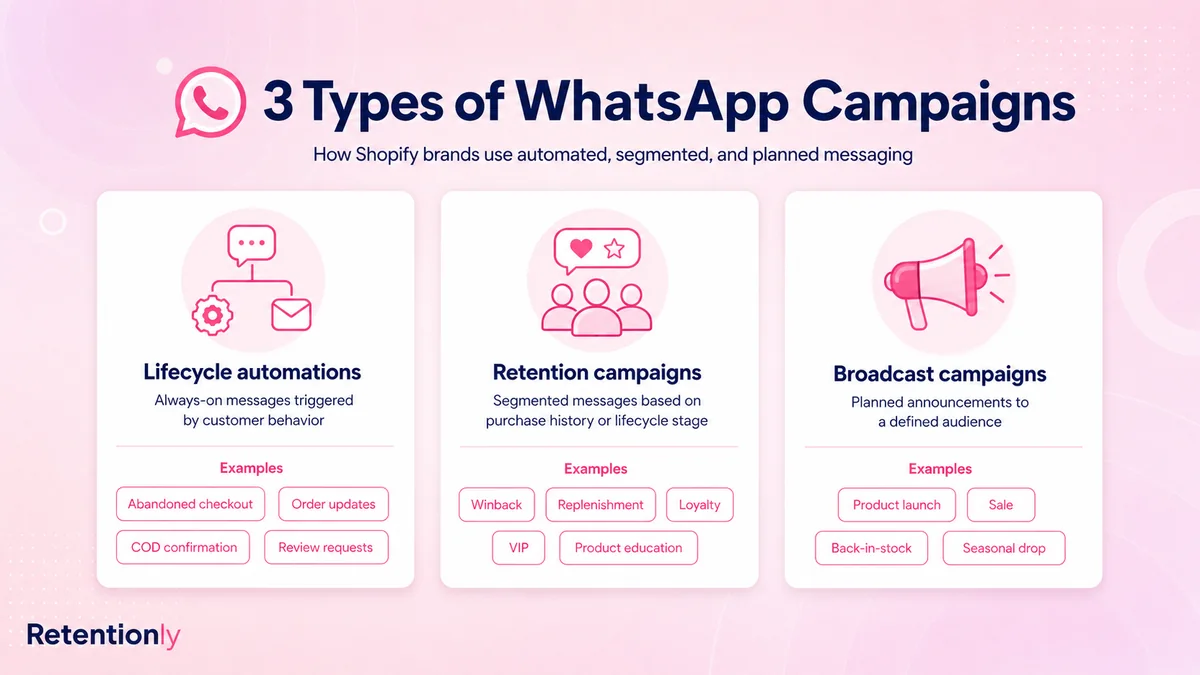
This is different from a broadcast. A broadcast sends one message to a segment. A drip sends a sequence where the next message depends on timing, eligibility, and whether the customer has already done the thing you wanted.
For the broader automation map, read the WhatsApp Automation for Shopify Guide.
When A Drip Campaign Makes Sense
Use a WhatsApp drip when one message is not enough, but a long campaign would be too much.
Good drip use cases include:
A shopper needs reassurance before completing checkout.
A COD order needs confirmation before fulfillment.
A new subscriber needs a simple path to the first purchase.
A delivered customer needs product usage guidance before a review request.
A consumable-product customer may be ready to reorder.
A lapsed customer needs a reason to come back.
Do not use a drip when the message should be a single utility update. Order confirmation, shipping confirmation, and delivery updates usually work better as clean operational messages. If you want to promote something after delivery, make that a separate review, reorder, upsell, or winback flow with its own consent and stop rules.
Start With One Job Per Drip
The easiest way to ruin a WhatsApp drip is to make it do too many jobs.
Before writing any copy, define the flow:
| Flow decision | What to choose | Example |
|---|---|---|
| Goal | The one outcome the drip should create | Recover checkout, confirm COD, collect review |
| Entry trigger | The Shopify event or segment that starts it | Checkout abandoned, order delivered, last order 45 days ago |
| Audience | Who is eligible | Opted-in customers with valid phone numbers and no active conflict |
| Sequence length | Number of messages | Usually 2-4 messages |
| Delay | Time between messages | 30 minutes, 4 hours, 1 day, or lifecycle-specific timing |
| Branch | What happens after reply, click, purchase, or no response | Pause, hand off, stop, or continue |
| Stop rule | What cancels the drip | Purchase, opt-out, refund, cancellation, support issue |
| Metric | How success is judged | Revenue, reply rate, review rate, repeat order, opt-out rate |
For most Shopify stores, a drip should be short. Two or three useful messages will teach you more than a seven-message sequence that creates noise.
Build The Sequence Around Customer Intent
The same timing does not work across every workflow.
An abandoned checkout drip is urgent because purchase intent is recent. A post-purchase education drip should be slower because the customer may not have received or used the product yet. A reorder drip should follow the product's usage cycle. A winback drip should respect how long it normally takes a customer to buy again.
Use this as a planning baseline:
| Drip type | Message 1 | Message 2 | Message 3 |
|---|---|---|---|
| Welcome | Immediately after opt-in | Next day with bestsellers or guide | Day 3 with first-purchase prompt |
| Abandoned checkout | 30-60 minutes after checkout abandonment | 12-24 hours later with help or reassurance | 2-3 days later with final reminder or offer |
| COD confirmation | Immediately after COD order | 3-6 hours later if no response | Next morning before holding or canceling |
| Post-purchase education | After fulfillment or delivery | 1-3 days after delivery | Later review or next-step prompt |
| Reorder reminder | Before expected replenishment window | A few days later if no purchase | Final reminder near run-out point |
| Winback | After inactivity threshold | 2-4 days later with value or proof | 5-7 days later with a clear reason to return |
These are starting points, not rules. A fashion store, supplement brand, beauty store, and food brand will need different timing because the buying cycle is different.
Example Drip 1: Welcome To First Purchase
Use this for new WhatsApp subscribers who have not purchased yet.
| Step | Timing | Message job |
|---|---|---|
| 1 | Immediately | Confirm the opt-in and set expectations |
| 2 | Next day | Help the shopper choose a product or category |
| 3 | Day 3 | Give one first-purchase path |
Example copy:
Hi [first_name], welcome to [store_name] on WhatsApp.
>
We will use this chat for useful product updates, offers, and order help. To start, here are our most-loved products: [link]
>
Reply STOP to opt out.
Follow-up:
Need help choosing? Tell us what you are shopping for and we will point you to the best fit.
Final prompt:
Still exploring [store_name]? Here is a simple starter pick many first-time customers choose: [product_link]
>
Reply STOP to opt out.
Keep the welcome drip light. It should build trust and guide action, not push every product line at once.
Example Drip 2: Delivered Order To Repeat Purchase
Use this when the customer has received the order and the product has a natural next step.
| Step | Timing | Message job |
|---|---|---|
| 1 | After delivery | Help the customer use the product well |
| 2 | 2-5 days later | Ask for feedback or a review |
| 3 | Based on product cycle | Suggest reorder, refill, add-on, or next product |
Example copy:
Hi [first_name], your [product_name] should be with you now.
>
Here is a quick guide to get the best result from it: [guide_link]
Follow-up:
How was your experience with [product_name]? If everything went well, could you leave a quick review here: [review_link]
Next-purchase prompt:
Many customers who bought [product_name] come back for [next_product] because [specific_reason].
>
You can see it here: [product_link]
>
Reply STOP to opt out.
If the product is consumable, this can become a Shopify reorder reminder WhatsApp flow. If the product has a natural companion, it may become a post-purchase upsell flow.
Example Drip 3: Winback For Lapsed Customers
Use this for customers who have not purchased for longer than their normal buying cycle.
| Step | Timing | Message job |
|---|---|---|
| 1 | After inactivity threshold | Give a relevant reason to return |
| 2 | 3-4 days later | Add proof, newness, or product fit |
| 3 | 5-7 days later | Make one final clear offer or ask |
Example copy:
Hi [first_name], it has been a while since your last order from [store_name].
>
We added new [category] picks that may fit what you bought last time: [link]
>
Reply STOP to opt out.
Follow-up:
If you liked [previous_product], [new_product] is the closest next pick. Here is why it fits: [product_link]
Final prompt:
Last reminder from us on this. Want help choosing something, or should we stop recommendations for now?
A winback drip should not feel like a generic sale blast. Use the customer's prior purchase, category, or stated preference to make the message relevant.
For the deeper strategy, read the WhatsApp Winback Campaigns for Shopify Guide.
Use Segmentation Before Personalization
Personalization is not just inserting a first name. The bigger win is deciding who should enter the drip at all.
Useful Shopify segments include:
| Segment | Why it matters |
|---|---|
| First-time visitor or subscriber | Welcome content can stay basic |
| First-time buyer | Post-purchase education and review timing matter |
| Repeat buyer | Reorder, loyalty, and VIP flows may fit |
| Product or collection purchased | Recommendations can match the order |
| Last order date | Winback and reorder timing become more accurate |
| Order value | Offer choice can protect margin |
| COD vs prepaid | Confirmation and trust-building needs differ |
| Discount user vs full-price buyer | Incentive strategy should differ |
| Active support issue | Promotional drips should pause |
| Recent opt-out or low engagement | The customer should be excluded |
Segmentation prevents the most common drip problem: sending a technically correct message to the wrong customer.
Set Frequency And Conflict Rules
WhatsApp feels personal because it sits beside messages from friends, family, and work. That also means bad frequency is noticed quickly.
Create rules for the full customer journey:
Do not run a winback drip while the customer is in an abandoned checkout flow.
Do not send an upsell if the customer's order is delayed or refunded.
Do not ask for a review before delivery is confirmed.
Do not send a reorder reminder if the customer already reordered.
Do not send multiple promotional drips in the same short window.
Stop every flow when the customer opts out.
Priority matters. Support, delivery problems, refunds, and explicit replies should override promotional automation.
Treat Most Drips As Marketing
Many WhatsApp drip messages are promotional, even when they are triggered by real Shopify behavior.
Practical guardrails:
Collect consent before enrolling customers in promotional WhatsApp drips.
Make the brand name and message purpose clear.
Use approved templates where required.
Keep each message expected, timely, and relevant.
Include a simple opt-out path such as "Reply STOP to opt out."
Avoid hiding discounts or product pushes inside operational order updates.
Respect local laws and platform rules for the markets you sell in.
The best test is simple: would the customer understand why they received this message at this moment? If not, the drip needs a tighter trigger, better copy, or a smaller audience.
Measure The Drip By Step
Do not judge a drip only by total revenue. A drip can generate sales while also increasing opt-outs, support load, or discount dependence.
Track:
| Metric | What it tells you |
|---|---|
| Delivery and failure rate | Whether phone quality, templates, or provider issues need attention |
| Read rate | Whether messages are reaching the audience |
| Reply rate | Whether the message invites useful conversation |
| Click rate | Whether the CTA is clear |
| Conversion by step | Which message actually moves revenue |
| Drop-off point | Where the sequence loses attention |
| Opt-out rate | Whether timing, frequency, or relevance is wrong |
| Revenue per recipient | Whether the flow is worth scaling |
| Support replies | Whether the drip creates confusion or needs human handoff |
| Margin after discounts | Whether the campaign is profitable |
Review step-level performance. If message 1 drives most conversions and message 3 drives most opt-outs, shorten the drip.
Common Mistakes To Avoid
The biggest mistake is treating WhatsApp drips like email sequences with shorter delays.
Other mistakes include:
Starting with a long sequence before proving the first two messages work.
Using the same drip for new subscribers, recent buyers, and lapsed customers.
Sending generic discounts instead of customer-specific next steps.
Forgetting to stop the flow after purchase, reply, refund, or opt-out.
Asking for reviews, reorders, upsells, and winbacks too close together.
Measuring only revenue and ignoring opt-outs or support burden.
Writing every message as a promotion.
Running drips without clear ownership between marketing and support.
Good drips are narrow. They know the customer moment, the next action, and when to stop.
How Retentionly Fits
Retentionly is built around Shopify WhatsApp retention automation, so drip campaigns can be planned from store events instead of static lists.
A practical Retentionly setup should help a Shopify team:
Start flows from customer, checkout, order, fulfillment, and lifecycle events.
Segment by purchase history, product category, order status, and customer timing.
Send WhatsApp templates for abandoned checkout, COD, review, reorder, winback, upsell, and welcome flows.
Stop or suppress messages after purchase, reply, opt-out, refund, delivery issue, or conflicting flow.
Track revenue and engagement by workflow.
Keep WhatsApp focused on retention and repeat revenue instead of broad bulk sending.
That matters because drip campaigns are only useful when they respect the customer journey. The goal is not more messages. The goal is better-timed messages that create the next purchase, reply, confirmation, or review.
A Simple First Drip To Launch
If you are starting from scratch, launch one three-step drip:
| Flow part | First version |
|---|---|
| Goal | Turn new WhatsApp subscribers into first-time buyers |
| Trigger | New WhatsApp opt-in with no prior order |
| Audience | Valid phone, marketing consent, not in checkout recovery |
| Message 1 | Welcome and expectation setting |
| Message 2 | Product/category guidance |
| Message 3 | One first-purchase CTA |
| Stop rules | Purchase, reply needing support, opt-out, checkout recovery start |
| Metrics | First purchase rate, reply rate, click rate, opt-out rate |
After that works, add abandoned checkout, COD confirmation, post-delivery review, reorder, and winback drips one at a time. Each drip should have one job and one owner.
Final Takeaway
A Shopify WhatsApp drip campaign works when it follows the customer's buying moment instead of forcing every customer into the same sequence.
Start with the trigger, keep the sequence short, personalize through Shopify data, and stop the flow when the customer buys, replies, opts out, or needs help. That is how WhatsApp becomes a retention channel rather than another place to send generic campaigns.
Ready to build WhatsApp drip campaigns around Shopify retention workflows? Install Retentionly free on Shopify and start with one focused automation.