WhatsApp Automation Tool: What Shopify Stores Should Compare
TL;DRA WhatsApp automation tool can mean very different things depending on who is buying it. For one team, it means a chatbot that answers FAQs. For another, it means a shared inbox. For a Shopify store, the better definition is more specific: a tool that can trigger WhatsApp messages from store events and improve revenue, retention, or support workload.
That distinction matters because many tools look similar on a pricing page. They all mention broadcasts, templates, chatbots, contacts, campaigns, and inboxes. The real decision is whether the tool can run the workflows your store will actually maintain after the first week.
This guide explains how Shopify merchants should compare WhatsApp automation tools, which pricing layers to check, when broad platforms make sense, and when a Shopify-first retention tool like Retentionly is the cleaner path.
Quick Verdict
Do not choose a WhatsApp automation tool by asking which one has the most features. Choose it by asking which one owns your first business outcome.
| If your first goal is... | Prioritize this tool type |
|---|---|
| Recover abandoned checkouts, confirm COD orders, send order updates, collect reviews, win back customers, and drive repeat purchases | Shopify retention automation tool |
| Manage high-volume customer replies, assignments, and agent workflows | Shared inbox or support-led WhatsApp platform |
| Sell through catalogs, campaigns, chat flows, and conversational commerce | Broad WhatsApp commerce platform |
| Build custom automations across many systems | WhatsApp API provider plus developer or middleware layer |
| Add a simple contact option to the storefront | WhatsApp chat button app |
For most Shopify stores, the first useful WhatsApp automation is not a complex bot. It is a store-event workflow: checkout abandoned, COD order placed, order shipped, order delivered, customer inactive, or replenishment window reached.
If that is your use case, read the Shopify WhatsApp Automation Guide alongside this comparison.
What A WhatsApp Automation Tool Should Do For Shopify
A Shopify-ready WhatsApp automation tool should connect three things: the store event, the customer context, and the message outcome.
The store event decides when the automation starts. The customer context decides who should receive it. The outcome tells you whether the message helped the business.
| Layer | What to check | Example |
|---|---|---|
| Trigger | Which Shopify event starts the workflow? | Checkout abandoned, order created, fulfilled, delivered, customer inactive |
| Eligibility | Which customers should be included or suppressed? | COD orders only, first-time buyers, VIP customers, unsubscribed customers excluded |
| Message | What template, variables, timing, and fallback are used? | One reminder after 30 minutes, second reminder after 18 hours, stop after purchase |
| Reply path | Who handles replies and what should happen next? | Support inbox, confirm/cancel action, refund question, product question |
| Measurement | What result is attributed to the flow? | Recovered revenue, confirmation rate, reviews collected, repeat orders, fewer WISMO tickets |
Without this structure, the tool may still be useful, but it is probably a messaging platform rather than a Shopify retention system.
The Buying Criteria That Matter
Start with the workflow, then compare features. This keeps the decision practical.
| Buying criterion | Strong signal | Weak signal |
|---|---|---|
| Shopify event depth | Native checkout, order, fulfillment, delivery, customer, product, and tag logic | Manual CSV uploads or generic contact lists |
| Automation ownership | Flows are organized around ecommerce lifecycle moments | Flows are organized only around bot menus or campaign blasts |
| Stop rules | The tool stops after purchase, opt-out, negative reply, or ineligible status | The tool mainly sends scheduled messages |
| Message templates | Approved template management with variables and fallbacks | Copy-paste templates without workflow checks |
| Segmentation | Store behavior, purchase timing, order type, product, and customer status | Only tags or broad lists |
| Reporting | Revenue, orders, confirmations, reviews, replies, opt-outs, failed sends | Opens and delivered messages only |
| Pricing clarity | Subscription, Meta fees, markups, add-ons, agents, limits, and usage rules are easy to model | Low starter price but unclear automation or message costs |
| Setup effort | First useful Shopify flow can go live quickly | Broad platform setup before any revenue workflow is active |
The deciding question is not "Can this tool send WhatsApp messages?" The deciding question is "Can this tool run the Shopify flows that will pay for the channel?"
Pricing Comparison: What The Plan Card Hides
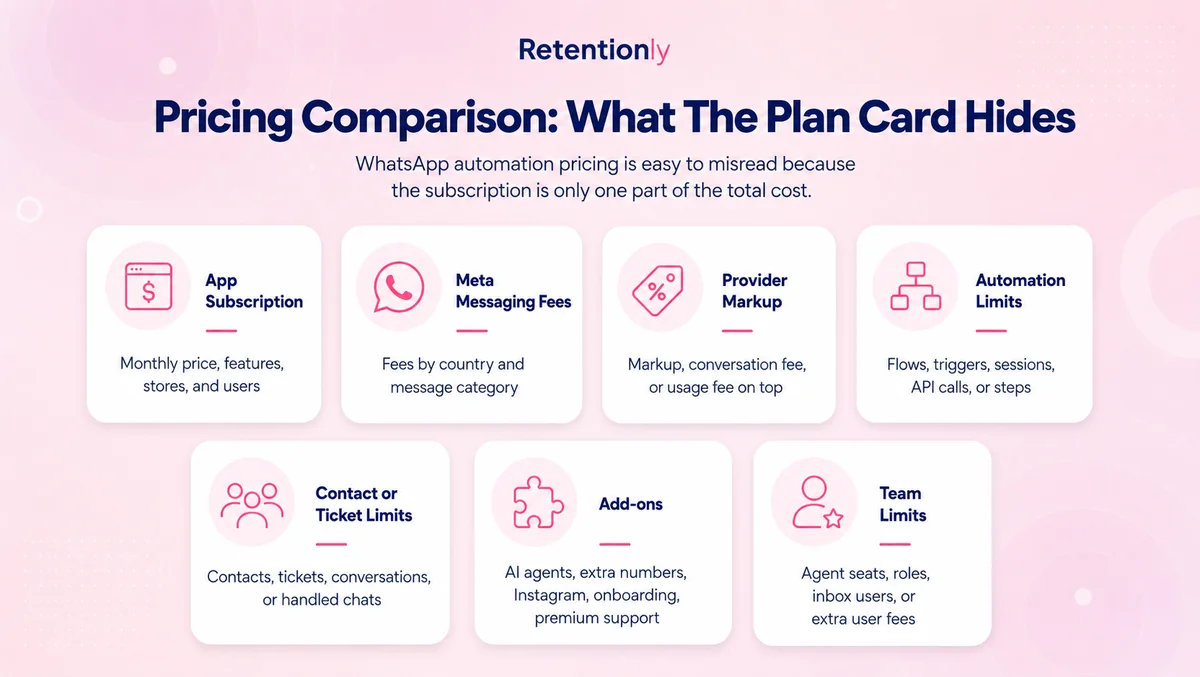
WhatsApp automation pricing is easy to misread because the subscription is only one part of the total cost.
| Cost layer | What to verify before choosing |
|---|---|
| App subscription | Monthly price, annual discount, features, stores, and included users |
| Meta messaging fees | Fees by country and message category through the WhatsApp Business Platform |
| Provider markup | Whether the platform adds a markup, conversation fee, or usage fee on top of Meta |
| Automation limits | Number of flows, custom flows, triggers, chatbot sessions, API calls, or workflow steps |
| Contact or ticket limits | Contacts, support tickets, marketing contacts, conversations, or handled chats |
| Add-ons | AI agents, extra WhatsApp numbers, Instagram, custom flows, premium support, onboarding |
| Team limits | Agent seats, roles, assignment, inbox users, and extra user fees |
Here is the practical comparison Shopify merchants should make:
| Tool | Public pricing pattern to check | Best-fit buying question |
|---|---|---|
| Retentionly | $24, $49, and $99/month plans; no Retentionly markup on Meta fees; no extra automation cost | Do you want Shopify retention flows with simple economics? |
| Zoko | Plans starting around $49.99/month with Meta rates, conversation fees or allowances, agents, custom-flow add-ons, Instagram, and AI bot add-ons | Do you want WhatsApp commerce, catalog, inbox, campaigns, and automation in one system? |
| Wati | Growth, Pro, and Business plans with messaging fees, chatbot sessions, prepaid credits, and optional add-ons | Do you need a broad WhatsApp Business operations platform? |
| Interakt | Shopify App Store plans around $21, $41, and $51/month, plus additional WhatsApp conversation charges | Do you want WhatsApp and Instagram marketing, sales, support, and cart recovery together? |
| Dondy | Free and low-cost widget plans, with automation/API tiers around $79.99 and $159.99/month | Do you want Shopify WhatsApp automation plus AI and support features? |
| DelightChat | Plans around $29, $99, and $299/month with ticket, contact, team, store, and support limits | Is WhatsApp part of a wider ecommerce helpdesk workflow? |
Pricing changes often, so verify the live plan page before buying. The important thing is to model the first three months of actual usage, not only the cheapest plan available today.
Retentionly is intentionally simple for Shopify retention use cases: Basic at $24/month, Growth at $49/month, and Scale at $99/month. It connects directly to Meta, does not add a markup on Meta message fees, does not charge extra for adding automations, and does not charge per chat.
Workflow Comparison
If the goal is revenue, compare tools by the workflows they can run from Shopify data.
| Workflow | What the tool must handle | Why it matters |
|---|---|---|
| Abandoned checkout recovery | Checkout trigger, cart link, timing, follow-up, discount logic, stop on purchase, revenue attribution | Often the fastest WhatsApp revenue test |
| COD confirmation | COD order trigger, confirm/cancel replies, fulfillment hold, tags, non-response fallback | Reduces fake orders and RTO waste |
| Order updates | Order confirmation, fulfillment, tracking, delivery, delay messages | Lowers repetitive support questions |
| Review requests | Delivery-based timing, product-use window, review-app handoff, unhappy-reply routing | Turns completed orders into social proof |
| Winback | Last purchase date, segment, offer, timing, suppression rules | Brings lapsed customers back |
| Reorder reminders | Product cycle, purchase history, expected replenishment date | Drives repeat orders for consumables |
| Post-purchase upsell | Product purchased, complementary product, timing, purchase stop rule | Raises repeat revenue without blasting the full list |
| Broadcast campaigns | Consent, segments, campaign calendar, opt-outs, reply owner | Useful after lifecycle automations are working |
For tactical examples, read the Shopify Abandoned Cart WhatsApp Guide and the Shopify COD Confirmation WhatsApp Guide.
How Major WhatsApp Automation Tool Types Differ
The market is crowded because different buyers use WhatsApp for different jobs. A fair comparison starts with the product's center of gravity.
| Tool type | Strength | Tradeoff |
|---|---|---|
| Shopify retention automation | Fast path to lifecycle flows, revenue tracking, and store-event messaging | Not meant to replace every broad support or sales operation |
| WhatsApp commerce platform | Strong for catalogs, broadcasts, inboxes, campaigns, and conversational selling | More setup and pricing layers if the first goal is retention |
| Shared inbox/helpdesk | Strong for agent workflows, tickets, assignment, and omnichannel support | Automation may be support-led rather than revenue-led |
| Chatbot platform | Strong for FAQs, routing, lead qualification, and structured replies | Can overcomplicate simple Shopify lifecycle flows |
| API provider or middleware | Flexible for custom systems and developer-owned workflows | Requires more implementation, monitoring, and message operations |
| Chat button app | Fast and low-cost contact option | Weak for automated retention and attribution |
This is why a broad feature checklist can mislead buyers. More breadth is useful when multiple teams need WhatsApp. It is unnecessary when the first job is one measurable Shopify flow.
Where Retentionly Fits
Retentionly is built for Shopify and D2C teams that want WhatsApp to drive retention and lifecycle revenue.
The strongest fit is a merchant that wants to launch and improve flows such as abandoned checkout recovery, COD confirmation, order updates, review requests, winback campaigns, reorder reminders, post-purchase upsells, welcome flows, and targeted broadcasts.
Retentionly is a good choice when:
Shopify events should drive the automation.
A founder, marketer, or ecommerce operator owns the channel.
The goal is recovered revenue, repeat purchase, or support reduction.
The team wants fewer setup steps before the first useful workflow is live.
Pricing should stay clear as message volume grows.
Retentionly is not trying to be the broadest WhatsApp platform for every team. If your support team needs a large shared inbox across many channels, a helpdesk-led platform may be better. If WhatsApp is a full sales operation with catalogs, AI agents, and manual selling, a broader commerce platform may be better.
The Retentionly wedge is narrower and deliberate: Shopify WhatsApp automation for retention.
Where Broad Platforms Still Make Sense
Broad platforms can be the right decision. Wati, Zoko, Interakt, Dondy, DelightChat, and similar tools are useful when WhatsApp is not only a retention channel.
Choose a broader platform when:
Multiple departments need one WhatsApp system.
Agents spend most of the day replying to customers.
Catalog selling inside WhatsApp is central to revenue.
You need advanced chatbot routing or AI support.
Instagram, Facebook, email, live chat, or helpdesk workflows matter as much as Shopify automations.
You have someone responsible for configuring and maintaining a larger platform.
The mistake is not choosing a broad tool. The mistake is choosing one before you know whether your first use case requires that breadth.
Setup Checklist Before You Commit
Before paying for a WhatsApp automation tool, map your first flow in plain language.
| Decision | Example answer |
|---|---|
| First business goal | Recover abandoned checkout revenue |
| Trigger | Checkout started but no order placed |
| Audience | Customers with WhatsApp-ready phone numbers who have not opted out |
| Timing | First message after 30 minutes, second message after 18 hours |
| Message | Helpful reminder with checkout link, not generic discount spam |
| Stop rule | Stop if purchase is completed, customer opts out, or customer replies negatively |
| Reply owner | Support inbox or founder-managed WhatsApp replies |
| Metric | Recovered revenue, conversion rate, opt-outs, replies, failed sends |
If a tool cannot make this flow easy to build, test, and measure, it may not be the right tool for your store yet.
For API setup context, read the WhatsApp Business API Shopify Guide. For app-specific buying criteria, read the Shopify WhatsApp App Buyer Guide.
Common Mistakes When Comparing Tools
The most common mistake is comparing tools by the longest feature list. WhatsApp automation is operational. A feature only matters if your team can launch it, maintain it, and measure the result.
The second mistake is treating broadcasts as the main use case. Broadcasts can work, but they are easier to abuse and harder to attribute than lifecycle automations. Start with flows triggered by customer behavior, then add campaigns once the channel has discipline.
The third mistake is ignoring replies. WhatsApp is conversational. If your abandoned checkout message works, people will ask product, shipping, discount, and payment questions. Decide who owns those replies before the automation goes live.
The fourth mistake is underestimating pricing complexity. A low subscription price can still become expensive if important automations require higher tiers, custom flows, AI add-ons, agent seats, usage fees, or message markups.
Final Recommendation
For Shopify stores, the best WhatsApp automation tool is the one that makes the first revenue workflow easy to launch and easy to improve.
If you need a company-wide WhatsApp operations platform, compare broad tools carefully. If you need an omnichannel support desk, compare helpdesk-led tools. If you need custom internal workflows, consider an API provider or middleware.
But if the goal is Shopify retention, start with lifecycle automation. Launch abandoned checkout recovery, COD confirmation, order updates, review requests, winback, reorder reminders, or post-purchase upsells. Measure the result. Then expand.
Install Retentionly free on Shopify if you want WhatsApp automation built around Shopify retention workflows, repeat purchases, and clear message economics instead of a broad platform your team may not need yet.
Quick FAQs
What is a WhatsApp automation tool?
A WhatsApp automation tool sends WhatsApp messages based on triggers, rules, templates, and customer data. For Shopify stores, the most useful tools connect those automations to store events such as abandoned checkouts, orders, fulfillment, delivery, reviews, and repeat purchase timing.
What should Shopify stores automate first on WhatsApp?
Most stores should start with abandoned checkout recovery because it is close to existing buying intent. COD-heavy stores may start with COD confirmation. Stores with high support volume may start with order and shipping updates.
Is a WhatsApp chatbot the same as WhatsApp automation?
No. A chatbot is one type of automation. Shopify WhatsApp automation can also include event-triggered reminders, order updates, review requests, winback flows, reorder reminders, broadcasts, and support handoffs.
Do WhatsApp automation tools charge Meta message fees?
Most official WhatsApp Business Platform tools involve Meta messaging fees in some form. Check whether the provider passes Meta fees directly, adds markup, charges conversation or usage fees, or bundles costs into plan limits.
Should I choose Retentionly or a broader WhatsApp platform?
Choose Retentionly when your main goal is Shopify retention automation and lifecycle revenue. Choose a broader platform when WhatsApp is also your support desk, sales inbox, catalog channel, chatbot system, or multi-team operations layer.