Shopify Flow WhatsApp Automation Use Cases
TL;DRShopify Flow is useful when a store wants more control over when something should happen. WhatsApp is useful when the customer moment needs attention, speed, or a reply. Put them together carefully and you get a practical retention system: Shopify decides the event logic, and WhatsApp carries the message that should move the customer to act.
The mistake is treating Shopify Flow and WhatsApp as a generic automation shortcut. A workflow that sends too many messages, ignores consent, or repeats the same campaign across every channel will create noise. A good Shopify Flow WhatsApp setup starts with one clear business outcome: recover checkout revenue, confirm COD intent, reduce order anxiety, collect reviews, trigger a reorder, or bring back a valuable inactive customer.
This guide shows where Shopify Flow fits, which WhatsApp use cases are worth building first, and how to avoid turning a useful automation layer into a messy messaging system.
Quick Verdict: When Should You Use Shopify Flow With WhatsApp?
Use Shopify Flow with WhatsApp when the store event is specific enough that a normal campaign calendar is too blunt.
Good examples include a COD order that needs confirmation before fulfillment, a high-value customer entering a winback segment, a delivery event that should trigger a review request, or an order tag that should route the customer into a different WhatsApp flow.
You do not need Shopify Flow for every WhatsApp automation. Many Shopify stores should start with app-native retention flows such as abandoned checkout recovery, order updates, review requests, winback, and reorder reminders. Add Shopify Flow when the logic needs more store-specific conditions, tags, segments, app events, or operational rules.
| Use Shopify Flow when... | Use app-native WhatsApp automation when... |
|---|---|
| The trigger depends on Shopify tags, segments, risk signals, order attributes, or app events | The workflow is a standard retention flow such as abandoned checkout, order updates, reviews, or winback |
| The store needs conditional branching before sending a message | The message should always follow the same Shopify event and timing |
| The team wants to coordinate WhatsApp with internal tasks, tagging, fulfillment holds, or CRM updates | The team wants a faster launch with less workflow maintenance |
| The workflow should run only for a narrow audience | The workflow is broadly useful across most eligible customers |
The right question is not "Can Shopify Flow send WhatsApp messages?" The better question is "Which Shopify event deserves a WhatsApp touch, and what stop rule protects the customer experience?"
How Shopify Flow And WhatsApp Fit Together
Shopify Flow works around triggers, conditions, and actions. A trigger starts the workflow, conditions decide whether the workflow should continue, and actions do the work. Shopify's own documentation describes Flow as a way to automate tasks in a store and across apps, with workflows built from those building blocks.
For WhatsApp automation, that usually means one of three patterns:
| Pattern | How it works | Best for |
|---|---|---|
| App-native WhatsApp flow | A Shopify WhatsApp app listens to store events and sends approved WhatsApp messages | Core retention automations with fast setup |
| Shopify Flow plus app action | Flow checks conditions and sends the customer into an app-supported action | Store-specific branching, segments, and operational rules |
| Shopify Flow plus HTTP request | Flow posts event data to an endpoint that handles the WhatsApp side | Advanced teams with technical setup and plan access |
That last option has an important caveat. Shopify's Send HTTP request action is available only on Shopify Plus, Advanced, or Grow plans. It can send a request to an external URL, but the workflow still needs proper authentication, payload design, retry handling, and a WhatsApp provider that can process the request safely. Shopify Flow waits up to 30 seconds for the HTTP response, and retry behavior depends on the response configuration.
For most Shopify merchants, the simpler path is to use Flow for decision logic only when needed and keep the WhatsApp sending layer inside a purpose-built Shopify WhatsApp app.
The Best Shopify Flow WhatsApp Use Cases
Start with workflows where WhatsApp has a clear job. It should not be another place to broadcast the same discount. It should solve a customer or revenue moment that benefits from immediacy.
| Use case | Shopify Flow trigger or condition | WhatsApp job | Main metric |
|---|---|---|---|
| Abandoned checkout recovery | Customer abandons checkout, customer segment, cart value, product type | Bring the shopper back to checkout | Recovered revenue |
| COD confirmation | Order created, payment method, order risk, order value, shipping region | Confirm, cancel, or edit before fulfillment | Confirmed COD rate, RTO reduction |
| Order status update | Fulfillment created, fulfillment event, order tag, delay condition | Reduce anxiety and support tickets | Delivery-related tickets, reply rate |
| Review request | Order fulfilled, delivery window, product tag, customer segment | Ask for a review after the customer can judge the product | Review rate |
| Reorder reminder | Customer joined segment, product tag, purchase cycle timing | Make repeat purchase easy | Repeat purchase revenue |
| Winback nudge | Customer joined inactive segment, lifetime spend, last order date | Re-engage valuable customers | Reactivation revenue |
| Post-purchase upsell | Order created, product purchased, customer tag, cooling-off period | Recommend the next logical product | Upsell conversion |
| VIP or loyalty moment | Customer joined segment, order count, lifetime spend | Send a personal retention message | Repeat purchase rate |
This is where Retentionly's Shopify-first angle matters. The channel is WhatsApp, but the workflow should be owned by Shopify behavior: checkout intent, order status, payment type, product category, customer value, and purchase history.
Use Case 1: Abandoned Checkout Recovery
Shopify Flow includes a Customer abandons checkout trigger, which starts a workflow when a customer abandons checkout. That can be useful when the store wants extra logic before recovery begins.
For example, a store might recover all eligible abandoned checkouts through its normal WhatsApp automation, but use Flow to treat certain customers differently:
| Condition | Better WhatsApp action |
|---|---|
| Cart value is high | Send a more personal recovery message or route replies to a team member |
| Product requires sizing, fit, or consultation | Ask a helpful question instead of pushing a discount |
| Customer is already in a VIP segment | Use a softer reminder and avoid first-touch discounting |
| Customer abandoned a low-margin product | Delay or skip the incentive |
| Customer bought recently | Avoid over-messaging and let post-purchase flows run first |
The message should be short and specific:
Hi [first name], you left [product name] in your cart. Want us to keep it aside? Complete your order here: [checkout link]
The stop rule matters more than the first message. Stop the WhatsApp flow after purchase, opt-out, expiry of the checkout link, or a support reply that needs human handling. A recovery flow without stop rules quickly becomes annoying.
For a full tactical setup, read the Shopify Abandoned Cart WhatsApp Recovery Guide.
Use Case 2: COD Confirmation Before Fulfillment
COD confirmation is one of the clearest Shopify Flow WhatsApp use cases because the business needs a customer response before spending money on packing and shipping.
A practical flow can start when an order is created. Conditions can check payment method, shipping region, order value, customer history, tags, or risk signals. The WhatsApp message should ask for a simple action:
Hi [first name], please confirm your COD order [order number] for [order total]. Reply 1 to confirm or 2 to cancel.
The workflow should separate confirmed, canceled, and no-response orders:
| Customer response | Flow action |
|---|---|
| Confirms order | Tag order as confirmed and continue fulfillment |
| Cancels order | Tag for cancellation review or cancel according to policy |
| Asks a question | Route to support before fulfillment |
| No response | Hold, delay, or review based on store policy |
This is where Shopify Flow can support operations beyond the WhatsApp message. The store can add order tags, hold fulfillment, notify the team, or trigger a follow-up path. WhatsApp handles the customer response; Flow helps the store act on the result.
For more detail, see the Shopify COD Confirmation WhatsApp Guide.
Use Case 3: Order And Delivery Updates
Order updates are not just notifications. They are support prevention.
Shopify Flow can react to order and fulfillment events. A store can use conditions to decide which customers need WhatsApp updates and which should only receive standard email notifications.
| Event | WhatsApp message job | When to use it |
|---|---|---|
| Order created | Reassure the customer that the order was received | High-anxiety categories, COD orders, first-time buyers |
| Fulfillment created | Share shipping status or tracking link | When tracking is important to reduce support tickets |
| Fulfillment delayed | Explain delay and set expectations | When the delay could create WISMO tickets |
| Delivered | Confirm receipt and prepare review timing | When post-delivery engagement matters |
Do not send every possible update by WhatsApp. Use WhatsApp for moments where timing or confidence matters. Email can remain the detailed receipt. WhatsApp should carry the short, useful status message that lowers uncertainty.
Use Case 4: Review Requests After The Right Delivery Window
Review requests work better when timing matches the product.
For simple products, a review request can go out soon after delivery. For skincare, supplements, electronics, home goods, or products that need real use, the request should wait longer. Shopify Flow can help when the timing depends on product tags, collection, delivery status, or customer segment.
| Product type | Better review timing |
|---|---|
| Simple accessory | Shortly after delivery |
| Apparel or footwear | After enough time to try the product |
| Skincare or supplements | After the customer has had time to use it |
| Electronics or appliances | After setup and first use |
| Gift item | After the likely gifting window |
The WhatsApp message should be direct:
Hi [first name], how did [product name] work out for you? If you have a minute, could you leave a quick review here: [review link]
If the customer replies with a problem, do not keep pushing for a review. Route the reply to support or pause the request. A good review flow protects the relationship before chasing public proof.
Use Case 5: Winback And Reorder Flows From Customer Segments
Shopify Flow's customer segment trigger can be useful when the store wants to turn segment movement into action.
For example, a customer might join a segment such as:
Bought skincare cleanser 35 days ago and has not reordered.
Spent more than $150 lifetime and has not purchased in 90 days.
Bought a subscription-like product once but never purchased again.
Purchased from a category with a predictable refill cycle.
The WhatsApp message should match the reason the customer entered the segment. A reorder reminder should not sound like a winback discount. A winback message should not pretend the customer is due for a replenishment if the purchase cycle is unknown.
| Segment signal | WhatsApp angle |
|---|---|
| Consumable product is likely running low | "Ready for a refill?" |
| High-value customer inactive for 90 days | "We saved a return offer for you." |
| Customer bought product A but not complement B | "This pairs well with your last order." |
| Customer joined VIP tier | "Thanks for being one of our best customers." |
This is a strong use case for Retentionly because the goal is not a broad campaign. The goal is repeat revenue from Shopify customer behavior.
A Practical Launch Order
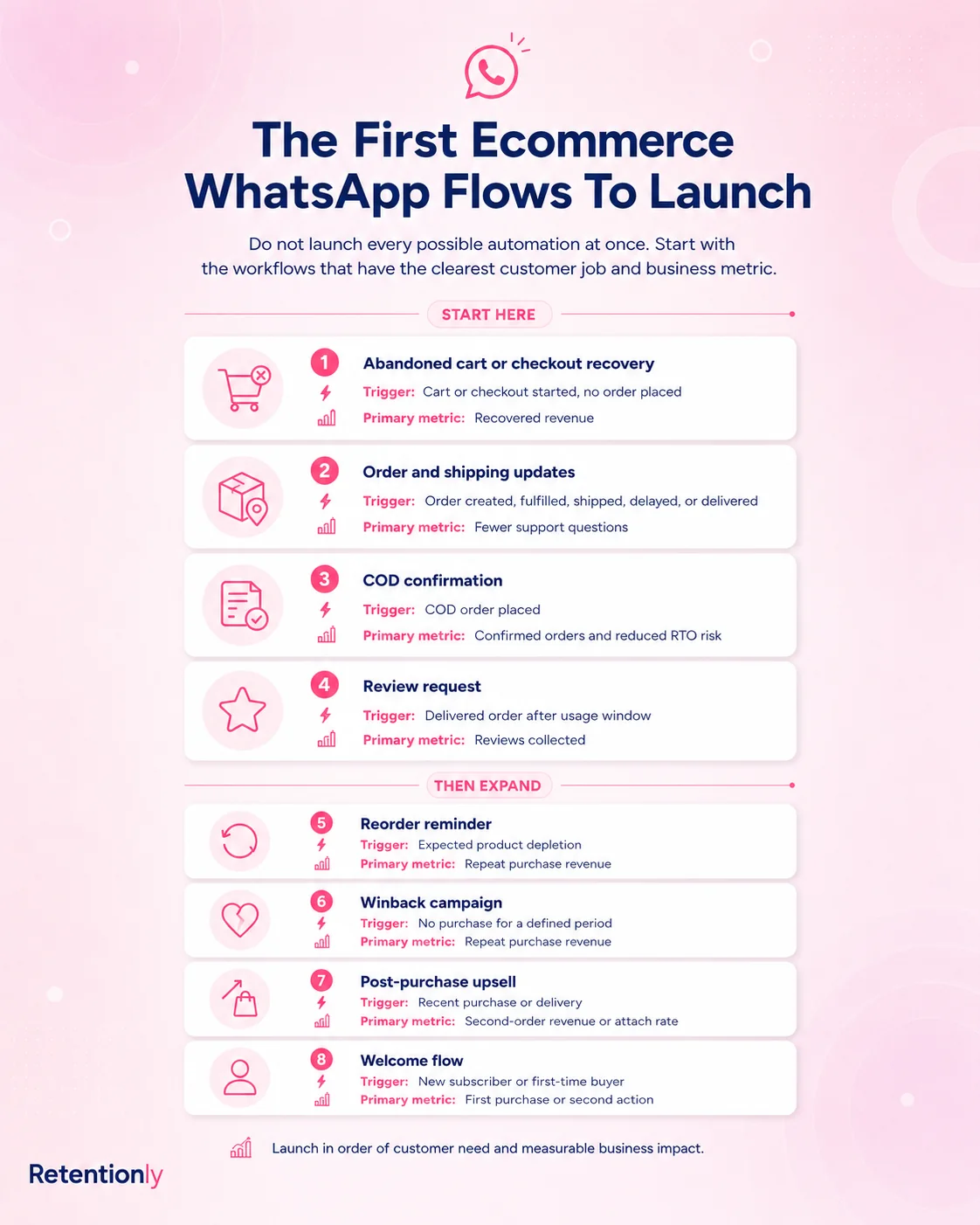
Do not build eight Shopify Flow WhatsApp workflows at once. Start where the business case is obvious and the customer experience is easy to control.
| Launch order | Workflow | Why it comes first |
|---|---|---|
| 1 | Abandoned checkout recovery | Direct revenue impact and clear stop rule |
| 2 | COD confirmation | Reduces operational waste and fulfillment risk |
| 3 | Order and delivery updates | Reduces support pressure and builds trust |
| 4 | Review requests | Creates post-purchase proof after delivery |
| 5 | Reorder reminders | Fits predictable consumable purchase cycles |
| 6 | Winback | Works once customer segments are cleaner |
| 7 | Post-purchase upsell | Needs careful product logic and cooling-off periods |
The first two workflows should prove that WhatsApp can drive revenue or reduce cost. Later workflows can add retention depth.
What To Include In Every Flow
Every Shopify Flow WhatsApp workflow should have the same operating skeleton.
| Flow component | Decision to make |
|---|---|
| Trigger | What exact Shopify event starts the workflow? |
| Audience | Who should receive the WhatsApp message? |
| Consent | Does the store have permission to message this customer on WhatsApp? |
| Timing | Should the message send immediately, after a delay, or after another event? |
| Template | What approved WhatsApp template will be used outside the service window? |
| Personalization | Which Shopify variables are actually useful? |
| Stop rule | What event stops the workflow? |
| Reply owner | Who handles customer replies? |
| Metric | How will the store judge success? |
If a workflow cannot answer these questions, it is not ready to launch.
Common Mistakes To Avoid
The biggest mistake is building the automation around the tool instead of the customer moment. Just because Shopify Flow can trigger something does not mean WhatsApp should be the next action.
Another common mistake is skipping consent logic. WhatsApp should be treated as a high-trust channel. If a customer did not opt in, the store should not treat Flow as a workaround.
Stores also overuse discounts. Abandoned checkout messages do not always need a coupon. COD confirmations do not need a coupon at all. Review requests should not sound like sales campaigns. Winback offers can use incentives, but only when the audience is narrow enough to justify them.
Finally, many teams forget reply handling. WhatsApp is conversational. If a customer replies with a question, cancellation request, address correction, or complaint, the flow needs a clear owner. Otherwise the automation creates work instead of reducing it.
Where Retentionly Fits
Retentionly is built for Shopify WhatsApp retention automation. That means the focus is not on creating a generic automation stack. The focus is on the Shopify flows that recover revenue, reduce avoidable fulfillment work, improve post-purchase communication, and bring customers back.
Use Shopify Flow when you need extra event logic. Use Retentionly to keep the WhatsApp side practical: abandoned checkout recovery, COD confirmation, order updates, review requests, winback, reorder reminders, post-purchase upsells, broadcasts, and customer replies.
The cleanest setup is usually simple:
| Layer | Job |
|---|---|
| Shopify | Source of customer, order, checkout, product, and fulfillment events |
| Shopify Flow | Extra conditions, tags, segments, and workflow routing when needed |
| Retentionly | WhatsApp retention workflows and customer messaging |
| Team inbox or support owner | Replies, exceptions, and human follow-up |
| Reporting | Revenue recovered, orders confirmed, reviews collected, and repeat purchases generated |
This keeps the stack understandable. Shopify owns the commerce data. Flow adds logic when the default path is not enough. WhatsApp carries the message. Retentionly keeps the workflow tied to retention outcomes.
Shopify Flow WhatsApp Checklist
Before launching a Flow-powered WhatsApp workflow, confirm these items:
The customer moment is worth a WhatsApp message.
The trigger is specific and easy to test.
The audience has WhatsApp consent.
The message has one clear action.
The flow has a purchase, reply, opt-out, or timeout stop rule.
Customer replies have an owner.
The workflow has one primary metric.
The team knows whether this should live in Shopify Flow or in the WhatsApp app's native automation.
If the workflow passes that checklist, it is probably worth testing. If it does not, simplify it before sending messages to customers.
Final Recommendation
Shopify Flow and WhatsApp work best together when Flow handles the logic and WhatsApp handles the timely customer action. Do not use Flow to create more messages. Use it to make better decisions about which messages deserve to be sent.
Start with the workflows closest to revenue and operational cost: abandoned checkout recovery, COD confirmation, order updates, and review requests. Then expand into reorder, winback, loyalty, and post-purchase upsell flows once the store has cleaner segments and stronger stop rules.
Retentionly helps Shopify teams run those WhatsApp retention workflows without turning every automation into a custom project. If your store wants WhatsApp flows that are tied to Shopify revenue moments, install Retentionly and start with the first workflow that has the clearest business case.
Quick FAQ
Can Shopify Flow send WhatsApp messages?
Shopify Flow can support WhatsApp workflows when an app provides a Flow action or when an eligible plan uses the Send HTTP request action to connect with an external service. Many stores are better served by using a Shopify WhatsApp app for sending and Flow only for extra decision logic.
Do I need Shopify Flow for abandoned checkout WhatsApp recovery?
Not always. A purpose-built Shopify WhatsApp app can usually handle abandoned checkout recovery directly. Shopify Flow is useful when the store wants extra conditions such as cart value, product type, VIP status, region, or customer tags.
What is the best first Shopify Flow WhatsApp use case?
For revenue, start with abandoned checkout recovery. For operations, start with COD confirmation. Both have clear triggers, clear customer actions, and measurable outcomes.
Should every Shopify event trigger a WhatsApp message?
No. WhatsApp should be reserved for moments where timing, attention, or replies matter. Email, Shopify notifications, and internal workflows can handle lower-urgency events.
How should Shopify stores measure Flow-powered WhatsApp automation?
Measure each workflow by its business job: recovered checkout revenue, confirmed COD orders, fewer delivery tickets, review rate, repeat purchase revenue, winback revenue, or upsell conversion. Avoid judging WhatsApp only by sends or clicks.