How to Use WhatsApp Business: A Practical Guide for Merchants
TL;DRUsing WhatsApp Business well is not the same as installing the app and waiting for messages. A merchant needs to decide what WhatsApp is for, how customers should enter the conversation, how the team will answer, and when manual chat should become automation.
For a small store, WhatsApp Business can be the fastest way to answer product questions, share catalog items, confirm order details, and follow up with buyers. For a growing Shopify store, it can also become the starting point for automated retention workflows such as abandoned checkout recovery, COD confirmation, order updates, reviews, winback, and reorder reminders.
The goal is simple: make WhatsApp useful enough that customers trust the channel, but structured enough that the store does not become dependent on one person checking a phone all day.
The Short Answer
Use WhatsApp Business as a managed customer channel, not a loose chat inbox.
That means:
Keep the business profile complete and recognizable.
Use the catalog for products customers ask about often.
Use greeting and away messages to set expectations.
Use quick replies for repeated questions.
Use labels, lists, and notes to organize follow-up.
Add WhatsApp entry points only where the team can respond.
Track which conversations create orders, repeat purchases, or support work.
Move repetitive Shopify events into automation when manual follow-up becomes unreliable.
If you still need the basic setup path, read How to Set Up WhatsApp Business. This guide assumes the account is already active and focuses on how to operate it.
Start With A Clear Job For WhatsApp
Before changing settings, decide what WhatsApp should do for the store.
Most merchants use WhatsApp Business for one of five jobs.
| Job | What the customer needs | How WhatsApp helps |
|---|---|---|
| Pre-purchase help | Size, fit, availability, compatibility, delivery estimate | Fast answers before the shopper leaves |
| Product discovery | A shortlist of relevant products or bundles | Catalog items and collections reduce back-and-forth |
| Order support | Tracking, delivery, COD, return, exchange, damage | Direct conversation with order context |
| Follow-up | Payment pending, custom order, quote, incomplete decision | Labels and reminders prevent missed revenue |
| Retention | Reorder, review, winback, post-purchase offer | Automation can trigger the right message from Shopify data |
Do not try to make WhatsApp handle every possible customer moment on day one. Pick the two or three jobs that already create sales or support pressure.
For many ecommerce teams, the best first jobs are product questions, order questions, and payment or COD follow-up. They have clear customer intent and can be handled with a simple profile, quick replies, labels, and a catalog.
Use The Profile As A Trust Check
Your WhatsApp Business profile is a quick credibility check. Customers should know they are messaging the real store before they share order details or payment questions.
Review these fields regularly:
| Profile item | Use it for | Good operating rule |
|---|---|---|
| Business name | Recognition | Match the Shopify store name customers already know |
| Logo or image | Trust | Use a clear logo or storefront image, not a personal photo |
| Description | Expectations | Say what customers can message about |
| Hours | Response time | Set the hours the team can actually support |
| Website | Verification | Link to the live store, not a placeholder |
| Backup channel | Use a monitored support or sales inbox |
A useful profile description is specific:
We help with product questions, order status, delivery issues, exchanges, and reorder support. Replies are usually available Monday to Saturday, 10 AM to 6 PM.
That is more valuable than a tagline because it tells the customer how to use the channel.
Build A Catalog Around Buyer Questions
The catalog should reduce repetitive product explanations. It does not need to duplicate the entire Shopify store.
Start with:
Best sellers.
Products with frequent sizing or usage questions.
Bundles and starter kits.
Refill or reorder products.
Seasonal products that need fast discovery.
Products commonly recommended by the support team.
Each catalog item should have a clear name, price where appropriate, a useful product image, and a short description that answers the common buying question. If a product needs detailed ingredients, sizing, warranty, shipping, or compatibility information, link to the Shopify product page instead of typing everything inside chat.
Collections are useful when customers shop by intent rather than SKU. A beauty brand might use "starter routines", "refills", and "gifts under 999". A fashion brand might use "wedding guest", "office wear", and "ready to ship". A food brand might use "weekly staples", "party boxes", and "same-day delivery".
The operating rule is simple: if the team keeps sending the same product photos and explanations manually, that information belongs in the catalog or on the product page.
Turn Quick Replies Into A Sales And Support System
Quick replies are saved responses for repeated questions. They should make the team faster without making the store sound robotic.
Create quick replies for the questions that appear every week.
| Shortcut | Use case | Example structure |
|---|---|---|
/hours | Response hours | We reply on WhatsApp from [days/time]. |
/shipping | Delivery estimate | Standard shipping usually takes [x-y] business days after dispatch. |
/track | Tracking request | Please share your order number and phone number so we can check the latest status. |
/cod | COD availability | COD is available for eligible pincodes. Please share your delivery pincode so we can confirm. |
/size | Product fit | Please share your usual size and the product you are considering. We will suggest the best fit. |
/return | Return or exchange | Here is the return/exchange policy: [link]. Share your order number if you need help. |
/reorder | Repeat purchase | Send your previous order number or product name and we will help you reorder. |
/payment | Payment pending | Here is the checkout/payment link: [link]. Tell us if you need help completing it. |
The best quick replies have three parts: answer the question, ask for the next useful detail, and leave space for personalization.
Avoid saving vague replies like "Thanks, we will check". A saved reply should move the conversation forward.
Use Labels, Lists, And Notes Around Next Actions
WhatsApp gets messy when every conversation looks equally urgent. Labels, lists, and notes help the team know what to do next.
Use action-based labels, not only customer-type labels.
| Label | Meaning | Next action |
|---|---|---|
| New inquiry | Customer asked a product question | Reply or share the right catalog item |
| Pending info | Team needs size, pincode, photo, or order number | Ask once for the missing detail |
| Payment pending | Customer is interested but has not paid | Send checkout help or payment instructions |
| COD question | Customer needs COD confirmation or availability | Confirm pincode, order value, and delivery rule |
| Order issue | Delivery, damage, return, exchange, or refund issue | Resolve before any sales follow-up |
| Follow up | Customer asked to come back later or needs a reminder | Review daily |
| VIP or repeat buyer | Customer has high value or repeat purchase history | Give faster context-aware support |
| Completed | Conversation is resolved | Archive or close the loop |
Use notes for details that should not be re-asked: size preference, allergy, preferred delivery slot, past issue, preferred language, favorite product, or custom-order detail.
This is where WhatsApp becomes operationally useful. The team stops relying on memory and starts managing conversations by state.
Create Entry Points With Clear Intent
Do not add WhatsApp everywhere without a response plan. Every entry point creates a promise that someone will answer.
Good places to add WhatsApp:
Product pages where shoppers need fit, variant, bundle, or compatibility help.
Contact page for sales and order questions.
Order confirmation page for delivery or support help.
Instagram and Facebook profiles.
Google Business Profile where relevant.
Packaging inserts for reorder or post-purchase support.
QR codes at events, stores, or popups.
Email footer for support follow-up.
Use specific prompts. "Ask us on WhatsApp about sizing" is better than "Chat with us" because it tells the customer what the channel is for.
If the website needs a simple entry point, read the WhatsApp Chat Button Shopify Guide. A chat button should create qualified conversations, not just decorate the page.
Run WhatsApp With A Daily Routine
A small team does not need a complicated support process. It does need a repeatable routine.
| Time | Routine | Goal |
|---|---|---|
| Morning | Review new inquiries, order issues, and pending payments | Catch revenue and urgent support early |
| Midday | Answer product questions and update labels | Keep active shoppers moving |
| Late afternoon | Follow up on payment pending and pending info | Recover sales without spamming |
| End of day | Mark completed chats, update notes, improve quick replies | Keep tomorrow's inbox clean |
Once a week, review the patterns:
Which questions repeated most?
Which product pages caused the most confusion?
Which labels sat unresolved for too long?
Which chats became orders?
Which issues should be handled by automation instead of manual replies?
WhatsApp should not hide operational problems. It should reveal what customers keep asking before and after purchase.
Use WhatsApp Without Training Customers To Expect Spam
WhatsApp is high-attention. That is why it works, and also why merchants need restraint.
Use WhatsApp when the message is useful, timely, and expected.
| Good use | Risky use |
|---|---|
| Customer asks a product question and receives a specific answer | Store sends generic promotion after every inbound chat |
| Customer asks about order status and receives a tracking update | Store mixes order information with unrelated discounts |
| Customer opted in for offers and receives relevant campaign messages | Store messages customers who only shared a number for delivery |
| Customer bought a consumable and receives a reorder reminder at the right time | Store sends the same weekly broadcast to everyone |
The practical rule is this: match the message to the expectation the customer had when they shared their number or opened the conversation.
Know When Manual WhatsApp Is Not Enough
The WhatsApp Business app is useful for manual conversations, but it is not a full Shopify automation system.
Manual WhatsApp starts to break when:
The team forgets to follow up on abandoned checkouts.
COD confirmation happens late or inconsistently.
Customers keep asking the same tracking questions.
Review requests depend on someone remembering delivery dates.
Reorder reminders require a spreadsheet.
Winback campaigns are sent to everyone instead of the right segment.
The store cannot tell which WhatsApp conversations created revenue.
At that point, the next step is not "send more messages". The next step is workflow design.
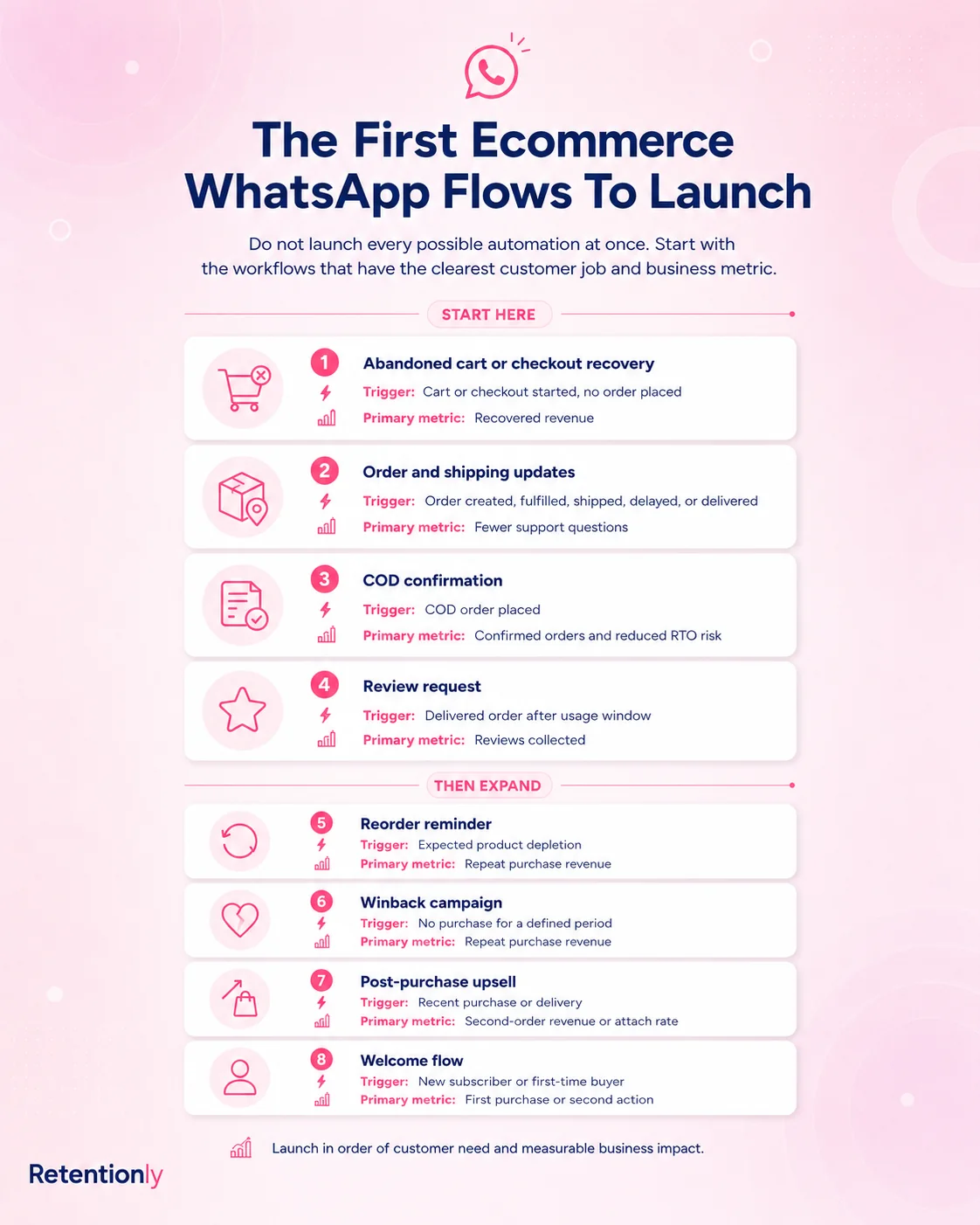
The Automation Map For Shopify Stores
When a Shopify store graduates from manual WhatsApp, each automation should have a clear trigger, message, owner, stop rule, and metric.
| Workflow | Trigger | Message goal | Metric |
|---|---|---|---|
| Abandoned checkout | Checkout started but not completed | Bring the shopper back with context and a checkout link | Recovered revenue |
| COD confirmation | COD order created | Confirm, cancel, or route uncertain orders | Confirmation rate and reduced bad shipments |
| Order update | Order placed, fulfilled, shipped, delayed, or delivered | Reduce anxiety and support questions | Fewer WISMO tickets |
| Review request | Order delivered and no active support issue | Collect feedback at the right moment | Reviews collected |
| Reorder reminder | Expected replenishment window | Bring a buyer back when the product is likely running out | Repeat orders |
| Winback | Customer inactive beyond normal purchase cycle | Re-engage without blasting the full list | Repeat purchase revenue |
| Post-purchase upsell | Recent order creates a relevant add-on opportunity | Recommend a useful next product | Attach rate or repeat revenue |
This is where Retentionly fits. Retentionly is built for Shopify stores that want WhatsApp to run retention workflows, not just manual customer chat. It connects Shopify events to WhatsApp messages with practical flows for abandoned checkout, COD confirmation, order updates, reviews, winback, reorders, and post-purchase revenue.
A Simple First-Month Plan
Use the first month to move from chat setup to operating discipline.
| Week | Focus | Done when |
|---|---|---|
| Week 1 | Profile, catalog, greeting, away message, quick replies | Customers can recognize the store and get basic answers fast |
| Week 2 | Labels, lists, notes, and daily review routine | The team knows what every open conversation needs next |
| Week 3 | Entry points and response ownership | WhatsApp is visible only where the team can support it |
| Week 4 | Automation review | The team knows which repetitive Shopify moments should be automated |
By the end of the month, the store should know whether WhatsApp is mainly a manual sales/support channel or a retention automation channel waiting to be connected to Shopify events.
Common Mistakes
The first mistake is treating WhatsApp Business as a personal chat app with a business name attached. Customer conversations need ownership, labels, and follow-up rules.
The second mistake is building a catalog that nobody maintains. A small accurate catalog is better than a large stale one.
The third mistake is using quick replies only for greetings. The real value is in repeated sales, support, delivery, COD, return, and reorder questions.
The fourth mistake is adding too many entry points before response capacity exists. More inbound chats are not useful if customers wait too long.
The fifth mistake is delaying automation after the same Shopify event repeats every day. If a workflow is predictable, measurable, and tied to revenue or support cost, it should not depend on memory.
FAQs
What is the best way to use WhatsApp Business?
Use it as a structured customer channel. Complete the profile, organize chats with labels or lists, save useful quick replies, maintain a focused catalog, and review open conversations daily.
Is WhatsApp Business good for ecommerce?
Yes, especially for product questions, order support, COD confirmation, repeat purchases, and post-purchase follow-up. Ecommerce stores should keep WhatsApp tied to customer intent rather than using it as a generic broadcast channel.
Can I use WhatsApp Business for Shopify?
Yes. You can use the WhatsApp Business app manually, add a chat button to your store, or use API-backed Shopify automation for flows such as abandoned checkout, COD confirmation, order updates, reviews, winback, and reorders.
What should I put in my WhatsApp Business catalog?
Start with best sellers, frequently asked-about products, bundles, starter kits, refills, seasonal products, and items that need explanation. Keep the catalog accurate and link to Shopify product pages for deeper details.
When should I move from WhatsApp Business app to automation?
Move when the same Shopify events need repeated follow-up: abandoned checkout, COD confirmation, shipping updates, delivery follow-up, review requests, reorder reminders, winback, or post-purchase upsells.
Can Retentionly help with WhatsApp Business?
Retentionly helps Shopify stores move from manual WhatsApp usage to automated retention workflows. Use it when you want WhatsApp messages triggered by Shopify events, measured by revenue, and managed with clear stop rules instead of manual follow-up.
Install Retentionly free on Shopify to turn WhatsApp Business into automated retention workflows for abandoned checkout recovery, COD confirmation, order updates, reviews, winback, reorders, and post-purchase revenue.