How Does WhatsApp Business Work? App, API, and Automation Basics
TL;DRWhatsApp Business works in layers. The Business app gives a small business a professional WhatsApp presence and a manual customer inbox. The WhatsApp Business Platform, often called the WhatsApp Business API, adds templates, integrations, automation, and scalable messaging. A Shopify automation app then turns those platform capabilities into real store workflows such as abandoned checkout recovery, COD confirmation, order updates, reviews, winback, and reorder reminders.
That distinction matters because many merchants ask one question and receive several different answers. A solo seller using WhatsApp from a phone does not need the same setup as a growing Shopify store sending approved messages from customer and order events.
The useful way to understand WhatsApp Business is simple: decide whether you need a manual chat channel, a programmable messaging layer, or ecommerce automations that are already connected to Shopify.
The Short Answer
WhatsApp Business lets a company communicate with customers through a business identity on WhatsApp.
There are two main products behind that phrase.
| Product | What it does | Best fit |
|---|---|---|
| WhatsApp Business app | Adds a business profile, catalog, labels, greeting messages, away messages, quick replies, and one-to-one chat tools | Small businesses and early-stage stores managing conversations manually |
| WhatsApp Business Platform/API | Lets approved software send and receive WhatsApp messages through templates, APIs, integrations, webhooks, and scalable customer messaging | Growing businesses that need automation, teams, templates, reporting, and system integrations |
For Shopify stores, the third layer is the automation product that sits on top of the platform. That is where the business value usually appears. The API makes messaging possible, but the automation tool decides when to send, who should receive the message, what Shopify data goes into it, when to stop, and how revenue is measured.
How WhatsApp Business Works When A Customer Messages You
The simplest WhatsApp Business conversation starts when a customer opens WhatsApp and messages the business.
For the customer, it feels like a normal chat. They ask a product question, share an order number, request delivery help, or reply to a message from the store.
For the business, the experience depends on the setup.
In the WhatsApp Business app, the message appears in the app inbox. The merchant can reply manually, use quick replies, share catalog items, label the chat, and continue the conversation from a phone or connected device.
In an API-backed setup, the same inbound message can appear inside a connected inbox, customer support tool, CRM, chatbot, ecommerce automation app, or custom system. The reply can be handled by a human, automation, or both, depending on the tool.
The important rule is that customer-initiated messages open a service window. During that window, the business can respond in a more conversational way. For Shopify teams, that is useful for product questions, order questions, delivery concerns, return issues, and replies to automated messages.
How WhatsApp Business Works When The Business Starts The Conversation
The rules are stricter when the business initiates the conversation.
A store cannot treat WhatsApp like an ordinary bulk email list. If the business wants to message a customer first through the platform, it generally needs:
A usable WhatsApp business number.
A clear customer opt-in for the type of WhatsApp communication being sent.
An approved message template when required.
A message category that matches the job of the message.
A working unsubscribe or opt-out process.
A tool that can send the message and handle replies.
This is where many Shopify merchants get confused. The Business app may feel easy for manual chat, but automated business-initiated messages usually require a platform-backed setup and approved templates.
For example, an abandoned checkout reminder, winback offer, reorder nudge, or back-in-stock alert is not just a text someone types from a phone. It needs the right customer, a reason to send, a template, a link, a timing rule, and a stop rule.
The Three Moving Parts: Identity, Permission, And Message Type
Most WhatsApp Business confusion comes from mixing these three things.
| Moving part | What it means | Shopify example |
|---|---|---|
| Identity | The business name, phone number, profile, and WhatsApp Business Account behind the sender | Customers should recognize the Shopify store when the message arrives |
| Permission | Whether the customer has agreed to receive the relevant WhatsApp communication | A checkout opt-in for order updates is not automatically permission for every promotion |
| Message type | Whether the message is a manual reply, free-form service reply, or approved template | A delivery question reply behaves differently from a business-initiated winback offer |
Strong WhatsApp programs keep these separate. They do not use a personal number as the business identity, treat every phone number as marketing consent, or use one generic template for every customer moment.
Business App Vs Business Platform Vs Shopify Automation
The Business app is often the right starting point. It helps a merchant look legitimate, answer faster, organize conversations, and showcase products without a technical project.
The Business Platform is the scalable messaging layer. It supports programmatic access, templates, integrations, interactive messages, customer care, and messaging across the buyer journey.
A Shopify automation app is the operating layer for ecommerce teams that do not want to build everything from scratch.
| Question | WhatsApp Business app | WhatsApp Business Platform/API | Shopify WhatsApp automation app |
|---|---|---|---|
| Can customers message the business? | Yes | Yes, through connected software | Yes, through the connected setup |
| Can the team reply manually? | Yes | Yes, through an inbox or custom tool | Yes, depending on the app workflow |
| Can it use a profile and catalog? | Yes | Yes, with platform-supported commerce features | Often yes, depending on setup |
| Can it trigger from Shopify events? | Not natively | Yes, if integrated | Yes, this is the point of the app |
| Can it send approved outbound templates? | Limited compared with platform workflows | Yes | Yes, through the platform connection |
| Does it require developers? | Usually no | Often yes unless a provider or app handles it | Usually no |
| Does it measure Shopify revenue impact? | No | Custom or provider-dependent | Should be built around flow-level results |
Use the app when WhatsApp is mostly a manual sales or support channel. Use the platform when you need messaging infrastructure. Use a Shopify automation app when the business goal is to launch retention workflows without building the API layer yourself.
What Templates Do
Templates are pre-approved message formats used for many business-initiated WhatsApp messages.
They matter because the customer did not always just message you. If your store initiates a cart recovery reminder, delivery update, winback offer, review request, or reorder reminder, WhatsApp needs to know what kind of message it is and whether the message follows platform rules.
For ecommerce, templates usually need:
A clear purpose.
Stable variables such as
[first_name],[order_number],[product_name],[tracking_link], or[checkout_link].Copy that still makes sense when variables are filled with real Shopify data.
A category that matches the message.
A reply path if the customer needs help.
A stop or unsubscribe path where appropriate.
The mistake is treating templates as copy storage. A template is part of the workflow. It should match the trigger, customer state, timing, and metric.
Message Categories In Plain English
The WhatsApp Business Platform uses categories such as marketing, utility, authentication, and service. The exact pricing depends on the current WhatsApp rate card, recipient market, and message category, so merchants should verify current rates before forecasting spend.
Here is the practical ecommerce version.
| Category | Plain-English job | Ecommerce examples |
|---|---|---|
| Marketing | Encourage discovery, purchase, reactivation, or promotion | Abandoned checkout reminder, winback offer, product recommendation, campaign announcement |
| Utility | Send information tied to a customer action or transaction | Order confirmation, payment update, shipping update, delivery notice |
| Authentication | Verify identity or account access | OTP, login code, account verification |
| Service | Respond to an inbound customer conversation during the service window | Product question, order support reply, return question, delivery issue follow-up |
For Shopify stores, the practical rule is to write the message around the customer's expectation. If a customer opted in for shipping updates, send shipping updates. If you want to send offers, collect consent for offers and use the right workflow.
How The 24-Hour Service Window Fits In
When a customer messages a business, a service window opens. During that window, the business can respond to that customer through the connected WhatsApp setup.
This is useful for support and sales because the customer has already started the conversation. A shopper asks about size. A buyer replies to a COD confirmation. A customer asks where an order is. The team can respond in context.
When that window is closed, business-initiated messages generally need approved templates. That is why a store should not plan WhatsApp automation as if it can freely text every customer at any time.
For Shopify automation, this creates a simple planning model:
| Situation | Better message plan |
|---|---|
| Customer just asked a product question | Reply helpfully inside the conversation |
| Customer abandoned checkout and opted in | Send a relevant cart recovery template with the checkout link |
| Customer placed an order | Send useful order or shipping updates tied to that transaction |
| Customer has not bought again after the normal cycle | Send a restrained winback or reorder template only if the customer is eligible |
| Customer replies with a problem | Stop promotional follow-up and route the conversation to support |
The window is not only a compliance detail. It changes how the team should design the customer experience.
How WhatsApp Business Works For A Shopify Store
For a Shopify merchant, WhatsApp Business should map to actual store events.
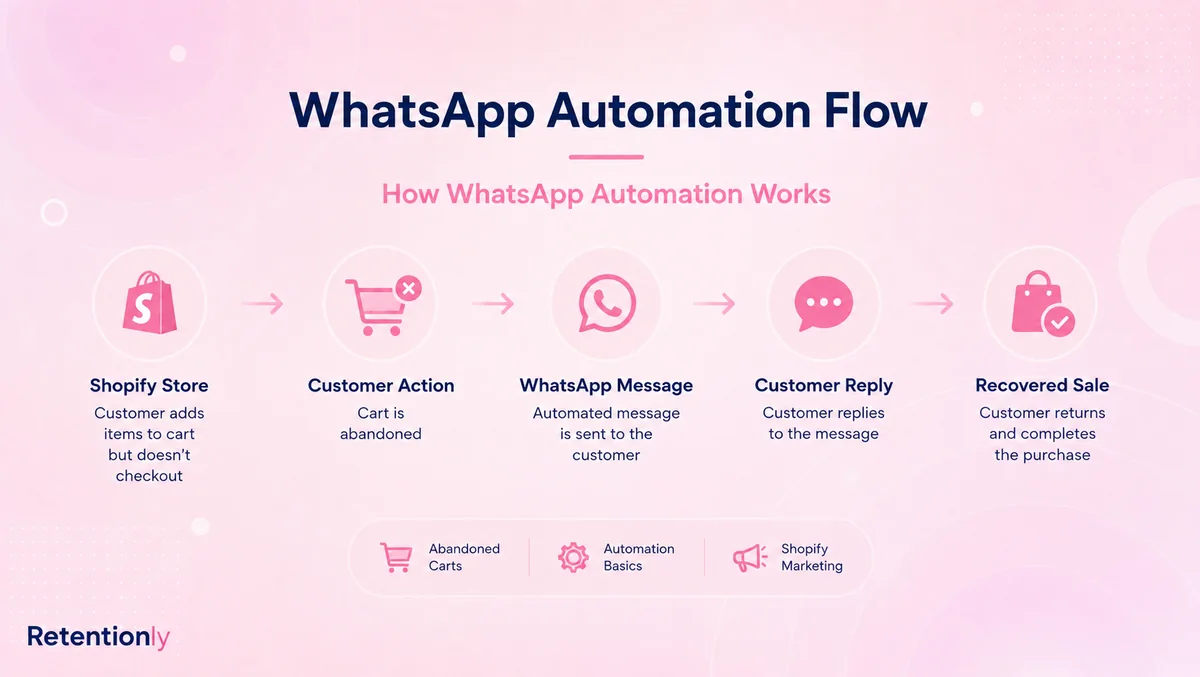
The flow usually looks like this:
A customer takes an action in Shopify.
The store checks whether the customer is eligible for a WhatsApp message.
The automation chooses the right template and variables.
The message is sent through a WhatsApp Business Platform connection.
The customer clicks, replies, confirms, cancels, or ignores the message.
The workflow stops, routes to support, or continues based on the customer's state.
The store measures the result.
That is very different from saving a customer's phone number and sending occasional manual messages.
Shopify Workflows That Make WhatsApp Useful
The best WhatsApp Business workflows are tied to customer intent and store data.
| Workflow | Shopify trigger | WhatsApp job | Metric |
|---|---|---|---|
| Abandoned checkout | Checkout started but no order completed | Bring the shopper back with context and a checkout link | Recovered revenue |
| COD confirmation | Cash-on-delivery order created | Confirm or cancel before fulfillment | Confirmation rate and reduced bad shipments |
| Order updates | Order placed, fulfilled, shipped, delayed, or delivered | Reduce anxiety and support questions | Fewer order-status tickets |
| Review request | Delivered order plus product-use delay | Ask for feedback at the right time | Reviews collected |
| Reorder reminder | Expected replenishment window | Bring a buyer back when the product may be running out | Repeat purchase revenue |
| Winback | Customer inactive beyond normal purchase cycle | Re-engage a customer with a relevant reason to return | Reactivation revenue |
| Post-purchase upsell | Recent purchase creates a useful add-on opportunity | Recommend one relevant next product | Upsell conversion and margin |
Each workflow needs a trigger, timing rule, template, exclusion rule, reply owner, and metric. Without those pieces, WhatsApp becomes manual follow-up with extra software around it.
When Manual WhatsApp Business Is Enough
Manual WhatsApp Business can be enough when the store is small, the team can reply consistently, and most conversations are customer-initiated.
It is a good fit when:
One person owns the inbox.
Product questions are manageable.
Customers mostly message before buying.
The catalog and profile answer common questions.
Quick replies handle repeated support topics.
Follow-up volume is low enough to review daily.
The store does not need reliable automation from Shopify events.
If that is your current situation, keep the setup simple. Improve the profile, catalog, quick replies, labels, and response routine before adding more tools.
For a setup walkthrough, read How to Set Up WhatsApp Business. For day-to-day operating advice, read How to Use WhatsApp Business.
When You Need API-Backed Automation
You need API-backed automation when the work is predictable, repeated, and tied to store data.
Move beyond the Business app when:
Abandoned checkout follow-up is too important to handle manually.
COD confirmation needs to happen before fulfillment every time.
Order updates should go out automatically from fulfillment events.
Review requests depend on delivery timing.
Reorder reminders depend on product cycle timing.
Winback campaigns need customer segments and exclusions.
The team needs reporting on clicks, replies, recovered orders, and revenue.
Customer replies need to be routed to the right person or process.
At that point, the real question is not whether WhatsApp Business works. It is who will own the workflow layer.
You can build directly on the API if you have the team for it. You can use a broad WhatsApp platform if WhatsApp needs to cover sales, support, marketing, campaigns, AI, and inbox operations. Or you can use a Shopify automation app if the main job is retention revenue.
Common Misunderstandings
The first misunderstanding is thinking the WhatsApp Business app and WhatsApp Business API are the same product. They are related, but they solve different jobs.
The second misunderstanding is thinking a phone number equals consent. A customer may share a number for delivery and still not expect promotional WhatsApp campaigns.
The third misunderstanding is thinking automation means sending more messages. Good automation sends fewer, better-timed messages with stop rules.
The fourth misunderstanding is thinking templates are only a compliance formality. Templates shape the customer experience, category, cost planning, and workflow reliability.
The fifth misunderstanding is thinking the API alone creates revenue. The API is infrastructure. Revenue comes from the trigger, segment, timing, message, reply handling, and measurement.
Where Retentionly Fits
Retentionly is built for Shopify and D2C teams that want WhatsApp Business to become a retention channel, not just another inbox.
Use Retentionly when the goal is to launch and measure workflows such as abandoned checkout recovery, COD confirmation, order updates, review requests, winback, reorder reminders, and post-purchase upsells.
That Shopify-first layer matters because a generic WhatsApp setup still leaves the store to answer hard questions:
Which Shopify event should trigger the message?
Which customers should be excluded?
Which template variables are reliable?
When should the flow stop?
Who handles replies?
Which message drove revenue?
Retentionly is designed around those questions. It helps merchants move from manual WhatsApp conversations to automated retention workflows that have a clear trigger, message, stop rule, and metric.
Quick FAQs
How does WhatsApp Business work?
WhatsApp Business gives a company a business identity on WhatsApp. The Business app supports manual chats, profile, catalog, labels, and quick replies. The WhatsApp Business Platform/API supports templates, integrations, automation, webhooks, and scalable messaging through connected software.
Is WhatsApp Business the same as the WhatsApp Business API?
No. The WhatsApp Business app is a mobile app for smaller businesses managing conversations manually. The WhatsApp Business API is part of the WhatsApp Business Platform and is used for programmatic messaging, templates, integrations, and automation.
Can WhatsApp Business send automated messages?
The Business app supports basic tools such as greeting messages, away messages, and quick replies. Store-event automation, approved outbound templates, reporting, and Shopify-triggered workflows usually require an API-backed setup or an app built on the WhatsApp Business Platform.
Do Shopify stores need WhatsApp Business Platform access?
They usually need platform access when they want automated WhatsApp messages triggered by Shopify events such as abandoned checkout, order creation, fulfillment, delivery, review timing, inactivity, or reorder cycles. A Shopify app can provide that platform-backed setup without a custom API build.
What is the best first WhatsApp Business workflow for Shopify?
Start with the workflow tied to the clearest revenue or support problem. For many stores that is abandoned checkout recovery, COD confirmation, order updates, or review requests. Choose one flow, define the trigger and stop rule, then measure the result before expanding.
Can Retentionly help with WhatsApp Business automation?
Yes. Retentionly helps Shopify stores use WhatsApp for retention automation, including abandoned checkout recovery, COD confirmation, order updates, reviews, winback, reorders, and post-purchase revenue flows.
Install Retentionly free on Shopify to turn WhatsApp Business into automated retention workflows connected to real Shopify events.