How to Send Bulk WhatsApp Messages Without Getting Banned
TL;DRSending bulk WhatsApp messages without getting banned is not about finding a trick that avoids WhatsApp's rules. It is about sending the right message, through the right channel, to people who expected to hear from your business.
That difference matters. A Shopify store can use WhatsApp for product launches, VIP offers, back-in-stock alerts, winback campaigns, and useful post-purchase messages. The same store can also damage its number by uploading a cold list, using unofficial sender tools, hiding promotional intent inside vague copy, or ignoring opt-outs.
This guide explains the safe way to plan bulk WhatsApp sends: consent first, official channels where scale is needed, approved templates, tight segments, frequency caps, suppression rules, and account-health monitoring.
What Bulk WhatsApp Messaging Actually Means
Bulk WhatsApp messaging means sending one campaign or announcement to many recipients. The message may be identical, personalized with variables, or adjusted by segment.
For ecommerce teams, bulk sends usually fall into three groups.
| Bulk send type | Example | Risk level |
|---|---|---|
| Useful operational send | Delivery delay notice to affected customers | Lower when tied to a real order event |
| Segmented retention campaign | Reorder reminder for customers near their normal refill window | Moderate when consent and timing are clear |
| Broad promotional blast | Same discount sent to every phone number | Higher when audience, consent, and relevance are weak |
The word "bulk" should not mean "everyone in the database." It should mean one planned send to a defined audience that has a clear reason to receive it.
If you are running a Shopify store, the safest bulk WhatsApp strategy starts with customer context: order history, product interest, opt-in source, lifecycle stage, and recent message activity.
Why WhatsApp Numbers Get Banned Or Restricted
WhatsApp account problems usually come from one of these patterns.
| Risk pattern | What it looks like | Better approach |
|---|---|---|
| No clear opt-in | Uploading purchased, scraped, old, or mixed-purpose phone lists | Message only people who gave their number and agreed to WhatsApp messages |
| Unofficial sending | Browser extensions, hacked tools, or automation that bypasses limits | Use the WhatsApp Business app for small manual sends or the official Business Platform for scale |
| Vague message purpose | "Updates" copy that actually means promotions | Name the message type: order updates, offers, product reminders, launch alerts |
| Poor relevance | Same sale to VIPs, recent buyers, and inactive customers | Segment by Shopify behavior and customer state |
| Too much frequency | Multiple promotional sends before the customer replies or buys | Use a global WhatsApp frequency cap |
| No opt-out handling | Customers reply STOP but remain in the next campaign | Suppress opt-outs before every send |
| Ignored replies | Campaign creates questions but nobody owns the inbox | Assign reply ownership before launching |
Meta's policy is clear on the foundation: businesses should contact people on WhatsApp only when they have the person's phone number and opt-in permission. People can block, report, or opt out, and repeated negative feedback can lead to enforcement or sending limits.
That makes account health an operating problem, not only a compliance problem.
The Safe Sending Options
There are three common ways businesses try to send WhatsApp messages to many people.
| Option | Best for | Main limitation | Account-health note |
|---|---|---|---|
| WhatsApp Business app broadcast list | Very small lists and manual local-business updates | Contacts generally need to have saved your number, and list size is limited | Easy to overuse because there is little workflow control |
| Official WhatsApp Business Platform/API | Growing businesses that need templates, scale, automation, reporting, and inbox handoff | Requires setup, templates, message costs, and policy discipline | Best path for legitimate scale, but still needs consent and quality controls |
| Unofficial bulk sender tools | Usually marketed as cheap or fast blasting | Often bypasses intended platform controls | Highest risk; avoid for a serious business number |
For Shopify and ecommerce, the official platform or an app built on it is usually the practical route once you need campaigns, approved templates, automation, metrics, and reply handling.
Do not confuse "official API" with "no risk." The official route gives you the right foundation. It does not make cold lists, irrelevant offers, or ignored opt-outs safe.
Start With Consent, Not The Send Button
Consent is the first control because it shapes customer expectation.
A phone number is not automatically WhatsApp marketing consent. A customer may have shared a number for delivery, COD confirmation, support, a product alert, loyalty access, or promotional updates. Those are different promises.
Store these fields before any bulk send:
| Field | Why it matters |
|---|---|
| Phone number and country code | Helps delivery and deduplication |
| Shopify customer ID | Ties consent to purchase history and lifecycle state |
| Opt-in source | Checkout, popup, product alert, loyalty form, WhatsApp chat, or offline form |
| Opt-in promise | What the customer expected to receive |
| Consent type | Order updates, product alerts, promotional messages, or retention reminders |
| Opt-in timestamp | Helps audit and segment list freshness |
| Opt-out status | Prevents sending after unsubscribe |
Good opt-in copy is specific.
| Use case | Clear opt-in copy |
|---|---|
| Order updates | Send me order and delivery updates from [store_name] on WhatsApp. |
| Product alerts | Message me on WhatsApp when [product_name] is back in stock. |
| Offers and launches | Send me WhatsApp offers, launch updates, and product reminders from [store_name]. |
| Reorders | Send me WhatsApp reorder reminders for products I buy. |
| VIP access | Send me VIP sale and early-access updates on WhatsApp. |
If the customer opted in for delivery updates, do not treat that as permission for a storewide sale. If the customer opted in for back-in-stock alerts, start with the product they asked about before adding broader campaigns.
For deeper Shopify consent planning, read the WhatsApp Checkout Opt In Shopify Best Practices guide.
Use Approved Templates For Business-Initiated Sends
Most bulk WhatsApp campaigns are business-initiated. If you are using the WhatsApp Business Platform outside the customer service window, you generally need an approved message template.
Think of templates as more than a formatting requirement. They help keep the message purpose clear before the send reaches thousands of customers.
Use this template checklist:
| Template check | Practical standard |
|---|---|
| Category fits the message | Do not disguise marketing as a utility update |
| Copy matches the opt-in | The customer can understand why this arrived |
| Variables are useful | Use name, product, order, collection, deadline, or link only when accurate |
| CTA is direct | One primary action, not several competing links |
| Opt-out path is visible | Tell customers how to stop promotional messages |
| Samples are accurate | Dynamic placeholders should use realistic examples during review |
Avoid mixing messages. An order update should not hide a discount. A COD confirmation should not become a product launch. A back-in-stock alert should not turn into a broad sale unless the customer opted in for that.
Segment Before You Scale
Bulk WhatsApp messages become safer when the audience is narrow enough that the message feels expected.
For Shopify stores, start with segments like these.
| Segment | Good bulk send | Avoid |
|---|---|---|
| Back-in-stock subscribers | Product or variant restock alert | Storewide discount before the requested product is back |
| Recent category buyers | New collection in the same category | Unrelated category promotion |
| Repeat buyers | VIP access or loyalty reward | Treating them like cold prospects |
| Inactive customers | Winback offer based on prior product interest | Same "we miss you" copy every month |
| Customers near reorder window | Refill reminder or bundle | Reorder push too soon after purchase |
| Customers with active support issue | Helpful order or support update | Promotional campaign |
| Recent purchasers | Product education, care tip, or relevant add-on after delivery | Immediate discount on the same item |
The practical test is simple: would the customer understand "why me, why now?" If not, your segment is too broad or your message is too generic.
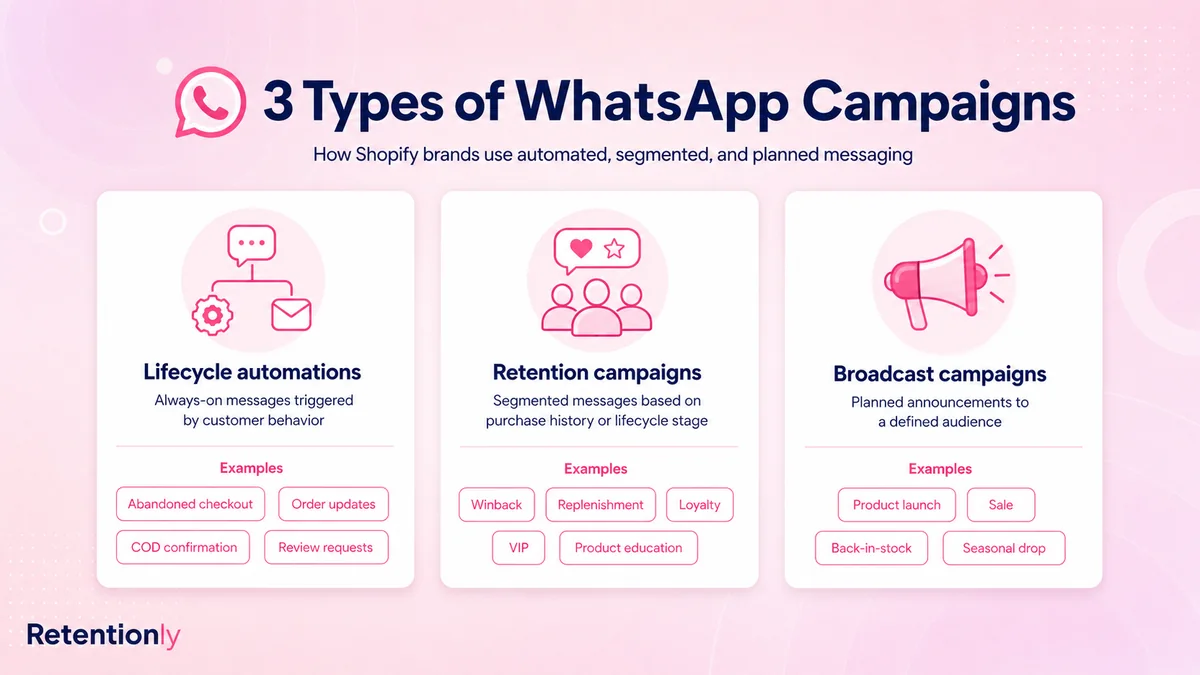
Bulk sends are safest when they sit behind lifecycle logic. A store should not use a broad send where a customer-triggered automation would be cleaner.
Warm Up New Numbers And New Templates Carefully
Do not take a new business number, upload a large audience, and send a sale campaign immediately.
A safer ramp looks like this:
| Stage | What to send | What to watch |
|---|---|---|
| First sends | Utility-style updates, support replies, or highly expected messages | Delivery, replies, blocks, opt-outs |
| Early campaigns | Small segments with clear opt-in and strong relevance | Read rate, click rate, negative replies |
| Larger campaigns | Proven template to a larger matching segment | Revenue per recipient, complaints, opt-outs |
| Regular cadence | Campaign calendar with global frequency caps | Account quality, template quality, unsubscribe trend |
Warming up does not mean pretending to be casual or manually delaying messages to bypass detection. It means proving that people want the messages before increasing volume.
If a new template performs poorly, do not force it across the full list. Pause, tighten the segment, improve the offer, and rewrite the template around a clearer customer reason.
Build Frequency Caps And Suppression Rules
Customers experience all WhatsApp messages as one relationship with your brand. They do not care whether one message came from a broadcast, one from a winback campaign, and one from an abandoned checkout flow.
Use suppression rules before each send.
| Suppress when | Why |
|---|---|
| Customer opted out | Prevents policy and trust problems |
| Customer already purchased | Stops stale offers |
| Customer has an active support issue | Avoids tone-deaf promotions |
| Order is delayed, cancelled, refunded, or disputed | Keeps operational problems from colliding with marketing |
| Another promotional flow ran recently | Reduces fatigue |
| Customer received the same template recently | Avoids repetitive messaging |
| Product is out of stock | Prevents frustration |
| Customer has not engaged after repeated sends | Protects quality signals |
Frequency caps should be global, not only per campaign. If your abandoned checkout, winback, sale broadcast, and reorder reminder tools all operate separately, a customer can receive too much even though each individual flow looks reasonable.
Write Bulk Messages That Do Not Feel Like Spam
Good WhatsApp campaign copy is short, specific, and tied to a customer state.
Use this pattern:
| Element | Example |
|---|---|
| Context | Since you bought [category_name] before |
| Offer or update | The new [collection_name] drop is live |
| Action | See it here: [link] |
| Boundary | Reply STOP to opt out of offers |
Examples:
Product Launch For Category Buyers
Hi [first_name], our new [category_name] drop is live. Since you bought from this category before, you can see it here: [collection_link]. Reply STOP to opt out.
Back-In-Stock Alert
[product_name] is back in stock at [store_name]. You asked for this update, so here is the direct link: [product_link]. Reply STOP to opt out.
Reorder Reminder
Hi [first_name], it may be time to restock [product_name]. Reorder in one tap here: [reorder_link]. Reply STOP to opt out.
Winback Offer
[first_name], we added new [category_name] picks since your last order. Your return offer is here until [deadline]: [link]. Reply STOP to opt out.
Store Announcement
Quick update from [store_name]: [announcement]. This affects your recent order/customer account because [reason]. Details: [link].
Weak copy usually removes context and overuses urgency:
Huge sale today. Buy now. Limited time. [link]
That message may get clicks, but it gives recipients little reason to trust the next send.
For campaign examples with more Shopify-specific copy, read WhatsApp Promotional Messages Shopify Stores Can Send Without Spamming.
Monitor Quality Before Revenue
Revenue is not the only success metric. A campaign that drives sales while increasing opt-outs, complaints, and ignored replies can weaken the next campaign.
Track this scorecard after each bulk send.
| Metric | What it tells you |
|---|---|
| Delivery rate | Whether the list and sender setup are healthy |
| Read rate | Whether the audience recognizes and values the sender |
| Click rate | Whether the message promise is strong |
| Reply rate | Whether customers want help, have questions, or are confused |
| Opt-out rate | Whether frequency or promise mismatch is damaging the list |
| Blocks or negative feedback | Whether account health is at risk |
| Revenue per recipient | Whether the segment was commercially relevant |
| Margin after discount | Whether sales were profitable |
| Support load | Whether replies were properly owned |
Set action rules before sending. For example:
| Signal | Action |
|---|---|
| Opt-outs spike | Stop broad sends and review consent source |
| Negative replies mention irrelevance | Narrow the segment or rewrite the promise |
| Clicks are low but opt-outs are low | Improve offer, creative, or landing path |
| Delivery drops | Check number quality, list hygiene, template status, and provider errors |
| Revenue is strong but complaints rise | Reduce frequency and segment more tightly |
The healthiest WhatsApp programs protect the channel before maximizing short-term send volume.
Common Mistakes That Lead To Bans Or Restrictions
Avoid these mistakes before sending at scale:
Uploading a cold list from an event, marketplace, scraped source, or old CRM without WhatsApp opt-in.
Treating delivery phone numbers as promotional consent.
Using unofficial tools that promise unlimited sending from a normal WhatsApp number.
Sending the same promotion to every customer segment.
Launching a new number with a large sale blast.
Reusing one template so often that customers stop engaging.
Hiding marketing content inside utility-style templates.
Ignoring STOP, unsubscribe, complaint, or "do not message me" replies.
Sending campaigns while support issues, refunds, or delayed deliveries are open.
Measuring only sales and ignoring opt-outs, blocks, replies, and quality signals.
If you are unsure whether a campaign is safe enough, do not scale it. Send to a smaller, clearer segment first and watch the response.
A Practical Shopify Workflow For Safe Bulk Sends
Here is a simple operating flow for ecommerce teams.
| Step | What to do |
|---|---|
| 1 | Choose one campaign job: launch, sale, restock, reorder, winback, or announcement |
| 2 | Pull only customers whose opt-in promise supports that message |
| 3 | Segment by Shopify behavior, product interest, purchase timing, and customer state |
| 4 | Suppress opt-outs, recent buyers, support-risk customers, and recently messaged customers |
| 5 | Use an approved template with one clear CTA and an opt-out path |
| 6 | Send to a smaller test segment before widening the audience |
| 7 | Monitor delivery, reads, clicks, replies, opt-outs, blocks, revenue, and support load |
| 8 | Feed the result into the next campaign instead of repeating the same blast |
This workflow keeps bulk messaging tied to retention and customer context. It also stops your team from treating WhatsApp as a last-minute revenue lever.
For Shopify-specific broadcast planning, read the WhatsApp Broadcast Shopify Guide.
Where Retentionly Fits
Retentionly is built for Shopify WhatsApp retention automation, so bulk sends can sit beside customer-triggered flows instead of replacing them.
Use Retentionly when you want to:
Send WhatsApp messages from Shopify events such as abandoned checkout, order status, delivery, review timing, reorder windows, and winback inactivity.
Keep promotional campaigns separate from order updates and utility messages.
Segment customers by Shopify behavior rather than uploading one static contact list.
Suppress messages after purchase, opt-out, support issue, refund, cancellation, or recent campaign activity.
Track WhatsApp outcomes by recovered revenue, repeat purchases, reviews, and campaign health.
Bulk WhatsApp campaigns can be useful. They are best after your core lifecycle automations are working and your opt-in data is clean.
Install Free on Shopify and use Retentionly to send WhatsApp messages around real Shopify customer moments instead of risky bulk blasts.
Final Recommendation
The safest way to send bulk WhatsApp messages without getting banned is to reduce the number of people who should receive each message.
Use official sending paths, collect explicit opt-ins, keep templates honest, segment by customer behavior, cap frequency, honor opt-outs, and monitor account-health signals before chasing more volume.
If the message has a clear reason, a clear audience, and a clear stop rule, WhatsApp can be a strong retention channel. If the plan is "send this to everyone today," the risk is usually already visible.
Quick FAQs
Can you send bulk WhatsApp messages legally?
Businesses can send WhatsApp messages at scale when they follow WhatsApp's policies and applicable laws. The practical baseline is clear opt-in, accurate message purpose, opt-out handling, and approved templates where required.
Will WhatsApp ban my number for sending bulk messages?
Volume alone is not the only issue. Risk increases when businesses use unofficial tools, send unsolicited messages, ignore opt-outs, trigger spam reports, or repeatedly send low-quality templates.
Is the WhatsApp Business app enough for bulk messages?
The WhatsApp Business app can work for very small manual broadcasts, but it is limited. Growing ecommerce teams usually need the official Business Platform or a Shopify app built on it for templates, scale, automation, reporting, and reply management.
How many WhatsApp promotional messages should a store send?
There is no universal safe number. Start with fewer, more relevant sends. Watch opt-outs, blocks, negative replies, read rate, and revenue per recipient, then adjust the cadence by segment.
Do customers need to save my number to receive bulk WhatsApp messages?
Broadcasts from the WhatsApp Business app generally depend on contacts having saved your number. Business Platform/API sends work differently, but they still require consent, templates where required, and account-health discipline.