Zapier WhatsApp Automation: What Works and What Does Not
TL;DRZapier WhatsApp automation is attractive because the promise is simple: connect a trigger in one app to a WhatsApp message in another app, without writing code. For a Shopify team, that can be useful. A new lead can be logged, a team can be alerted, a spreadsheet can be updated, or a simple follow-up can be kicked off.
The problem starts when the workflow is not just "send a message." Shopify WhatsApp retention needs cart links, order context, customer consent, approved templates, reply handling, stop rules, and revenue reporting. A Zap can connect pieces together, but the store still has to own the workflow logic.
This guide explains when Zapier works for WhatsApp automation, where it becomes fragile for ecommerce, and when a Shopify-first tool like Retentionly is the cleaner path.
Quick Verdict
Use Zapier when the WhatsApp job is lightweight, internal, or experimental. Use a Shopify WhatsApp automation app when the job is a revenue workflow that must run reliably from store events.
| If your goal is... | Better starting point | Why |
|---|---|---|
| Send a simple internal alert when something happens | Zapier | The workflow is low-risk and does not need customer lifecycle logic |
| Test whether a WhatsApp touch is useful for one narrow event | Zapier plus a WhatsApp provider | Good for proof-of-concept work if consent and templates are handled correctly |
| Recover abandoned checkouts | Retentionly | The flow needs cart links, timing, purchase stop rules, and revenue attribution |
| Confirm COD orders before fulfillment | Retentionly | The flow needs order/payment context and reply-based outcomes |
| Send order, shipping, or delivery updates | Retentionly | The flow needs Shopify event context, customer expectations, and support fallback |
| Request reviews after delivery | Retentionly | The timing, review link, and unhappy-reply handling matter |
| Run winback, reorder, or upsell flows | Retentionly | The workflow depends on purchase history, segments, timing, and suppression rules |
The deciding question is not "Can Zapier connect WhatsApp?" The better question is "Who owns the customer workflow after the first trigger fires?"
What Zapier WhatsApp Automation Can Do Well
Zapier is strongest as glue between apps. It is useful when one event needs to create a simple next action somewhere else.
For WhatsApp, that can help with operational workflows such as:
notifying a team when a high-value Shopify order comes in
adding a WhatsApp lead to a CRM or spreadsheet
creating a task when a customer replies through a connected provider
routing form submissions into a follow-up process
testing a simple message path before investing in a full workflow
Those are real use cases. They are especially useful when the message is internal, when the automation does not need a complicated customer state, or when a team is validating a process before turning it into a permanent flow.
Zapier is also useful when WhatsApp is one step in a larger back-office workflow. For example, a team might use Zapier to update a spreadsheet, add a CRM note, notify Slack, and create a task after a customer takes an action.
But that is different from owning ecommerce retention.
Where Zapier Gets Fragile For Shopify Retention
Shopify retention workflows are not simple connector tasks. They are customer journeys tied to store behavior.
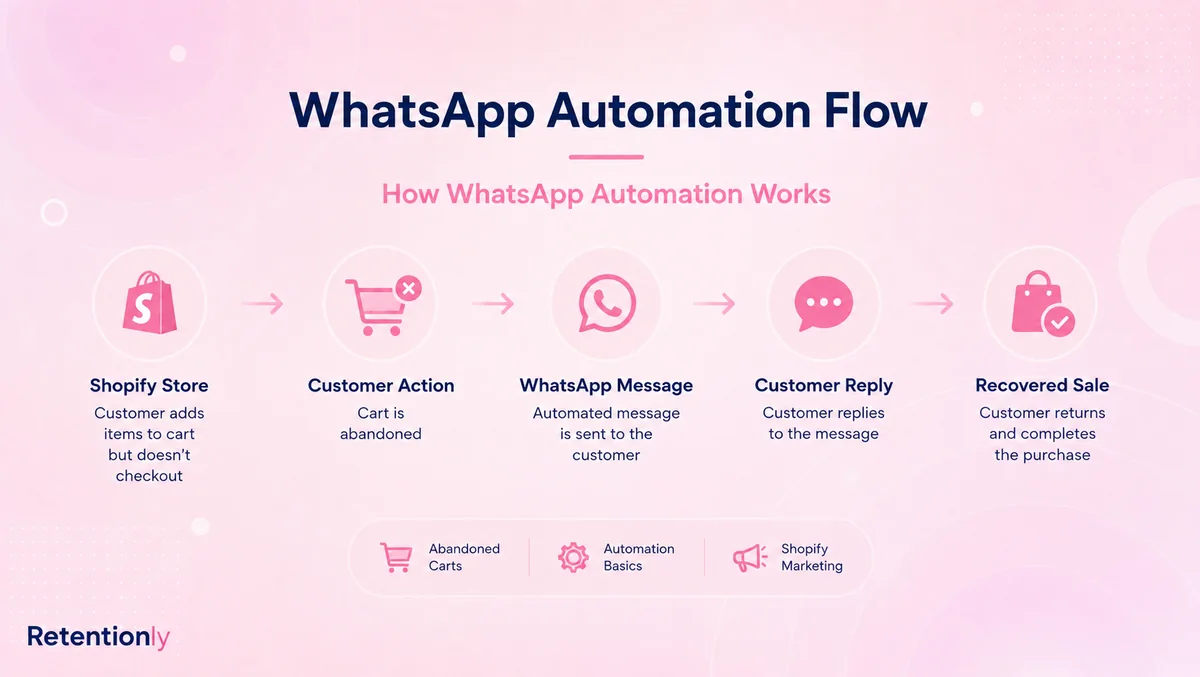
An abandoned checkout reminder is not just a WhatsApp message. It needs to know which checkout was abandoned, what product was in the cart, when to send, whether the customer has opted in, whether the checkout was later completed, which template can be used, and how revenue should be attributed.
A COD confirmation flow is not just a notification. It needs order value, payment method, fulfillment state, confirm/cancel replies, non-response handling, and a decision about whether fulfillment should continue.
This is where a Zapier setup can become fragile. The team may have a trigger and an action, but still need to solve the actual ecommerce workflow.
| Workflow need | Why it matters | What often breaks in a no-code stack |
|---|---|---|
| Consent and eligibility | WhatsApp should not be treated like a generic notification channel | The Zap fires before consent, opt-out, or suppression logic is checked |
| Approved templates | Messages outside the service window need approved WhatsApp templates | Copy is changed in one place but not reflected in the provider or approval flow |
| Shopify context | Good messages need cart, order, product, delivery, or customer data | The Zap has only partial fields or needs manual mapping |
| Stop rules | A flow should stop after purchase, opt-out, cancellation, or support escalation | The first message sends, but follow-ups continue after the customer state changes |
| Reply handling | WhatsApp customers reply with questions, cancellations, and objections | Replies land in a separate inbox without changing Shopify state |
| Reporting | Operators need recovered revenue, confirmed orders, reviews, and repeat purchases | Reporting stays spread across Zapier, the provider, Shopify, and spreadsheets |
| Maintenance | Templates, fields, provider rules, and Shopify events change | The workflow quietly fails or needs ongoing manual checks |
The issue is not that Zapier is bad. It is that Zapier is not the retention system by itself.
The Shopify Workflows To Compare Before Building A Zap
Before building Zapier WhatsApp automation, map the exact workflow your store is trying to run. If the workflow needs Shopify state, timing, stop rules, and customer replies, use that as the buying test.
| Workflow | What the flow needs | Zapier fit | Retentionly fit |
|---|---|---|---|
| Abandoned checkout recovery | Checkout link, product context, timing, follow-up, stop on purchase, revenue tracking | Possible for a simple test, fragile as the flow grows | Core workflow |
| COD confirmation | COD order trigger, confirm/cancel replies, fulfillment hold, tags, fallback for no response | Harder because reply outcomes must affect order operations | Core workflow |
| Order updates | Order, fulfillment, shipping, tracking, delay, and support fallback | Useful for basic notifications if data is clean | Core lifecycle automation |
| Review requests | Delivery timing, review destination, customer issue fallback | Possible if the store manually handles timing and exceptions | Core post-purchase workflow |
| Winback | Last purchase date, customer segment, offer, frequency cap, opt-out handling | Possible with extra segmentation tools | Growth retention workflow |
| Reorder reminders | Product cycle, purchase history, quantity, timing, suppression | Usually too stateful for a simple Zap | Repeat purchase workflow |
| Post-purchase upsell | Purchased product, complementary offer, timing, stop on purchase | Possible for simple campaigns, harder to keep disciplined | Post-purchase revenue workflow |
| Broadcasts | Audience consent, segmentation, campaign calendar, replies, opt-outs | Useful if the provider owns messaging rules | Supported after lifecycle flows are clear |
If the first workflow is abandoned checkout, COD confirmation, order updates, reviews, winback, reorders, or upsells, start with a Shopify WhatsApp automation tool first. Zapier can still support side tasks, but it should not be forced to become the lifecycle engine.
Pricing And Maintenance: The Part Teams Underestimate
Zapier can look cheaper at the start because the first automation feels small. But the real cost of Zapier WhatsApp automation includes more than the Zapier subscription.
You need to account for:
| Cost layer | What to verify |
|---|---|
| Zapier plan and task usage | How many tasks each message, lookup, filter, path, or update consumes |
| WhatsApp provider | Which provider sends the message and how it charges |
| Meta message fees | Country, category, and current WhatsApp Business Platform pricing rules |
| Template work | Who writes, submits, updates, and monitors approved templates |
| Shopify data mapping | Which fields are available and what happens when the schema changes |
| Error handling | Who monitors failed Zaps, retries, duplicate sends, and missing fields |
| Reply handling | Where customer replies go and who is responsible for them |
| Reporting cleanup | How revenue, confirmations, reviews, and repeat orders get attributed |
This is why a no-code stack can be useful but still expensive operationally. A founder or marketer may avoid custom development, but someone still owns the workflow, tests edge cases, and fixes failures.
For Shopify teams, the practical comparison is not "Zapier cost versus app cost." It is "Which setup gets the first retention workflows live, measurable, and maintainable?"
A Setup Checklist Before You Build
If you still want to use Zapier for WhatsApp automation, define the workflow before connecting apps.
| Decision | What to write down |
|---|---|
| Trigger | The exact Shopify, form, CRM, or app event that starts the automation |
| Customer eligibility | Consent, country, opt-out status, order state, segment, and suppression rules |
| Message type | Whether the message is utility, marketing, service, or another approved category |
| Template | Approved WhatsApp template, variables, fallback copy, and owner |
| Timing | Immediate, delayed, after another event, or after a customer enters a segment |
| Stop rule | Purchase completed, order canceled, customer replied, customer opted out, or time expired |
| Reply owner | Inbox, support person, founder, automation, or app workflow |
| Failure handling | What happens if the provider fails, a field is missing, or the Zap retries |
| Measurement | Recovered revenue, confirmed orders, support tickets reduced, reviews collected, repeat orders |
If the checklist is short and low-risk, Zapier may be enough. If the checklist is long and tied to revenue, the store is probably building a retention workflow, not just a Zap.
When Zapier Is Still The Better Fit
Zapier is still a good choice when the team needs flexible glue across tools.
Use Zapier when the workflow is internal, experimental, or secondary. For example, a store might send an internal alert when a VIP customer places an order, add a WhatsApp contact to a CRM, update a Google Sheet after a campaign reply, or notify the team when a high-value inquiry comes in.
Zapier also works when the store already has a WhatsApp provider that owns templates, delivery, replies, opt-outs, and reporting, and Zapier only moves small pieces of data around that system.
In that situation, Zapier is not pretending to be the entire WhatsApp automation platform. It is doing what it does best: connecting one tool to another.
When Retentionly Is The Better Fit
Retentionly is the better fit when WhatsApp should be a Shopify retention channel.
That means the store wants workflows such as:
abandoned checkout recovery
COD confirmation
order and shipping updates
review requests
winback campaigns
reorder reminders
post-purchase upsells
welcome flows and segmented retention broadcasts
These workflows need Shopify context from the beginning. They also need message discipline. A good retention system knows when to send, when not to send, when to stop, where replies should go, and which metric proves the flow worked.
Retentionly is built around that job. It connects WhatsApp automation to Shopify and D2C retention moments instead of making the merchant assemble every step from generic connector blocks.
Retentionly pricing is also easier to reason about as workflows grow: Basic at $24/month, Growth at $49/month, and Scale at $99/month. Retentionly connects directly to Meta, does not add a markup on Meta message fees, does not charge per-chat fees, and does not charge extra for added automations.
That focus is the main difference. Zapier gives you flexibility. Retentionly gives you Shopify retention workflow ownership.
Final Recommendation
Zapier WhatsApp automation can work when the job is simple: move data, trigger a small notification, test a narrow idea, or connect tools that already own their parts of the workflow.
But if the goal is Shopify retention revenue, do not start by asking how to build a Zap. Start by naming the flow that should pay for the channel: abandoned checkout, COD confirmation, order updates, review requests, winback, reorder reminders, or post-purchase upsell.
If the flow depends on Shopify events, customer state, templates, stop rules, replies, and revenue reporting, Retentionly is the cleaner starting point.
Install Free on Shopify to launch WhatsApp automation around the retention workflows that actually move ecommerce revenue.
Quick FAQs
Can Zapier automate WhatsApp messages?
Zapier can help automate WhatsApp-related workflows when it is connected to a WhatsApp provider or app that supports the needed actions. The exact setup depends on the provider, message rules, templates, and data available from the trigger app.
Is Zapier good for Shopify WhatsApp automation?
Zapier can be useful for simple Shopify WhatsApp tasks, internal alerts, or experiments. For core Shopify retention workflows such as abandoned checkout recovery, COD confirmation, order updates, reviews, winback, reorders, and upsells, a Shopify-first automation app is usually cleaner.
What is the biggest risk with Zapier WhatsApp automation?
The biggest risk is treating the trigger and message as the whole workflow. Ecommerce WhatsApp automation also needs consent, templates, customer context, stop rules, reply handling, failure monitoring, and reporting.
When should I use Retentionly instead of Zapier?
Use Retentionly when the goal is Shopify WhatsApp retention automation. If the flow should recover checkout revenue, confirm COD orders, reduce support tickets, collect reviews, win back customers, or drive repeat purchases, Retentionly is built for that job.
Can I use Zapier and Retentionly together?
Yes. Zapier can still support internal workflows around a retention stack, such as updating a CRM, logging data, notifying a team, or moving side-process data. Retentionly should own the customer-facing Shopify WhatsApp retention flows.