WhatsApp Message Templates for Shopify Retention Flows
TL;DRWhatsApp message templates for Shopify should not be a random swipe file of promotions. The best templates are tied to store events: a customer abandons checkout, places a COD order, receives a shipment, gets the product, becomes inactive, or may need to reorder.
That trigger matters because WhatsApp is personal. A useful message feels expected and timely. A generic template feels like another broadcast list.
This guide gives Shopify teams practical WhatsApp message templates for retention flows, plus the trigger, variables, stop rule, and metric each template needs. Use it as a hub for abandoned checkout, COD confirmation, order updates, review requests, winback, upsell, and reorder messages.
Start With The Flow, Not The Copy
A Shopify WhatsApp template should answer five questions before the first line is written.
| Question | Why it matters |
|---|---|
| What event starts the message? | Prevents generic sends and keeps timing relevant |
| Who should receive it? | Keeps consent, segment, order state, and customer context aligned |
| What should the customer do next? | Makes the CTA obvious |
| What stops the message? | Prevents stale reminders after purchase, delivery issue, opt-out, or support escalation |
| What metric proves it worked? | Connects template quality to revenue, retention, or support outcomes |
If the message does not have a trigger and a stop rule, it is not ready for automation. It may be usable as manual copy, but it should not run as an always-on Shopify flow.
For API-specific template planning and category setup, read the WhatsApp Business API Templates Shopify Stores Should Start With. This article focuses on message copy and retention-flow usage.
The First Shopify Template Library To Build
Most stores do not need 50 templates to start. They need a small library that covers the main customer lifecycle moments.
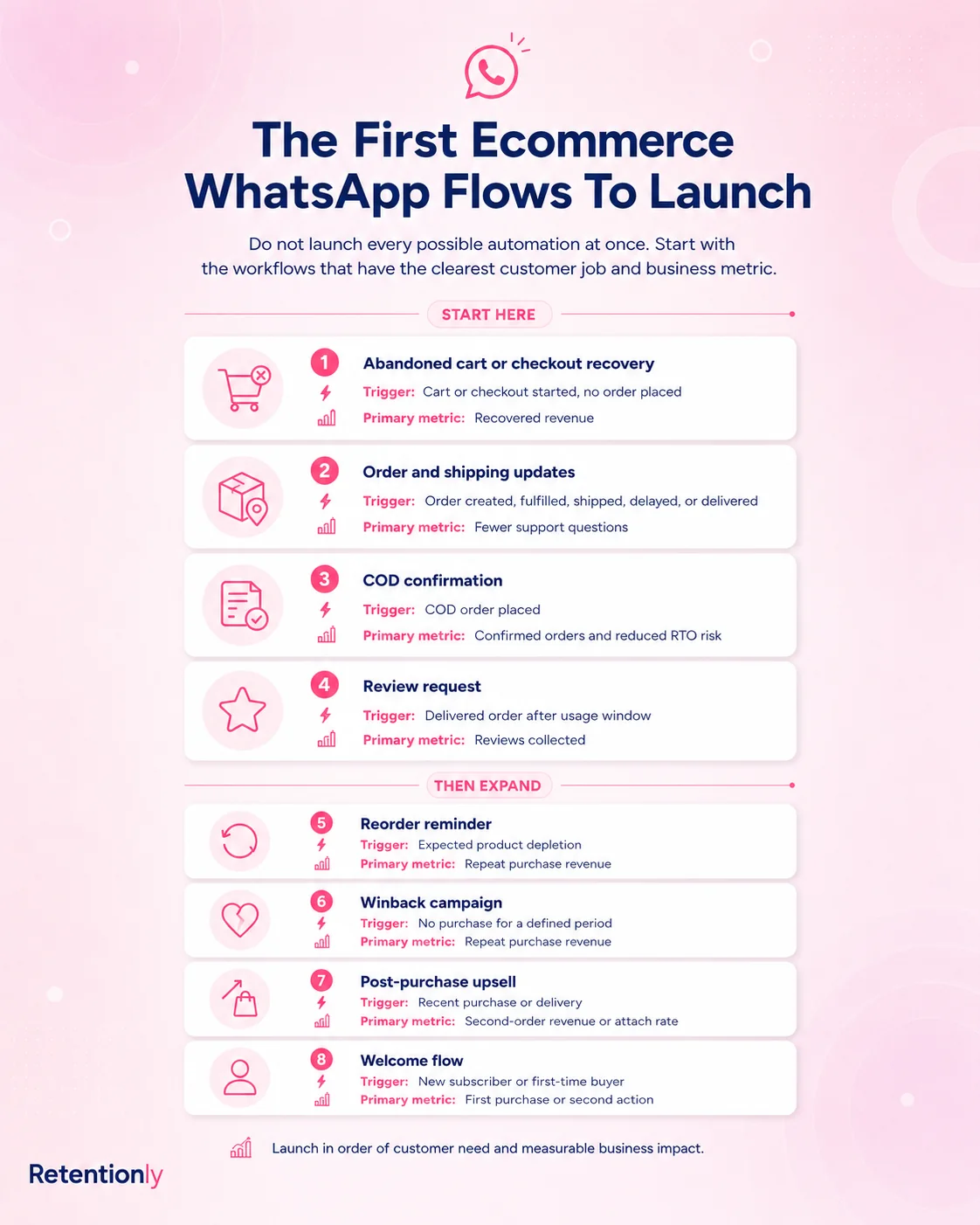
| Priority | Template family | Shopify trigger | Main outcome |
|---|---|---|---|
| 1 | Abandoned checkout | Checkout abandoned | Recover revenue from high-intent shoppers |
| 2 | COD confirmation | COD order created | Reduce fake orders, cancellations, and RTO risk |
| 3 | Order confirmation | Order created | Reassure the buyer and reduce uncertainty |
| 4 | Shipping update | Fulfillment or tracking created | Reduce "where is my order?" support questions |
| 5 | Review request | Delivered order plus usage delay | Collect reviews and catch issues early |
| 6 | Reorder reminder | Product reorder window | Drive repeat purchase at the right time |
| 7 | Winback | Customer inactive after expected buying cycle | Reactivate lapsed customers |
| 8 | Upsell or cross-sell | Recent purchase, product affinity, or delivery event | Increase repeat revenue without pushing unrelated offers |
Broadcast, sale, festival, and product-launch templates can come later. They perform better after the store already understands opt-in source, purchase behavior, and lifecycle response.
Abandoned Checkout Templates
An abandoned checkout template should help the shopper return to a specific checkout. Do not make every first message a discount.
| Situation | Template |
|---|---|
| First reminder | Hi [first_name], your [store_name] checkout is still saved. Complete your order here: [checkout_link]. Reply if you need help before ordering. |
| Product reminder | Hi [first_name], your [product_name] is still waiting in your cart. You can finish checkout here: [checkout_link]. |
| Help-first reminder | Hi [first_name], did anything stop you from ordering? Reply here if you need help with size, delivery, payment, or returns. Your checkout is saved here: [checkout_link]. |
| Controlled offer | Hi [first_name], your cart is still saved at [store_name]. Use [discount_code] before [deadline] if you want to finish today: [checkout_link]. |
| Final reminder | Last reminder, [first_name]: your [store_name] checkout is here if you still want to complete it: [checkout_link]. We will stop cart reminders after this. |
Use these variables carefully: [first_name], [store_name], [product_name], [checkout_link], [discount_code], and [deadline].
Stop the flow after purchase, checkout expiry, opt-out, negative reply, support escalation, or when the customer enters another active recovery sequence.
For deeper cart copy examples, read Abandoned Cart WhatsApp Message Examples for Shopify.
COD Confirmation Templates
COD confirmation messages should be operational. The job is to confirm intent before fulfillment, not to sell more products inside the same template.
| Situation | Template |
|---|---|
| Simple confirmation | Hi [first_name], please confirm your COD order [order_number] from [store_name] for [order_total]. Reply 1 to confirm or 2 to cancel. |
| Address check | Hi [first_name], before we ship your COD order [order_number], please confirm your delivery address: [address_summary]. Reply 1 if correct or 2 if it needs changes. |
| No-response reminder | Hi [first_name], we still need confirmation for your COD order [order_number]. Reply 1 to confirm or 2 to cancel so we can update fulfillment. |
| Prepaid conversion | Hi [first_name], you can convert COD order [order_number] to prepaid here: [payment_link]. Reply if you want help before paying. |
| Cancellation acknowledgement | Thanks for confirming, [first_name]. We have cancelled COD order [order_number]. Reply if this was a mistake. |
Useful variables include [first_name], [order_number], [order_total], [address_summary], and [payment_link].
Stop after confirmation, cancellation, prepaid payment, order cancellation, fulfillment hold decision, opt-out, or support handoff.
For more variants, read WhatsApp COD Confirmation Message Templates.
Order Confirmation Templates
Order confirmation templates should reduce uncertainty immediately after purchase. Keep them factual and avoid adding a promotion that changes the message purpose.
| Situation | Template |
|---|---|
| Basic confirmation | Hi [first_name], thanks for your order from [store_name]. We received order [order_number] and will update you here when it ships. View order: [order_status_link]. |
| Prepaid confirmation | Hi [first_name], payment for order [order_number] is confirmed. We are preparing your order and will share tracking once it ships: [order_status_link]. |
| COD received | Hi [first_name], we received COD order [order_number] for [order_total]. Please watch for our confirmation message before fulfillment. |
| Payment issue | Hi [first_name], payment for order [order_number] did not complete. You can retry here: [payment_link]. Reply if you need help. |
| High-value reassurance | Hi [first_name], your [store_name] order [order_number] is confirmed. Our team will send shipping updates here and you can view the latest status: [order_status_link]. |
Useful variables include [first_name], [order_number], [order_total], [payment_link], and [order_status_link].
Stop after the order is cancelled, refunded, payment fails permanently, or the customer asks for support.
For a copy-focused version, read WhatsApp Order Confirmation Message Templates.
Shipping And Delivery Update Templates
Shipping updates are not retention messages in the promotional sense, but they protect the customer experience. They can reduce support load and build trust for the next purchase.
| Situation | Template |
|---|---|
| Shipped | Good news, [first_name]. Your order [order_number] has shipped. Track it here: [tracking_link]. |
| Out for delivery | Hi [first_name], your [store_name] order [order_number] is out for delivery today. Track the latest status here: [tracking_link]. |
| Delivered | Your order [order_number] has been marked delivered. Reply here if anything looks wrong and our team will help. |
| Delivery delayed | Hi [first_name], there is a delay with order [order_number]. We are tracking it and will update you here. Latest status: [tracking_link]. |
| Pickup reminder | Hi [first_name], your order [order_number] is ready for pickup at [pickup_location]. Please collect it by [pickup_deadline]. |
Useful variables include [order_number], [tracking_link], [delivery_date], [pickup_location], and [pickup_deadline].
Do not send a shipping update until the tracking link works. Stop after delivery, failed delivery handling, support escalation, cancellation, refund, or opt-out.
Review Request Templates
A review request should arrive after the customer had enough time to use the product. If there is a delivery issue, delay the review request and route the customer to support first.
| Situation | Template |
|---|---|
| Product review | Hi [first_name], hope you are enjoying your [product_name]. Could you share a quick review? It helps other shoppers choose with confidence: [review_link]. |
| Store review | Hi [first_name], thanks for shopping with [store_name]. If your order went well, could you leave a quick review here: [review_link]? |
| Photo review | Hi [first_name], we would love to see how you use [product_name]. You can add a quick photo review here: [review_link]. |
| Support-first | Hi [first_name], checking in on order [order_number]. Reply here if anything is wrong. If everything went well, you can review your purchase here: [review_link]. |
| Reminder | Quick reminder, [first_name]: your review of [product_name] helps other shoppers. Share it here when you have a minute: [review_link]. |
Useful variables include [first_name], [product_name], [order_number], and [review_link].
Stop after review completion, complaint reply, refund, return request, delivery issue, opt-out, or support escalation.
For more examples, read WhatsApp Review Request Message Examples.
Reorder Reminder Templates
Reorder reminders work best for products with a real usage cycle: supplements, skincare, coffee, tea, snacks, pet food, baby care, refills, and home-care products.
| Situation | Template |
|---|---|
| Simple reorder | Hi [first_name], your [product_name] from [store_name] may be running low soon. You can reorder it here: [reorder_link]. |
| Repeat last order | Hi [first_name], ready to repeat your last [store_name] order? Your quick reorder link is here: [reorder_link]. |
| Routine continuity | Hi [first_name], keeping your [product_name] routine going? You can restock here: [reorder_link]. |
| Subscription option | Hi [first_name], if you reorder [product_name] regularly, a subscription may help you avoid running out. See options here: [subscription_link]. |
| Low-pressure reminder | Hi [first_name], quick restock reminder for [product_name]. If you still have enough, no action needed. Reorder link: [reorder_link]. |
Useful variables include [product_name], [reorder_link], [subscription_link], and [last_order_date].
Stop after repeat purchase, subscription start, opt-out, support issue, return, refund, or when the reorder window has clearly passed.
For more copy by product type, read WhatsApp Reorder Reminder Message Examples.
Winback Templates
Winback templates should not treat every inactive customer the same. A first-time buyer, repeat buyer, VIP customer, and replenishment buyer need different copy.
| Situation | Template |
|---|---|
| Soft reactivation | Hi [first_name], it has been a while since your last [store_name] order. Here are customer favorites you may like: [collection_link]. |
| Repeat buyer | Hi [first_name], thanks for being a repeat customer at [store_name]. We picked a few products that fit your past orders: [collection_link]. |
| VIP customer | Hi [first_name], we saved early access to [collection_name] for our regular customers. You can view it here: [collection_link]. |
| Offer-led winback | Hi [first_name], we would love to see you back. Use [offer_code] before [deadline] on your next [store_name] order: [collection_link]. |
| Replenishment winback | Hi [first_name], if you are ready to restock [product_name], your reorder path is here: [reorder_link]. |
Useful variables include [collection_link], [offer_code], [deadline], [product_name], and [reorder_link].
Stop after purchase, opt-out, negative reply, support issue, recent campaign exposure, or when the customer does not match the intended segment.
For the full copy companion, read WhatsApp Winback Message Examples.
Upsell And Cross-Sell Templates
Upsell templates should make the customer's purchase more useful. If the product relationship is weak, better copy will not fix the flow.
| Situation | Template |
|---|---|
| Add-on before fulfillment | Hi [first_name], we are preparing your [product_name] order. If you want [addon_name] shipped with it, you can add it before [cutoff_time]: [link]. |
| Complementary product | Hi [first_name], [addon_name] pairs well with your recent [product_name] order because [reason]. Take a look here: [link]. |
| Bundle | Hi [first_name], if you plan to use [product_name] regularly, the [bundle_name] may be better value than buying items one by one: [link]. |
| Upgrade | Hi [first_name], quick option before you continue with [product_name]: [upgrade_name] gives you [premium_benefit]. Compare both here: [link]. |
| VIP offer | Hi [first_name], because you have ordered from [store_name] before, here is early access to [offer_name]: [link]. |
Useful variables include [product_name], [addon_name], [bundle_name], [cutoff_time], [reason], and [link].
Stop after purchase, fulfillment deadline, refund, support issue, opt-out, or when the offer is no longer available.
For more examples, read WhatsApp Upsell Message Examples.
Promotional Templates For Shopify Campaigns
Promotional WhatsApp templates can work, but they should not replace lifecycle automation. Use them for specific segments and real customer reasons.
| Campaign | Better template angle |
|---|---|
| Product launch | Hi [first_name], [product_name] is now live at [store_name]. See the launch collection here: [link]. |
| Back in stock | Hi [first_name], [product_name] is back in stock. You can order it here while inventory is available: [link]. |
| Price drop | Hi [first_name], [product_name] you were interested in is now at [new_price]. View it here: [link]. |
| Loyalty offer | Hi [first_name], you have [points_balance] points at [store_name]. Use them on your next order here: [link]. |
| Seasonal sale | Hi [first_name], [store_name] has a [sale_name] offer for selected customers. Shop before [deadline]: [link]. |
The key is segmentation. A back-in-stock message should go to people who showed interest. A price-drop alert should go to people who viewed, carted, requested, or subscribed to that product. A loyalty message should use loyalty data, not a generic discount list.
Template Variables To Keep Reliable
Variables make messages feel specific, but bad variables make WhatsApp feel careless.
| Variable | Good use | Risk |
|---|---|---|
| [first_name] | Clean customer names | Blank, fake, or all-caps names |
| [product_name] | One clear product | Multi-item cart where one product misleads |
| [checkout_link] | Active saved checkout | Expired or already purchased checkout |
| [order_number] | Confirmed order | Pre-purchase flow with no order |
| [tracking_link] | Working tracking page | Fulfillment exists but tracking is unavailable |
| [review_link] | Correct product or store review form | Customer had delivery or product issue |
| [discount_code] | Valid, margin-approved offer | Expired or overused coupon |
| [deadline] | Real deadline | Fake urgency that damages trust |
Every variable needs a fallback. If the checkout link is missing, suppress the abandoned checkout message. If tracking is missing, delay the shipping update. If the review link is unavailable, do not send a broken request.
Approval And Consent Guardrails
Most business-initiated WhatsApp messages need approved templates, and customers should have opted in to receive the category of message you are sending. That is not just a compliance concern. It affects how the message feels.
Use these rules:
Keep each template to one purpose.
Do not add promotional copy to a transactional update.
Use marketing copy for marketing flows instead of hiding the intent.
Make the reason for the message clear in the first line.
Use variables only when the data is reliable.
Include a reply path only if someone owns replies.
Stop promotional flows after opt-out, purchase, complaint, or support issue.
Respect the difference between order updates, retention offers, and service replies.
Weak:
Great news from [store_name]. Tap now before it is too late: [link]
Better:
Hi [first_name], [product_name] is back in stock at [store_name]. You can order it here while inventory is available: [link].
Clear copy is easier for the customer to understand and easier for the team to manage.
Build A Template Matrix Before Launch
Before activating any WhatsApp flow, put each template into a matrix.
| Field | Example |
|---|---|
| Flow name | Reorder reminder |
| Template name | reorder_reminder_product_cycle |
| Category | Marketing |
| Shopify trigger | 28 days after delivered order for selected consumables |
| Audience | Customers opted in for WhatsApp updates or offers |
| Variables | first_name, product_name, reorder_link |
| Timing | Product-specific reorder window |
| Stop rules | Stop after purchase, opt-out, support issue, return, or subscription start |
| Fallback | Do not send if product_name or reorder_link is missing |
| Primary metric | Repeat purchase rate |
This is where many template libraries improve. The team can see which messages are duplicates, which ones do not have a stop rule, and which flows have no measurable outcome.
What To Measure By Template Family
Do not measure every WhatsApp template only by delivery or read rate.
| Template family | Useful metrics |
|---|---|
| Abandoned checkout | Click rate, recovered revenue, discount usage, opt-out rate |
| COD confirmation | Confirmation rate, cancellation rate, non-response rate, RTO reduction |
| Order updates | Tracking clicks, WISMO ticket reduction, delivery issue replies |
| Review request | Review completion rate, support issue replies, reminder performance |
| Reorder reminder | Repeat purchase rate, days between orders, unsubscribe rate |
| Winback | Reactivation rate, revenue per recipient, offer margin |
| Upsell | Conversion rate, AOV lift, refund or complaint rate |
| Promotions | Revenue per recipient, opt-outs, repeat campaign fatigue |
If a template has strong delivery but weak business results, the issue may be audience, timing, offer, link, or product fit. Do not solve every weak result by adding more messages.
Where Retentionly Fits
Retentionly helps Shopify stores turn WhatsApp message templates into real retention flows. The difference is that each template is connected to the Shopify event, segment, variable, stop rule, reply path, and metric that makes the message useful.
Use Retentionly when you want to:
Trigger WhatsApp templates from Shopify events.
Launch abandoned checkout, COD confirmation, order update, review, reorder, winback, and upsell flows.
Keep promotional and transactional messages separate.
Use customer, order, product, checkout, tracking, and review variables carefully.
Stop messages when the customer buys, opts out, complains, cancels, or enters support.
Measure WhatsApp by recovered revenue, repeat purchase, reviews, and support reduction.
That keeps the template library small enough to manage and specific enough to perform.
Final Recommendation
Start with templates for the customer moments your Shopify store already has data for.
If you have checkout abandoners, start with abandoned checkout. If COD creates fulfillment risk, start with COD confirmation. If support is full of order-status questions, start with order updates. If you sell consumables, add reorder reminders. If you already have happy delivered customers, add review requests.
The goal is not to collect the most WhatsApp templates. The goal is to send the right message when Shopify data says it is useful.
Install Free on Shopify and use Retentionly to launch WhatsApp message templates for abandoned checkout, COD confirmation, order updates, reviews, winback, reorders, and upsells with clear timing and revenue tracking.
Quick FAQs
What are WhatsApp message templates for Shopify?
They are reusable WhatsApp messages Shopify stores use for automated customer moments such as abandoned checkout, COD confirmation, order updates, review requests, winback, reorders, and upsells. The best templates are tied to a trigger, variables, stop rule, and metric.
Which WhatsApp templates should Shopify stores create first?
Start with abandoned checkout, COD confirmation if relevant, order confirmation, shipping update, review request, reorder reminder, winback, and upsell templates. Add broad promotional campaigns after the core lifecycle flows are working.
Are abandoned checkout WhatsApp templates transactional or promotional?
Abandoned checkout templates usually encourage the customer to complete a purchase, so they should be treated as marketing or promotional in practice. Keep the copy honest, use clear consent, and avoid hiding the purpose inside vague update wording.
What variables should Shopify WhatsApp templates use?
Useful variables include first name, product name, checkout link, order number, tracking link, review link, reorder link, discount code, and deadline. Use a variable only when the source data is reliable.
How many WhatsApp templates does a Shopify store need?
A store can start with a small library of 6 to 10 practical templates. More templates only help when each one has a distinct trigger, audience, stop rule, and business metric.