WhatsApp API Shopify Guide: Setup Without the Confusion
TL;DRWhatsApp API for Shopify is not a feature a merchant should buy in isolation. The useful question is whether the API setup can connect Shopify events to the right WhatsApp messages without forcing your team to manage a custom messaging system.
For most Shopify stores, the goal is simple: recover abandoned checkouts, confirm risky COD orders, send order updates, request reviews, and bring customers back for another purchase. The API matters only if it helps those workflows run reliably.
This guide explains what WhatsApp API means for Shopify, when a direct API setup makes sense, when a Shopify app is easier, and what to check before committing to either path.
What WhatsApp API Means For Shopify
WhatsApp API usually refers to the WhatsApp Business Platform, Meta's infrastructure for business messaging at scale. It lets approved businesses send template messages, respond to customer conversations, automate messages, and connect WhatsApp to other systems.
For a Shopify store, that infrastructure is useful only when it is connected to ecommerce data.
The API should help your store answer questions like:
Did this customer abandon a checkout?
Has this customer opted in to WhatsApp messages?
Was the order paid, COD, fulfilled, delayed, delivered, returned, or canceled?
Which product did the customer view, buy, or leave behind?
Should this message stop because the customer purchased, replied, or opted out?
Did the WhatsApp flow recover revenue, reduce support load, or create repeat purchases?
If the setup cannot answer those questions, it may be technically connected but commercially weak.
WhatsApp API Vs WhatsApp Business App Vs Shopify App
The wording can be confusing because merchants often hear three options that sound similar.
| Option | What it is | Best for | Main limitation |
|---|---|---|---|
| WhatsApp Business App | The manual mobile or desktop app for small business chats | Small teams replying manually | Not built for automated Shopify workflows |
| WhatsApp API or Business Platform | Meta's scalable messaging infrastructure | Templates, automation, integrations, multi-system messaging | Needs software, developers, or a provider on top |
| Shopify WhatsApp app | A Shopify app that uses WhatsApp infrastructure and Shopify data | Fast launch of ecommerce automations | Less custom than owning the full API stack |
The mistake is assuming "API" automatically means "better." A direct API setup gives control, but it also creates ownership. Someone has to manage webhooks, templates, retries, opt-outs, reporting, billing, and edge cases.
A Shopify WhatsApp app gives up some custom control, but it usually gets a store to the first measurable workflow faster.
When A Shopify Store Actually Needs WhatsApp API
A store needs API-backed WhatsApp when WhatsApp moves beyond manual support.
You should evaluate an API-backed setup if you want to:
Send abandoned checkout reminders automatically.
Include Shopify checkout, order, customer, product, or tracking variables in messages.
Confirm COD orders before fulfillment.
Send order, shipping, delivery, refund, or return updates.
Request reviews after delivery.
Launch winback, reorder, or post-purchase upsell flows.
Send approved campaigns to opted-in customer segments.
Let customers reply and route those replies to the right team.
Track results by workflow, not just by message delivery.
You may not need API-backed automation yet if your only goal is a storefront "Chat on WhatsApp" button. A chat button can be useful, but it waits for the shopper to start the conversation. API-backed automation can start from Shopify behavior.
The Practical Architecture
A useful Shopify WhatsApp API setup has six layers.
| Layer | Shopify example | Why it matters |
|---|---|---|
| Trigger | Checkout abandoned, order created, fulfilled, delivered, or customer inactive | Starts the right message from real store behavior |
| Eligibility | Customer has phone number, consent, language, market, and suppression status | Prevents irrelevant or risky sending |
| Template | Approved WhatsApp copy with variables | Allows business-initiated messages to send reliably |
| Timing | 45 minutes after checkout, 2 days after delivery, 60 days after last purchase | Controls customer experience |
| Stop rule | Stop after purchase, opt-out, cancellation, negative reply, or support handoff | Prevents over-messaging |
| Measurement | Recovered revenue, confirmation rate, review rate, repeat purchase, support reduction | Shows whether the flow is worth scaling |
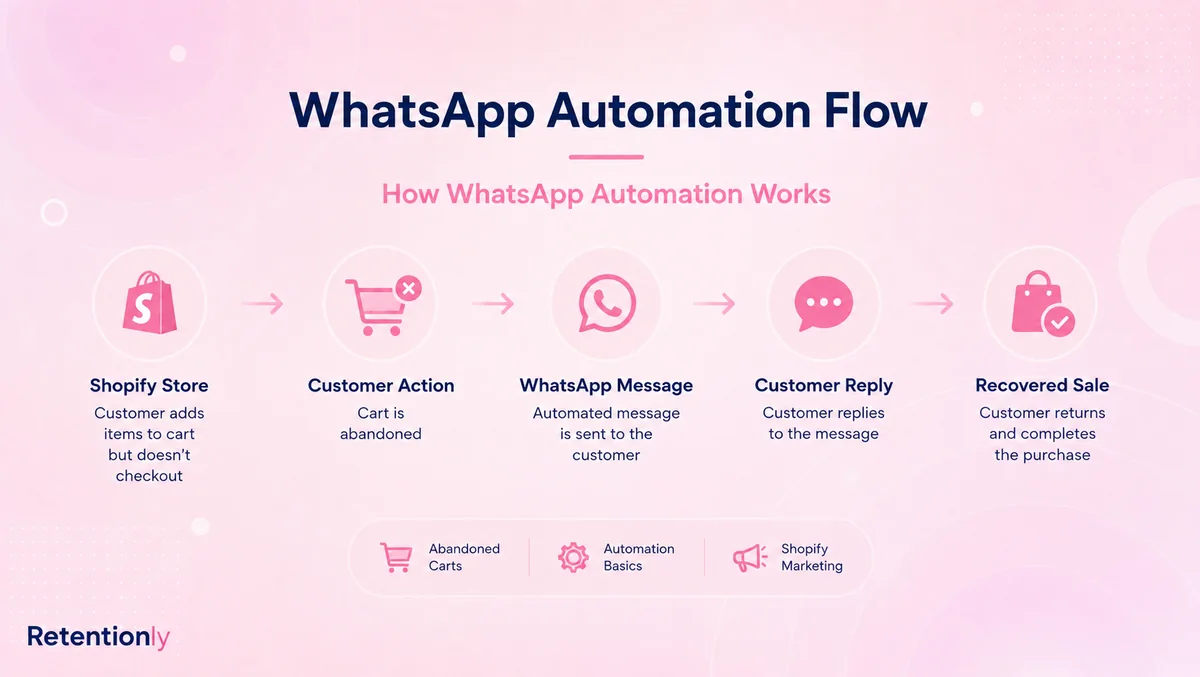
This is why API access alone is not enough. The API sends messages. The store still needs workflow logic.
Three Ways To Set Up WhatsApp API For Shopify
There are three realistic setup paths.
| Setup path | Best when | What your team owns |
|---|---|---|
| Shopify WhatsApp app | You want ecommerce flows live quickly | Choosing flows, approving templates, improving results |
| WhatsApp platform or BSP | You want broader inbox, campaign, bot, and support operations | Platform setup, team process, pricing review, workflow configuration |
| Custom API build | You have developers and unusual business rules | Shopify webhooks, WhatsApp API calls, template sync, retry logic, reporting, monitoring, and maintenance |
The right choice depends on the job WhatsApp needs to do.
If the first job is abandoned checkout recovery, COD confirmation, order updates, reviews, winback, reorder reminders, or post-purchase upsells, a Shopify-first app is usually the practical starting point.
If WhatsApp needs to become a full company-wide support, sales, commerce, and campaign system, a broader WhatsApp platform may make sense.
If your store has custom systems, unusual approval rules, or an internal engineering team that wants full ownership, a custom API build may be worth considering.
Direct API Setup: What You Need To Build
A direct API setup sounds clean because your team controls the system. In practice, the build is larger than "send a WhatsApp message."
You need to handle:
Shopify webhook subscriptions for checkout, order, fulfillment, delivery, customer, and refund events.
A customer consent and suppression model.
WhatsApp business account setup, phone number setup, and sender quality monitoring.
Template creation, approval, localization, and category handling.
Variable mapping from Shopify fields into WhatsApp templates.
Message queueing, retries, duplicate prevention, and delivery status webhooks.
Reply handling and human handoff.
Opt-out detection and unsubscribe behavior.
Revenue attribution back to Shopify orders.
Billing review across Meta fees, provider charges, and internal maintenance cost.
That level of control can be valuable. It is also why direct API is rarely the fastest first step for a normal Shopify retention program.
Before building directly, prove that the workflow is worth owning. A store can often validate WhatsApp revenue with an app first, then move to deeper custom infrastructure only if the business case is clear.
App-Based Setup: What It Should Still Give You
Using an app should not mean accepting a shallow chat widget. A strong Shopify WhatsApp app should still expose the workflow controls that matter.
Check for:
| Capability | What to verify |
|---|---|
| Shopify event triggers | Abandoned checkout, order created, fulfilled, delivered, customer inactive, tags, and product context |
| Template handling | Approved templates, variables, categories, previews, and fallbacks |
| Consent controls | Opt-in source, opt-out handling, suppression lists, and customer eligibility |
| Timing controls | Delays, follow-ups, limits, and flow-level rules |
| Stop conditions | Stop after purchase, reply, cancellation, refund, opt-out, or support escalation |
| Reply ownership | Where customer replies go and who handles them |
| Reporting | Revenue, recovered orders, confirmation rate, reviews, repeat purchases, replies, blocks, and opt-outs |
| Pricing clarity | App subscription, Meta fees, markup, chat fees, user seats, and automation limits |
The app should hide unnecessary plumbing, not hide the operating logic.
Which Workflows Should Use WhatsApp API First?
Do not start with every possible message. Start with the flows that have clear intent and measurable value.
| Priority | Workflow | Why it is a strong first API use case |
|---|---|---|
| 1 | Abandoned checkout recovery | The customer recently showed buying intent, so timing and checkout-link personalization matter |
| 2 | COD confirmation | The flow can reduce fake orders, cancellations, and fulfillment waste |
| 3 | Order and shipping updates | Customers expect updates, and the messages can reduce repetitive support tickets |
| 4 | Review request | Delivery timing and product context make the ask more relevant |
| 5 | Winback campaign | Purchase history helps segment inactive customers |
| 6 | Reorder reminder | Product cycle timing can turn WhatsApp into repeat purchase revenue |
| 7 | Post-purchase upsell | Recent order data helps keep recommendations relevant |
For a broader launch sequence, read the WhatsApp Automation for Shopify guide. For setup paths and cost layers, read the Shopify WhatsApp Integration guide.
Message Categories And Costs In Plain English
WhatsApp Business Platform pricing depends on the recipient market and message category. The main categories are marketing, utility, authentication, and service.
For Shopify merchants, the practical distinction is this:
| Category | Shopify use cases | How to think about it |
|---|---|---|
| Marketing | Abandoned checkout reminders, winback offers, product drops, broadcast campaigns, upsells | Revenue-driving messages and promotions |
| Utility | Order confirmation, shipping update, delivery update, payment reminder tied to a transaction | Non-promotional updates related to a customer action |
| Authentication | OTPs, login verification, account security | Usually relevant for account or verification flows |
| Service | Replies after the customer messages the business | Support and conversation handling inside the customer service window |
Do not mix purposes casually. An order update with a discount code may stop feeling like a clean utility message. A winback message should not pretend to be a transactional update.
The cleanest approach is to design templates by flow: one job, one customer context, one clear action.
Cost Questions To Ask Before Choosing A Setup
WhatsApp API cost is not just one number.
Ask every provider or app:
| Question | Why it matters |
|---|---|
| Are Meta message fees passed through or marked up? | Markup changes the economics as volume grows |
| Are there app, platform, or BSP subscription fees? | The monthly plan is separate from message fees |
| Are there per-chat, per-agent, or per-contact fees? | Support-heavy usage can price differently from automation usage |
| Are automation flows limited by plan? | A cheap plan may not include the flows you need |
| Are broadcasts priced differently from automations? | Campaign usage can change the bill |
| Can costs be reviewed by flow? | Abandoned checkout, order updates, and winback should be evaluated separately |
Do not compare only the lowest monthly plan. Compare the real cost of running your first three workflows for the customers and markets you actually serve.
Launch Checklist For WhatsApp API On Shopify
Use this sequence before going live.
Choose the first business outcome.
Pick the setup path: app, platform, or custom API.
Confirm the WhatsApp sender and business profile.
Confirm where WhatsApp consent is collected.
Map the Shopify event that starts the flow.
Confirm the fields needed in the message.
Write one or two templates for the first flow.
Check the template category and remove mixed-purpose copy.
Define timing, follow-ups, and frequency limits.
Define stop rules for purchase, reply, opt-out, cancellation, and refunds.
Test with internal orders and real Shopify event data.
Assign reply ownership before the first customer receives a message.
Track revenue, replies, opt-outs, blocks, and support impact.
This keeps the project grounded. You are not "integrating WhatsApp API" in the abstract. You are launching one Shopify workflow with a measurable result.
Common Mistakes To Avoid
The first mistake is starting with API access instead of a workflow. Access does not recover a checkout, confirm a COD order, or bring back an inactive customer. The workflow does.
The second mistake is building direct API infrastructure before proving the channel. If the store has not tested abandoned checkout, COD confirmation, order updates, or winback, a custom build can delay learning.
The third mistake is treating broadcasts as the first move. Broadcasts can work, but they require stronger opt-in quality, segmentation, copy discipline, and frequency control. Lifecycle automations are easier to justify first.
The fourth mistake is ignoring replies. WhatsApp is conversational. If a customer replies to an automation and nobody owns the conversation, the flow can create support debt.
The fifth mistake is comparing tools only by API access. Compare workflow depth, Shopify data, template handling, stop rules, reporting, and pricing clarity.
When Retentionly Fits
Retentionly is built for Shopify and D2C teams that want WhatsApp automation tied to retention revenue, not a generic API project.
Use Retentionly when your first goals are:
Abandoned checkout recovery.
COD confirmation.
Order, shipping, and delivery updates.
Review requests.
Winback campaigns.
Reorder reminders.
Post-purchase upsells.
Retentionly keeps the operating model focused on Shopify events, WhatsApp templates, timing, stop rules, customer replies, and revenue reporting.
It is also designed for clearer economics. Retentionly does not add a markup on Meta message fees, does not charge per chat, and does not charge extra for adding more automations.
Final Recommendation
If you are evaluating WhatsApp API for Shopify, start with the first workflow, not the infrastructure.
Choose a Shopify app if you want retention flows live quickly. Choose a broader WhatsApp platform if your team needs support, inbox, campaign, commerce, and bot operations in one place. Choose direct API only when your team has the engineering capacity and business reason to own the messaging system.
For most Shopify stores, the practical path is to launch one measurable workflow, learn from the results, then expand.
Install Retentionly free on Shopify to launch WhatsApp automations for abandoned checkout recovery, COD confirmation, order updates, reviews, winback, reorder reminders, and post-purchase revenue without turning WhatsApp API into a custom infrastructure project.