Shopify WhatsApp Business: How Stores Should Use It
TL;DRShopify WhatsApp Business should not mean "add a phone number and wait for customers to message us." For a growing Shopify store, WhatsApp Business is useful when it helps the team answer customers faster, recover checkout intent, confirm risky orders, send timely post-purchase updates, and bring customers back when they are likely to buy again.
The important decision is not whether WhatsApp is popular. Your customers probably already use it. The real decision is which WhatsApp Business setup matches the job: the free WhatsApp Business app, the WhatsApp Business Platform, or a Shopify WhatsApp app that connects store events to automated messages.
This guide explains how Shopify stores should use WhatsApp Business without turning it into a generic inbox, a bulk sending habit, or an API project with no clear revenue workflow.
The Short Answer
Use WhatsApp Business manually when your store only needs a professional chat number, quick replies, greetings, and one-to-one customer conversations.
Use a Shopify WhatsApp automation app when messages need to start from Shopify behavior, such as abandoned checkout, order creation, fulfillment, delivery, COD risk, customer inactivity, or purchase history.
Use the WhatsApp Business Platform or API path when you need scalable templates, higher-volume messaging, integrations, multiple agents, automated workflows, and reporting. Many Shopify stores get those benefits through an app instead of building directly on the API.
That distinction matters because manual chat and Shopify-triggered retention automation are not the same job.
WhatsApp Business App Vs Platform Vs Shopify App
Merchants often hear these terms together, but each option solves a different problem.
| Option | What it is | Best for Shopify stores when | Main limitation |
|---|---|---|---|
| WhatsApp Business App | A free business messaging app for a phone number | You need a professional profile, quick replies, labels, greetings, and manual conversations | It is not designed for Shopify event-triggered automation at scale |
| WhatsApp Business Platform | Meta's API-backed infrastructure for business messaging | You need templates, automation, integrations, agents, bots, and scalable messaging | It requires setup through developers, partners, platforms, or apps |
| Shopify WhatsApp app | A Shopify app that connects store data to WhatsApp messaging | You want abandoned checkout, COD, order updates, reviews, winback, reorders, or upsells without building infrastructure | It is less custom than building your own API stack |
Most Shopify stores should not start by asking, "Do we need the API?" Start by asking, "Which customer moment should WhatsApp improve first?"
If the answer is "customers ask basic questions before buying," a manual Business app setup may be enough. If the answer is "recover abandoned checkouts automatically," "confirm COD orders before fulfillment," or "send delivery updates without support tickets," you need a Shopify-connected automation setup.
For the API-specific path, read the WhatsApp Business API Shopify Guide. This article stays focused on how a store should operate WhatsApp Business as a channel.
What Shopify Stores Should Use WhatsApp Business For
WhatsApp Business is strongest when the message is timely, personal, and tied to a real customer action. It is weaker when it becomes a generic blast channel.
Good Shopify use cases include:
Answering product questions before purchase.
Helping shoppers choose size, variant, bundle, or delivery option.
Recovering abandoned carts and checkouts.
Confirming COD orders before fulfillment.
Sending order confirmation, shipping, and delivery updates.
Asking for a review after the order has arrived.
Sending reorder reminders for consumable products.
Running winback messages for inactive customers.
Sending relevant post-purchase upsell or cross-sell offers.
Weak first use cases include cold promotions, frequent store-wide broadcasts, untargeted discount blasts, and messages sent to customers who did not clearly agree to receive them.
The best Shopify WhatsApp Business setup starts with moments where the customer already has context. An abandoned checkout reminder, delivery update, or reorder reminder feels more useful than a random promotion because the message connects to something the customer did.
When The Free WhatsApp Business App Is Enough
The WhatsApp Business app can be a good first step for a small store that wants to look professional and respond faster.
It can help with:
A business profile with store name, category, website, and hours.
Greeting messages for new inbound chats.
Away messages when the team is unavailable.
Quick replies for common questions.
Labels for leads, open questions, paid customers, or urgent issues.
Manual sharing of product links, order information, and support replies.
This is useful if WhatsApp is mostly a support or pre-sales conversation channel.
But the free app becomes limiting when the store wants messages to happen automatically from Shopify data. A team member can manually follow up on a few carts. They cannot reliably manage thousands of checkout events, order updates, delivery follow-ups, review requests, opt-outs, and stop rules from a phone.
The Business app is a chat tool. Shopify retention automation needs a workflow system.
When A Shopify Store Needs Automation
A store needs automation when WhatsApp should react to store behavior without manual work.
That usually means:
A checkout was started but not completed.
A COD order needs confirmation before fulfillment.
An order was placed, fulfilled, shipped, delayed, or delivered.
A customer became eligible for a review request.
A customer has not purchased again after a sensible window.
A product is ready for reorder.
A customer bought one product and is eligible for a relevant add-on.
These flows need more than a saved reply. They need a trigger, customer data, template, timing, eligibility rule, stop condition, reply owner, and metric.
| Workflow component | Shopify example | Why it matters |
|---|---|---|
| Trigger | Checkout abandoned, order paid, fulfillment created, order delivered | Starts the message from real customer behavior |
| Segment | High-value carts, COD orders, delivered orders, inactive customers | Prevents irrelevant sends |
| Message | Approved template or reply copy with variables | Keeps the message specific and clear |
| Timing | 45 minutes after abandonment, 2 days after delivery | Controls customer experience |
| Stop rule | Stop after purchase, cancellation, opt-out, refund, or support issue | Protects trust |
| Owner | Growth, support, operations, or founder | Ensures replies are handled |
| Metric | Revenue, confirmation rate, support reduction, repeat purchase | Shows whether the workflow is worth scaling |
If a tool cannot explain these pieces, it may send WhatsApp messages but still fail as a Shopify retention system.
Set Up The Business Profile Before Automating
Before launching automations, clean up the sender experience. Customers should immediately recognize who is messaging them and why.
Set up:
Store name and display name.
Logo or brand image.
Website URL.
Business category.
Support hours or response expectations.
Short description of what customers can ask or receive.
A team process for replies.
Do not treat the WhatsApp number as a hidden technical detail. It becomes part of the customer experience. If the sender name, profile, or reply behavior feels unclear, automated messages can look less trustworthy even when the offer is useful.
Also decide whether this number belongs to support, marketing, operations, or a shared customer team. Ownership matters once customers reply.
Get Consent And Set Expectations
WhatsApp is a high-attention channel. That is why it works. It is also why stores need to be careful.
A Shopify store should be clear about what customers are opting in to receive. If the customer gives a phone number for delivery updates, do not immediately treat that as permission for every promotion. If the opt-in is for offers, do not make the first message sound like an order notification.
Useful opt-in points include:
Checkout phone collection with clear marketing or notification language.
Newsletter or popup forms that mention WhatsApp messages.
Post-purchase opt-in for delivery updates, reviews, and reorders.
Account or loyalty signup moments.
Campaign landing pages where the customer asks for WhatsApp updates.
The safest operating rule is simple: match the message to the expectation you created.
For example, a customer who opted in for order updates should receive order updates. A customer who opted in for product drops can receive product-drop messages. A customer who abandoned checkout should receive a reminder that is tied to that checkout, not a generic sale blast.
Start With These Shopify WhatsApp Flows
Do not launch every possible WhatsApp Business workflow at once. Start with flows where the customer intent is obvious and the business outcome is measurable.
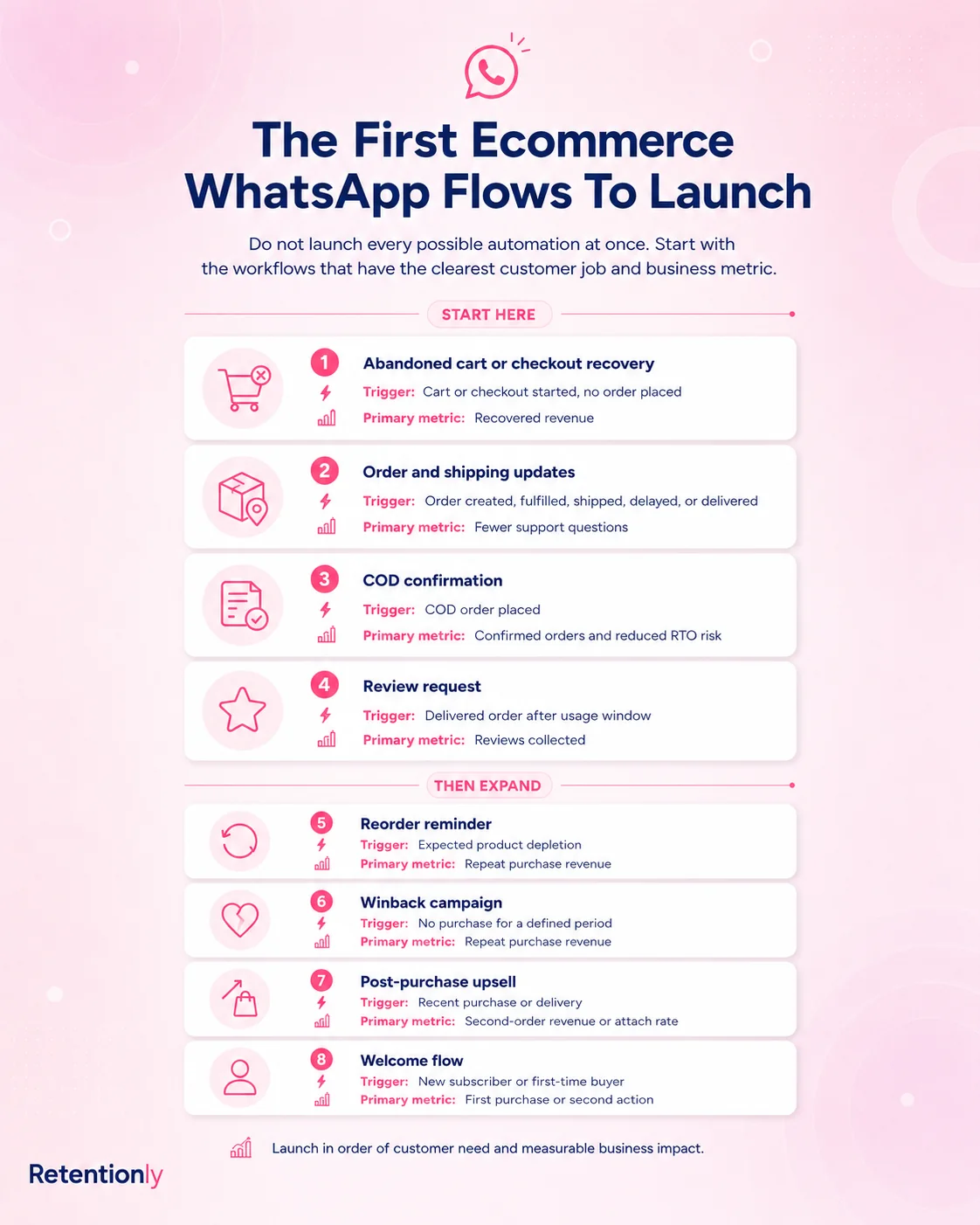
| Flow | Why it is a good early use case | Primary metric |
|---|---|---|
| Abandoned checkout | The customer already showed purchase intent | Recovered revenue |
| Order and shipping updates | Customers want timely information | Support ticket reduction and delivery confidence |
| COD confirmation | Fake or uncertain COD orders can waste fulfillment cost | Confirmation rate and reduced RTO risk |
| Review request | Delivered orders create a natural review moment | Reviews collected |
| Winback | Inactive customers may buy again with the right timing | Repeat purchase revenue |
| Reorder reminder | Consumable products have predictable purchase cycles | Repeat orders |
| Post-purchase upsell | Recent buyers have known product context | Attach rate and repeat revenue |
This sequence keeps WhatsApp tied to real Shopify moments instead of turning the channel into a broadcast calendar too early.
Abandoned Checkout Recovery
Abandoned checkout is often the first revenue workflow to test because the customer already reached a high-intent moment.
A practical WhatsApp abandoned checkout flow includes:
| Element | Recommended setup |
|---|---|
| Trigger | Checkout started but order not completed |
| First message | 30 to 60 minutes after abandonment |
| Follow-up | Around 24 hours later if the customer has not purchased |
| Message angle | Saved cart, product context, checkout link, help option |
| Stop rule | Stop after purchase, opt-out, invalid phone, or final reminder |
| Metric | Recovered revenue, conversion rate, replies, opt-outs |
Do not lead with a discount by default. First test whether a helpful reminder and saved checkout link recovers orders. Then use discounts selectively for high-value carts, repeat customers, or second reminders.
Good WhatsApp cart recovery feels like service. Poor cart recovery feels like pressure.
COD Confirmation
For cash-on-delivery stores, WhatsApp can protect margin before fulfillment.
The flow should be simple:
COD order is created.
WhatsApp asks the customer to confirm or cancel.
Confirmed orders move forward.
Canceled orders are reviewed or canceled.
No-response orders are held, delayed, or routed for manual review.
The message should ask for one clear action. Do not mix confirmation, upsell, feedback, and policy language into the same message.
Track confirmation rate, cancellation rate, no-response rate, fulfillment saves, and RTO risk. The goal is not more messages. The goal is fewer bad shipments and faster handling of genuine orders.
Order, Shipping, And Delivery Updates
Order updates are useful because customers already expect them. A good Shopify WhatsApp Business setup can send:
Order confirmation.
Payment or COD confirmation.
Shipping update.
Tracking link.
Delivery update.
Delay notification.
Post-delivery support or review follow-up.
Keep these messages clean. If the message is a shipping update, make it a shipping update. Do not stuff a discount into it and create confusion about the purpose of the communication.
Measure fewer "where is my order?" tickets, fewer repeated support questions, delivery confidence, and customer replies that need team attention.
Review Requests
Review requests work best after delivery, not immediately after purchase. The customer needs time to receive and experience the product.
A strong WhatsApp review flow includes:
| Rule | Why it matters |
|---|---|
| Wait until delivery is complete | Avoids asking before the customer has the product |
| Exclude refunds, failed deliveries, and support issues | Prevents tone-deaf messages |
| Mention the purchased product | Makes the request feel specific |
| Use one clear review link | Reduces friction |
| Stop after review, opt-out, or support reply | Prevents repeated asks |
This flow should feel like a follow-up from the store, not a demand. If the customer replies with a problem, route that conversation to support before asking for public feedback.
Winback, Reorder, And Upsell
After the first operational flows are working, WhatsApp can help with retention.
Winback messages should target customers whose purchase behavior suggests they may be slipping away. Reorder reminders should match the expected consumption cycle. Upsell and cross-sell messages should be based on what the customer bought, not what the store wants to push.
| Flow | Better trigger | Poor trigger |
|---|---|---|
| Winback | No purchase after a sensible inactivity window by product category | Same delay for every customer |
| Reorder | Expected refill or repurchase timing | Random monthly broadcast |
| Upsell | Complementary product based on recent order | Store-wide promotion to all buyers |
| Cross-sell | Product affinity or bundle logic | Unrelated product recommendation |
Retention messages need restraint. The audience is warmer than cold traffic, but it can still opt out if the message feels irrelevant.
Templates And Message Categories
If your store uses the WhatsApp Business Platform through an app or provider, some business-initiated messages use approved templates. These templates should be written around the flow.
For Shopify stores, common template groups include:
Abandoned checkout reminder.
COD confirmation.
Order confirmation.
Shipping update.
Delivery update.
Review request.
Winback offer.
Reorder reminder.
Post-purchase upsell.
WhatsApp Business Platform messaging is also organized around categories such as marketing, utility, authentication, and service. The category matters for pricing, approval, and customer expectation.
The practical rule is this: do not mix purposes.
An order update should not become a disguised promotion. A promotional offer should not pretend to be a transactional update. A support reply should have an owner. Clear templates are easier to approve, easier to understand, and easier to measure.
Reply Ownership Is Not Optional
WhatsApp is not email. Customers reply.
Before launching automations, decide who handles replies for each flow.
| Reply type | Likely owner |
|---|---|
| Product question from abandoned checkout | Support or sales |
| COD confirmation reply | Operations or fulfillment |
| Delivery issue | Support |
| Review complaint | Support or founder |
| Winback product question | Support or growth |
| Opt-out request | System suppression plus team visibility |
Automations can create revenue, but they can also create conversations. If nobody owns those conversations, WhatsApp becomes a trust problem.
How To Measure Shopify WhatsApp Business
Do not measure WhatsApp Business only by delivered messages or read rates. Those numbers are useful for debugging, but they do not prove business impact.
Use workflow-level metrics.
| Flow | Primary metric | Watch carefully |
|---|---|---|
| Abandoned checkout | Recovered revenue | Discount cost, opt-outs, negative replies |
| COD confirmation | Confirmed orders and reduced bad shipments | No-response orders and delays |
| Order updates | Reduced support tickets | Failed sends and delivery complaints |
| Review request | Reviews collected | Support issues triggered by unhappy customers |
| Winback | Repeat purchase revenue | Opt-outs and offer cost |
| Reorder | Repeat orders | Timing accuracy |
| Upsell | Attach rate or repeat revenue | Relevance and complaints |
The channel is working when it improves a customer moment and creates a measurable outcome. More sends are not automatically better.
Cost Planning
WhatsApp Business costs depend on the setup.
The free WhatsApp Business app is different from the WhatsApp Business Platform. API-backed or platform-backed setups can include message fees, app subscriptions, provider fees, add-ons, inbox seats, automation limits, or usage charges.
Plan cost by workflow, not by total message volume.
Ask:
Which flows will we run first?
Which messages are marketing, utility, authentication, or service?
Are Meta fees passed through directly or marked up?
Does the app charge per chat, per agent, per automation, or per message?
Are broadcasts priced differently from automations?
Can reporting connect WhatsApp spend to Shopify revenue?
For Shopify teams, the best question is not "What is the cheapest WhatsApp Business setup?" It is "Which setup gives us clear economics for the flows we will actually operate?"
Common Mistakes
The first mistake is using WhatsApp Business only as a manual inbox after the store has enough volume for automation.
The second mistake is launching broadcasts before lifecycle flows. Broadcasts can work, but they are easier to misuse. Abandoned checkout, order updates, COD confirmation, and review requests usually create clearer context.
The third mistake is ignoring consent and message expectation. Customers should understand why they are getting a WhatsApp message from your store.
The fourth mistake is mixing support, marketing, and operations ownership. Each flow needs a reply owner.
The fifth mistake is choosing a tool because it has the longest feature list. Shopify stores usually need the cleanest path to a few measurable retention workflows first.
Where Retentionly Fits
Retentionly is built for Shopify stores that want WhatsApp Business to drive retention revenue, not just handle generic chat.
Use Retentionly when your priority is to launch workflows such as:
Abandoned checkout recovery.
COD confirmation.
Order and shipping updates.
Review requests.
Winback campaigns.
Reorder reminders.
Post-purchase upsells.
Retentionly keeps the operating model focused on Shopify events, WhatsApp templates, timing, customer replies, stop rules, and revenue-oriented reporting.
That makes it a good fit for D2C teams that want WhatsApp Business to become a practical retention channel without building a custom API stack or managing a broad all-in-one WhatsApp operations platform.
FAQ
Can I use WhatsApp Business with Shopify?
Yes. You can use the WhatsApp Business app manually, add a WhatsApp chat button, connect a WhatsApp Business Platform provider, or install a Shopify WhatsApp app for automations. The right option depends on whether you need manual chat or Shopify-triggered workflows.
Is the WhatsApp Business app enough for Shopify automation?
It can be enough for manual conversations, greetings, quick replies, and small-volume support. It is not enough when you need abandoned checkout recovery, COD confirmation, order updates, review requests, winback flows, or other automations triggered by Shopify data.
Do Shopify stores need WhatsApp Business API?
Stores need API-backed WhatsApp when they want scalable business-initiated templates, automated messages, integrations, multiple agents, or reporting. Many stores access this through a Shopify app rather than building directly on the API.
What should a Shopify store automate first on WhatsApp?
Start with abandoned checkout recovery, order and shipping updates, or COD confirmation. These flows have clear customer context and measurable outcomes. Add reviews, winback, reorders, upsells, and broadcasts after the first flows are working.
Can Shopify stores send WhatsApp marketing messages?
Yes, but they should do it with clear consent, relevant segments, and message expectations. Promotional WhatsApp messages should not be disguised as order updates or sent as untargeted blasts.
What is the best way to start?
Choose one workflow with a clear business outcome. Define the trigger, audience, message, timing, stop rule, reply owner, and metric. Then launch that flow, measure the result, and expand only after the store knows what is working.
Install Retentionly free on Shopify to turn WhatsApp Business into practical retention automations for abandoned checkout recovery, COD confirmation, order updates, reviews, winback, reorders, and post-purchase revenue.